
Customer.io attribution tools: which one answers which question

In April 1902 the French colonial government in Hanoi feared bubonic plague. Rats had colonised the new sewers under the French Quarter, so officials hired Vietnamese rat-catchers and paid them for every rat killed (Wikipedia). The rats bred faster than the catchers could work, so the city opened the scheme to everyone: 1 cent a rat, paid on a severed tail handed in at the municipal offices.
Tails poured in. Then officials started seeing live rats around the city with no tails. Hunters were cutting off the tail and releasing the rat to breed, and health inspectors found rat farms on the outskirts. The bounty was cancelled. Michael G. Vann, the historian who found the records and published the account in 2003, told Saigoneer the French were furious that their spending was increasing the number of rats.
A tail proved someone had caught a rat. It never proved a rat had died. Customer.io's conversion report works the same way: it proves a person converted after a message, not that the message made them convert.
TL;DR: Customer.io's conversion metric counts people who converted after a message, inside a window of up to 90 days, and credits the most recent message. Goals and the agent's conversational analytics, released 10 September 2026, use their own last-touch rules, so three reports can credit one purchase to three different messages. A holdout is the only built-in tool with a control group, so it is the only one that answers the causal question. Pick the tool by the question: conversions for monitoring, holdouts for causation, UTMs into GA4 for channel mix, the warehouse for revenue. By our arithmetic, a 10% holdout needs 2,487 conversions to see a 20% lift, about 830 a month over a quarter. Between about 300 and 830 a month, widen the split towards 50/50; under about 300, no split gets there. Paid multi-touch attribution tools are observational too, so they cannot replace a holdout.
Which question are you asking?
Most attribution arguments we sit in on are people asking one number different questions. Each question has its own tool.
| Question | Tool | What it cannot tell you |
|---|---|---|
| Is this flow still working? | Automation conversions | Whether people would have converted anyway |
| Which message sits closest to the outcome? | Goals, or the agent | Cause |
| Did the message cause the conversion? | Holdout test | Anything reliable below the volume boundary |
| Which channel brought the visit? | UTMs into GA4 | Emails read but never clicked |
| How much revenue did email add? | Warehouse, with the holdout flag | Anything Customer.io does not export |
Only the third row has a control group, so only it can say because. Our lifecycle reporting guide covers the wider picture.
What Customer.io counts as a conversion
An automation goal is one criterion: a person performs an event, enters a segment or leaves one. You set a conversion window of up to 90 days. You also choose what starts the clock: a delivery being sent, opened, or clicked through a tracked link.
Credit goes to the last message. With the sent anchor, a person who got two messages and converted inside both windows converts the second. With the open or click anchor, the most recent message they opened or clicked takes the credit. That is last touch, inside one automation.
Across automations there is no sharing at all: "We count conversions independently for each automation." A buyer who passed through your cart flow and your browse flow converts both, and adding the two dashboards double-counts the sale.
Two smaller rules move the numbers (Customer.io docs, automation goals):
- Conversions are not retroactive. Edit a live goal and only new conversions follow the new rule.
- Screening out machine clicks takes up to 10 seconds, so a conversion straight after a click can go unlogged.
Opens are the weakest anchor
The docs warn that opens "may not be reliable for certain message types". Apple's Mail Privacy Protection is one big reason: Apple says it stops senders seeing whether a message was opened (Apple Support). Customer.io counts a significant share of Apple Mail Protected opens as machine opens. With a large Apple share, it warns, "your overall open rate overstates real engagement" (Customer.io docs, email client metrics). The conversions page does not say whether open-anchored conversions count human opens only, so anchor on sent or clicked.
Goals and the agent use different rules
Goals give one view across automations and broadcasts: "Source attribution is tied to the last message a person received from one of your sources." The window defaults to 7 days and runs from 0 to 90. Goals only track data processed since November 2025, skip transactional messages, and cannot be exported. The bigger catch: Customer.io is building the next version, and workspaces that never used Goals will not see the page until then (Customer.io docs, Goals).
The agent gained conversational analytics on 10 September 2026. The release note says the agent, CLI and MCP server can now build conversion reports. Its example question, "Did my onboarding automation drive purchases?", "works even if you never set up a conversion goal" (release note).
The constraint the announcement leaves out sits on the page it links to: "Customer.io credits a conversion to the latest message a person received (within the past 30 days)." Conversion questions use the last 90 days of event history (Customer.io docs, conversational analytics). That is last touch again, with a third window and no control group.
So one purchase can meet three rules: the automation's window, the Goal's 7-day default and the agent's 30 days. None is broken when they disagree, but adding them up double-counts: the goals vs conversion events trap. Each answers after, its own way.
What a conversion figure proves
A conversion figure proves which email sits closest to the sale, and that is useful on its own. On our Slimfy cart abandonment programme we tracked sales conversion rate and earnings per click for each email, and kept adding emails to a 6-part campaign. In the case study's words: "We'd gone up to 9 emails in the cart abandonment campaign before people stopped clicking through".
Per-email monitoring found that depth. It answers which email is doing the work? It cannot answer what would have happened with no emails at all? That is a holdout's question.
Holdouts answer the causal question
A holdout is an A/B test where one variant sends nothing. You turn an email into an A/B test and tick Make this message a holdout test on the second variation, as we walk through in the holdout checkbox. Customer.io sends the held-out deliveries to an internal message trap, so nothing reaches an inbox or touches deliverability (Customer.io docs, holdout tests).
Two settings decide whether the result means anything. The sending behaviour must be Queue Draft or Send Automatically. And the conversion anchor must be sent, because a held-out message is never opened or clicked. With an open or click anchor, everyone held out can convert but only openers or clickers who got the email can. The conversions page spells out the result: "holdout groups can appear to have inflated conversion rates when you use open- or click-based criteria."
Results show as Chance to Beat Original (CTBO) for open rate, clicks and conversion rate. Ignore the first two: the variant you send always wins them. Customer.io declares a winner only when CTBO passes 95% or falls below 5%. Otherwise it shows "Not significant, need more data" (Customer.io docs, A/B test results).
That is the message to plan for. How much is more?
How many conversions a holdout needs
The standard formula for comparing two proportions is:
n per group = (1.96 + 0.84)² × (p1(1 − p1) + p2(1 − p2)) / (p1 − p2)²
Here 1.96 sets 95% confidence and 0.84 sets 80% power (Select Statistical Consultants).
Take a flow where 5% of people convert without the email, and you want to detect a 10% relative lift, to 5.5%. The formula gives 31,196 people per group: 1,560 conversions among those who get nothing and 1,716 among those who get the email, 3,276 in all. These are our calculations, not measurements.
Half your audience getting nothing is expensive, so a smaller holdout is tempting. With a 10% holdout the small group sets the precision. Divide each group's variance by its share of traffic and the total rises to 9,105 conversions.
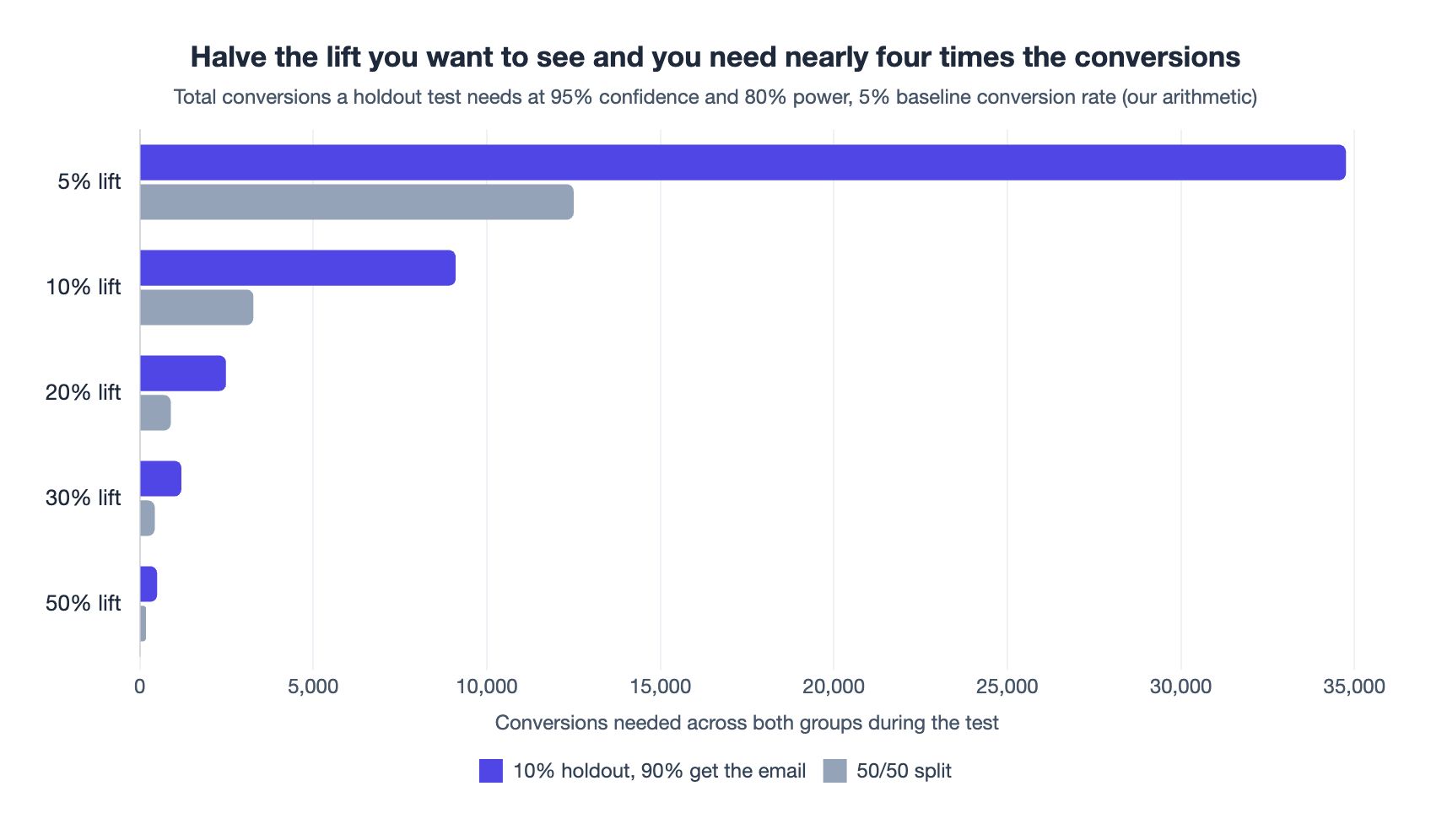
| Lift to detect | 10% holdout: total | 10% holdout: a month | 50/50 split: total | 50/50 split: a month |
|---|---|---|---|---|
| 5% | 34,755 | 11,585 | 12,503 | 4,168 |
| 10% | 9,105 | 3,035 | 3,276 | 1,092 |
| 20% | 2,487 | 829 | 896 | 299 |
| 30% | 1,200 | 400 | 434 | 145 |
| 50% | 502 | 167 | 183 | 61 |
The baseline barely matters. At a 2% baseline the 10% lift needs 9,396 conversions with a 10% holdout; at 10%, it needs 8,621. Both sit within 6% of the 5% case, so the boundary works in conversions, not recipients.
500 recipients is not a conversion number. That is Customer.io's rule of thumb per variation (Customer.io docs, conclusive A/B results). At a 5% conversion rate, 500 people produce 25 conversions.
The decision boundary
Counting conversions during the test, a 10% holdout needs about 830 a month to reliably detect a 20% lift inside a quarter. Between about 300 and 830, only a wider split, towards 50/50, gets there. Under about 300, no split can. Pick the smallest lift that would change your decision, read its row, and confirm your volume before you build.
Below the boundary
- Widen the split. Between about 300 and 830 a month, a 50/50 split can see a 20% lift inside a quarter, at the price of half the flow's audience getting nothing while it runs.
- Test the flow, not the email. A whole flow has a bigger effect to find than one email, so you can read a bolder row. Put a Random Cohort Branch at the top with one holdout message on the held-out path. Compare the paths per person in the warehouse export below, not per message: last-touch credit splits the live path's conversions across its emails.
- Hold out people across the programme. Flag a random 10% of new sign-ups in your own code, filter them out of every automation trigger, and compare over months.
- Test bold changes only. A 5% lift needs 34,755 conversions. Skip that test.
Which channel brought the visit?
Turn on URL parameters under Workspace Settings > URL Parameters and Customer.io appends them to every email link. The defaults: utm_source is customer.io and utm_medium is {{message.type}}, which renders as email_action (Customer.io docs, URL parameters). GA4's Email channel matches a source or medium of email, e-mail, e_mail or e mail (GA4 help, default channel group). Neither default is on that list, nothing else in the rule table matches them, and traffic that matches no rule is filed as Unassigned. Set utm_medium to email.
GA4 sees an email only when someone clicks a tagged link. And "All attribution models exclude direct visits from receiving attribution credit, unless the path to key event consists entirely of direct visits." So the reader who opened your email and later typed your URL gives email no credit (GA4 help, attribution). That is the dark funnel in one line. Data-driven attribution does use a counterfactual, but Google describes it as trained for Google ad exposures. It has no holdout for your emails.
How much revenue did email add?
On Premium and Enterprise plans, Customer.io exports Deliveries, Metrics, People and other files as parquet to a storage bucket (Customer.io docs, data warehouse integrations).
The field that matters is holdout. Schema v11, the current version, sets it on every Deliveries row, so held-back deliveries still get a record, and adds branch_label to Outputs for Random Cohort Branch paths. Older integrations get both only after the v11 upgrade. Join those rows to your orders table and compare revenue per person between held out and sent. That is incremental revenue, the number a finance lead wants. Revenue varies more than a yes-or-no conversion, so treat the table as the minimum volume. A Goal's revenue impact value cannot leave Customer.io, and it is last-touch revenue anyway.
Where multi-touch attribution tools fit
A paid multi-touch attribution tool earns its place when paid media is the budget question and someone runs lift tests to calibrate it. Like every tool above except the holdout, it is observational: nobody was kept away from the email.
Gordon, Zettelmeyer, Bhargava and Chapsky tested observational methods against 15 US advertising experiments at Facebook (Marketing Science, 2019). The observational methods mostly overestimated lift, and in half the studies the estimated increase in purchases was off by a factor of three. In one, the experiment measured a 2.4% lift and the closest observational estimate was 1,306% (working paper).
Those researchers had logged-in users tracked across devices. If your tool learns about email from tagged clicks, it sees what GA4 sees. If it ingests sends or opens as well, it is still observational. Either way, for lifecycle email a holdout is cheaper and answers the causal question. We made the wider case in why marketers struggle with attribution.
Pick the tool by the question
- Is a flow still working? Automation conversions, anchored on sent or clicked.
- Did a message cause the conversions? A holdout anchored on sent, once your volume clears the table.
- Under about 830 a month for a 10% holdout? Widen the split towards 50/50. Under about 300, hold out people across the programme or test only bold changes.
- Which channel brought the visit? UTMs into GA4, with
utm_mediumset toemail. - How much revenue did email add? The warehouse export, holdout flag joined to orders.
- Considering a paid attribution tool? Run a holdout first.
Want a second pair of eyes on which questions your reporting answers? That is the audit we run in email marketing consulting, or send us an enquiry.
Frequently asked questions
Does Customer.io use last-touch attribution for conversions?
Yes: within one automation, Customer.io credits a conversion to the most recent message the person was sent, opened or clicked, depending on your anchor. Each automation counts conversions independently, so two automations can both claim one purchase (automation goals).
How long is the Customer.io conversion window?
Automation goals allow up to 90 days from a send, open or click. Goals default to 7 days and allow 0 to 90 (Goals). The agent credits the latest message received within the past 30 days.
How many conversions do I need for a Customer.io holdout test?
By our arithmetic, a 10% holdout needs 9,105 conversions to detect a 10% lift and 2,487 for a 20% lift, at 95% confidence, 80% power and a 5% baseline. A 50/50 split needs 3,276 and 896. So between about 300 and 830 conversions a month, a wider split still sees a 20% lift in a quarter. These are calculations, not benchmarks.
Why does my holdout group convert better than my email?
Look at the conversion anchor first: with an open or click anchor, everyone held out can convert but only openers or clickers in the sent group can. Customer.io's docs say this can inflate holdout conversion rates, so anchor holdout goals on sent (automation goals).
Why do my Customer.io email clicks show as Unassigned in GA4?
The default URL parameters are the usual cause: Customer.io sets utm_medium to email_action, and GA4's Email channel only matches email, e-mail, e_mail or e mail. Change utm_medium to email (GA4 default channel group).
Can the Customer.io agent tell me whether an automation drove purchases?
The Customer.io agent can tell you who purchased after an automation's messages, not whether the messages drove the purchases. It credits the latest message a person received within the past 30 days and has no control group (conversational analytics).
Do I need a paid multi-touch attribution tool with Customer.io?
For most SMBs, no: paid multi-touch attribution tools are observational, so they re-weight the same activity rather than measure what the email caused. Field experiments at Facebook found observational methods often failed to match experimental results, so run a holdout first (Gordon et al.).
Sources
- Customer.io, Automation goals & conversion criteria, updated 14 September 2026.
- Customer.io, Holdout tests, updated 14 September 2026.
- Customer.io, Goals, updated 18 September 2026.
- Customer.io, Agent analytics release note, 10 September 2026.
- Customer.io, Conversational analytics, updated 14 September 2026.
- Customer.io, Understanding your A/B test results, updated 1 September 2026.
- Customer.io, Getting conclusive results from A/B tests, updated 14 September 2026.
- Customer.io, Email client metrics, updated 1 September 2026.
- Customer.io, Adding URL parameters to links, updated 1 September 2026.
- Customer.io, Storage data warehouse integrations, updated 14 September 2026.
- Google Analytics Help, Get started with attribution, read 28 September 2026.
- Google Analytics Help, Default channel group, read 28 September 2026.
- Apple, Use Mail Privacy Protection on iPhone, read 28 September 2026.
- Gordon et al., Marketing Science record, vol. 38(2), 2019.
- Gordon et al., working paper, 12 April 2018.
- Select Statistical Consultants, Comparing Two Proportions: Sample Size, read 28 September 2026.
- NerveCentral, Slimfy cart abandonment case study.
- Wikipedia, Great Hanoi Rat Massacre, and Saigoneer, Michael Vann on Hanoi's colonial rat hunt, read 28 September 2026.
Want this working in your Customer.io workspace?
It's what we do all day for SMBs—strategy, automations, deliverability and hands-on execution.
See how we work as a Customer.io agency →

