Customer.io transactional email API: what goes in the payload and what stays on the profile
On 3 December 1992, Neil Papworth, a 22-year-old software engineer working on Vodafone's Short Message Service, typed "Merry Christmas" on a computer. It went to the mobile phone of Richard Jarvis, a Vodafone director. Jarvis read it on an Orbitel 901 handset. He could not reply, because phones at the time had no way to send a text. Early texts were limited to 160 characters, Nokia added an SMS feature with a beep for incoming messages in 1993, and texts could not cross between networks until 1999.
The first text message carried everything it needed inside itself. There was no profile on the receiving end to look anything up in, no attribute to resolve, nothing to wait for.
That is still the right shape for a transactional message. The order, the reset link and the invoice travel with the message. The person's name, plan and language live on their profile, where every other message can use them too. Teams get this split wrong in one of two directions.
TL;DR: Put the thing the message is about in message_data on the POST /v1/send/email call: the order lines, the reset URL, the invoice number and amount. Keep the things about the person on the profile: first name, plan, language. Never make a transactional send wait for a profile update to land. Customer.io gives you no ordering guarantee between a Track API identify call (the request that creates or updates a profile) and an App API send. The limits make the decision for you: a profile attribute value holds 1,000 bytes, event data 100,000 bytes, and a transactional payload 1 MB excluding attachments. A customer attribute the person does not have fails the delivery unless you write a fallback. Customer.io cannot check your transactional Liquid, the template code, at draft time, because it does not know who the audience will be. Stuff the profile and you get race conditions and stale tokens. Stuff the payload and you lose the name and plan across every automation in the account. Split it, and both problems go away.
What the send call actually takes
The transactional email endpoint is POST https://api.customer.io/v1/send/email, authenticated with a bearer App API key (send a transactional email). Push, SMS, in-app, inbox and WhatsApp have their own /v1/send/ endpoints on the same host. These are the fields that matter for the decision, from the transactional email setup page.
| Field | What it does | Why it matters here |
|---|---|---|
to |
The recipient, with up to 15 recipients across to, cc and bcc |
Addressing, not personalisation |
identifiers |
One of id, email or cio_id |
Which profile the delivery attaches to. Optional when to is a single literal address |
transactional_message_id |
The template, by numeric ID or by its case-insensitive Trigger Name | Without it, metrics roll up as uncategorised |
message_data |
"An object containing the key-value pairs referenced using liquid in your message" | Where the order, the token and the invoice go |
Two limits on the Send Messages page decide a lot of what follows. The payload is capped at 1 MB excluding attachments, and attachments at 2 MB. The attachments page adds that the 2 MB applies to the encoded string. Base64 grows a file by about a third, so "roughly 1.5 MB of original files" fit, and going over returns a 413.
One more line from the setup page changes how you think about identity: "If the person you want to send a message to doesn't exist yet, we'll create them for you." A transactional send does not need a prior identify call.
The channels shipped in stages (release notes). Transactional push arrived on 8 May 2023, transactional SMS and WhatsApp on 18 June 2025, and transactional WhatsApp as its own endpoint on 24 August 2026. SMS and WhatsApp must use a template; email and push can carry the whole body in the call. WhatsApp has its own rules, covered in the WhatsApp template operations post, so this post stays on email.
How Liquid sees the two sources
Customer.io's Liquid gives you separate keys for the two places data can live (the Liquid personalisation page):
{{customer.<attribute>}}reads the profile. Available in any message or action.{{trigger.<property>}}reads the data that triggered the send:message_datafor a transactional message, or the trigger payload of an API-triggered broadcast.{{event.<property>}}reads an event. The docs giveeventonly to event-triggered automations.
Now the part that bites. The Liquid page is blunt about missing data. If a Liquid statement does not evaluate, because the person has no first_name attribute, say, then "the message won't send". You see Failed in the logs. The fix is a fallback: {{customer.first_name | default:"Buddy"}} on the latest Liquid, or an if block on legacy Liquid. Accounts opened before 28 November 2023 may still be on legacy (transactional key concepts).
The transactional concepts page is inconsistent here. It says transactional messages are important enough that Customer.io sends them even with Liquid errors. Two paragraphs later it says: "If someone in your workspace doesn't have a first name attribute, we won't send a message to them." It never says which Liquid errors go through. The Liquid page and the Failed log entry describe the one behaviour the docs spell out: a missing attribute stops the send. Design for that one. Every customer reference in a transactional template gets a fallback, no exceptions. The same page explains why the editor cannot catch it for you: "When you draft your message, we also won't know who your transactional audience is. This means that we can't validate the attributes and other properties you reference".
The consequence for the split: every field you pull from the profile can be missing on the one person who most needs the receipt. Every field in message_data is one your own code just built from the row that triggered the send. The Liquid anti-patterns post covers the unguarded reference, and the Liquid tutorial covers loops and dates.
Identify, then send: the ordering problem
Here is the pattern that depends on an order nobody promises. The backend handles a password reset like this:
- Call the Track API to set
reset_tokenas an attribute on the person. - Call the transactional API with a template that renders
{{customer.reset_token}}.
It works in testing. Nothing in the docs says the send will see that attribute. If it does not, the email carries the previous token, or none, and the logs show a successful send.
The two calls go to two different APIs on two different hosts with two different credentials. The Track API lives at https://track.customer.io with basic auth on a site ID and API key; the App API lives at https://api.customer.io with a bearer token (Track API reference). Nothing in either reference promises that a send will render after an identify that left your server a few milliseconds earlier.
The Track API's own identify reference shows how little ordering it promises even to itself (add or update a customer). It offers a _timestamp field that "can be used to control the order of attribute updates when multiple requests are sent in rapid succession". It offers an _update flag because "there's a danger that you could create multiple profiles" when creates arrive close together. If two identify calls can land out of order, an identify followed by a send on a separate API is not a sequence to build a password reset on.
You do not need the sequence at all. The token goes in message_data, it arrives in the same request as the send, and the template reads {{trigger.reset_url}}. Nothing to wait for, nothing to go stale, nothing left on the profile afterwards. If the person does not exist yet, the send creates them. Identify them properly in parallel, so the profile has a name and a language for next time.
The rule generalises: a transactional send must be correct with the profile in whatever state it is in at render time, including empty. Everything the message cannot be wrong about goes in the payload.
The decision table
| Field | Where it goes | Why |
|---|---|---|
| Order ID, line items, quantities, totals, currency | message_data |
About this message only. An attribute value holds 1,000 bytes, and the next order would overwrite it |
| Shipping address for this order | message_data |
The address on the profile may be a different one, or missing |
| Password reset URL or token | message_data, with disable_message_retention: true |
Short-lived and secret; never read it from a profile another request may have changed |
| Invoice number, amount, due date, period | message_data |
About one document |
| The invoice PDF | A link to a hosted file, or attachments under 2 MB encoded |
The docs prefer links for deliverability |
| First name | Profile attribute, with a fallback | Every automation and broadcast needs it too |
| Plan or tier | Profile attribute | Segments and automations read it; a receipt reads it for a plan-specific footer at most |
| Language | Profile attribute | Localised transactional messages match the person's language attribute; language in the payload is the override |
| Email address | to plus identifiers |
Addressing, not personalisation |
| Purchase history across orders | Events, not either of the above | A profile holds the current value; an event holds the record |
The last row sends people in circles. Purchase history means two things. The items in this order are payload. The fact that this person has ordered four times is derived from events and belongs in segments and automations, not in the receipt call. Attributes versus events gives the rule: if a value changes and you will ever ask what it used to be, it is an event. Design the order_completed event with the event schema guide, send it on the Track API alongside the transactional call, and let the automations read it.
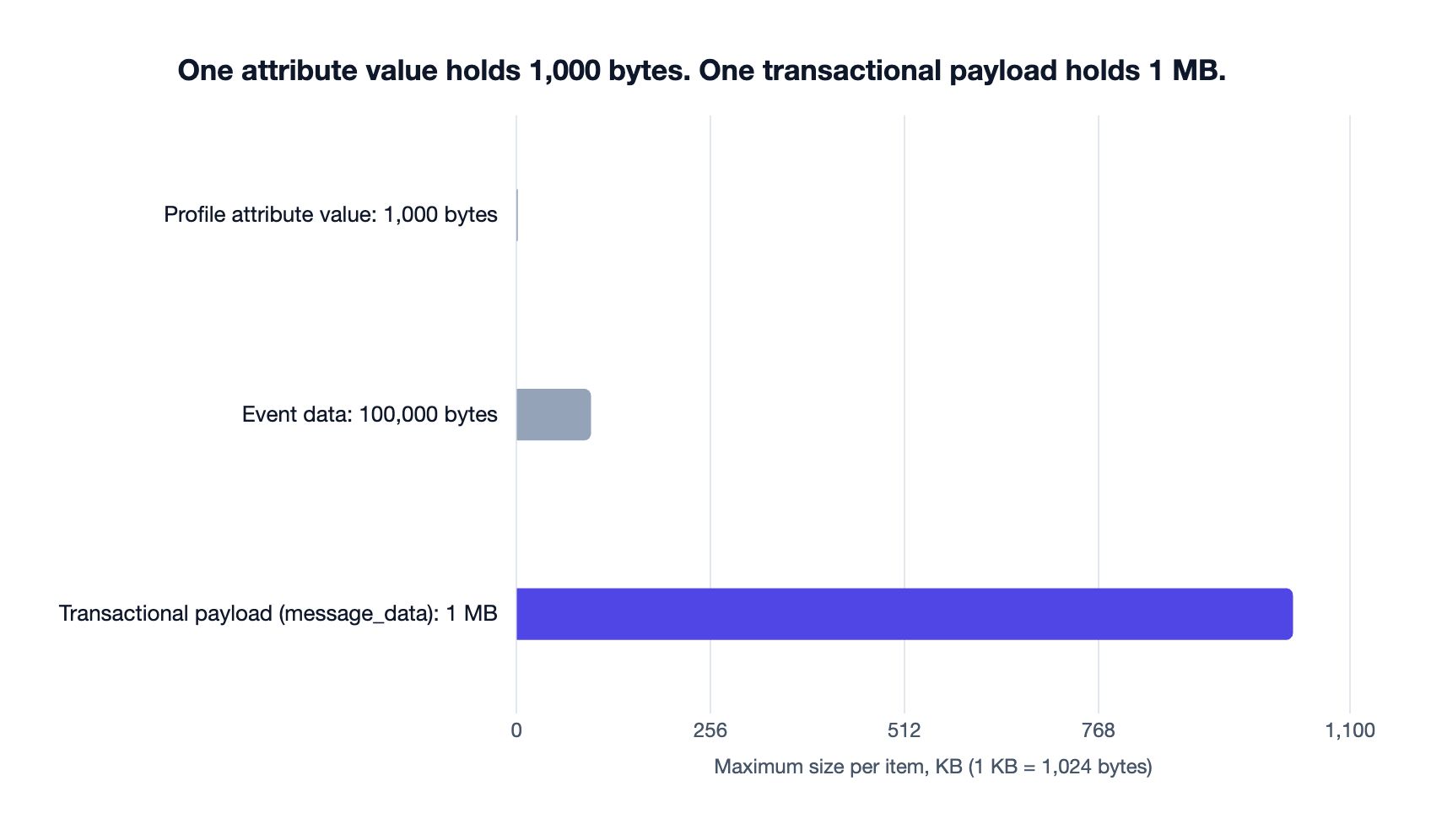
| Where the data lives | Maximum size | Source |
|---|---|---|
| Profile attribute value | 1,000 bytes | Track API reference |
| Event data | 100,000 bytes | Track API reference |
| Transactional payload, excluding attachments | 1 MB | Send Messages limits |
Worked example: order confirmation
The backend already has the order. Send it:
{
  "transactional_message_id": "order confirmation",
  "to": "[email protected]",
  "identifiers": { "id": "u_1234" },
  "message_data": {
    "order_id": "ORD-5678",
    "currency": "GBP",
    "items": [
      { "name": "Grinder", "qty": 1, "price": "89.00" },
      { "name": "Filters, 100", "qty": 2, "price": "6.50" }
    ],
    "total": "106.95",
    "shipping_address": "12 Example Street, Leeds, LS1 1AA",
    "tracking_url": "https://track.example.io/5678"
  }
}
The template:
Hi {{ customer.first_name | default: "there" }},

Thanks for order {{ trigger.order_id }}.

{% for item in trigger.items %}
{{ item.qty }} × {{ item.name }}: {{ trigger.currency }} {{ item.price }}
{% endfor %}

Total: {{ trigger.currency }} {{ trigger.total }}
Shipping to: {{ trigger.shipping_address }}
Track it: {{ trigger.tracking_url }}
Three things to notice. The greeting is the only customer reference, and it has a fallback. Every amount comes from the payload as a string your code formatted, so no Liquid filter has to guess the decimal places. And the transactional_message_id is a Trigger Name, which the docs allow; a send without one has its metrics attributed to "transactional_message_id": 1, so you cannot see receipts against resets.
Alongside the send, not before it, the backend fires an order_completed event on the Track API with the same order_id and total. That is what the win-back automation reads next month. The receipt does not wait for it.
The upsell post makes the case for adding something below the order block. Whatever you add comes from the profile with fallbacks, so the receipt still sends when the recommendation data is missing.
Worked example: password reset
{
  "transactional_message_id": "password reset",
  "to": "[email protected]",
  "identifiers": { "email": "[email protected]" },
  "disable_message_retention": true,
  "tracked": false,
  "message_data": {
    "reset_url": "https://app.example.io/reset?token=9f3c…",
    "expires_in_minutes": 30,
    "requested_from": "Chrome on macOS, Leeds"
  }
}
The payload carries the reset URL, the expiry and the context the person needs to decide whether the request was theirs. Nothing is written to the profile.
disable_message_retention: true is the field the transactional FAQ points at for "sensitive content, like password reset tokens". The template-level equivalent is the Protect sensitive data setting, and the API field overrides the setting. The concepts page spells out the trade: enabling the setting disables link tracking for that message, because there is no stored message to track against. The common errors page adds that "View in browser" links do not work on protected messages either. Set tracked: false explicitly so nobody wonders why the reset link has no click metrics. Leave send_to_unsubscribed at its default of true: a person locked out of their account is not asking for a newsletter.
Worked example: invoice
{
  "transactional_message_id": "invoice issued",
  "to": "\"Accounts Payable\" <[email protected]>",
  "cc": "[email protected]",
  "identifiers": { "id": "u_1234" },
  "message_data": {
    "invoice_number": "INV-2026-0912",
    "issued_on": "2026-10-23",
    "due_on": "2026-11-22",
    "period": "October 2026",
    "amount_due": "1,200.00",
    "currency": "GBP",
    "company_name": "Client Ltd",
    "pdf_url": "https://billing.example.io/invoices/INV-2026-0912.pdf"
  }
}
The invoice is a document, so the whole document is in the payload, including a link to the hosted PDF. If the client insists on an attachment, attachments takes a base64-encoded file under the 2 MB encoded limit. The API examples page shows the shape with a calendar invite. The attachments page is clear about the cost: attachments are a deliverability risk, and a link to a page that links to the file is the recommended route.
The profile side of an invoice is thin: name and language, with fallbacks. The company name belongs on an account object if you run B2B on Customer.io, but the docs give trigger object data only to object-triggered automations, so the company name goes in the payload as well. For a reminder before the due date, send_at schedules a second send up to 90 days ahead from the same call site, with the same payload.
For code-first teams, auto_create: true with a string Trigger Name creates the message record on first send. Records created this way "don't contain message content", so you pass body, subject and from on every send until content goes in through the UI or the CLI. The CLI post walks that path on the Builder plan.
When not to do this
When the flow has more than one step. The transactional FAQ is explicit: for double opt-in, branching or A/B tests, use an event-triggered automation. You cannot A/B test a transactional message. A follow-up that depends on a click is an automation reading an order_completed event, with the order data on the event instead of in message_data.
When the data has to outlive the message. If the plan name exists only in receipt payloads, the dunning automation and the upgrade segment cannot see it. Anything an automation or a segment will ask about goes on the profile or into an event, even when the send also carries it.
When the payload is a catalogue. 1 MB is generous for an order and tight for a long receipt with images and options on every line. Send the summary and link to a hosted order page.
When you are tempted to use it for a blast. The FAQ says the transactional API "should not be used to send marketing blasts", and the 15-recipient cap enforces it. API-triggered broadcasts exist for that, at 1 request every 10 seconds.
If you want a second pair of eyes on which fields belong where before the integration ships, send a note through the enquiry form with your transactional emails. We will come back with a placement table for each.
Frequently asked questions
What is message_data in the Customer.io transactional API?
message_data is the object in a transactional API request that holds the key-value pairs your template reads with {{trigger.<property>}}. It is the right place for anything that belongs to this one message: the order, the reset link, the invoice. It arrives in the same request as the send, so it is never stale.
Should I store order details on the customer profile or send them in the transactional API call?
Send them in the call. An order is about one message, a profile attribute value is capped at 1,000 bytes on the Track API, and the next order would overwrite whatever you stored. Pass the order in message_data, read it with {{trigger.order_id}} and a loop over the items, and send a separate order_completed event so segments and automations keep the history.
What happens if a Customer.io transactional email references an attribute the person does not have?
The delivery fails unless the reference has a fallback. Customer.io's Liquid documentation says that if a person does not have the referenced attribute "the message won't send", and the transactional concepts page repeats it for first_name. Use {{customer.first_name | default:"there"}} on the latest Liquid, or an if block on legacy Liquid, on every customer reference in a transactional template.
Do I need to identify a person before sending them a transactional email in Customer.io?
No: if the person does not exist yet, Customer.io creates them from the identifiers in the send request, as the transactional email page says. Identify people properly anyway, so the profile carries a name and language for next time. Never make the send depend on that identify call landing first: the Track API and the App API give no ordering guarantee between them.
How big can a Customer.io transactional API payload be?
The payload is limited to 1 MB excluding attachments, attachments to 2 MB in total, and a single request to 15 recipients across to, cc and bcc. The attachment limit applies to the base64-encoded string, so roughly 1.5 MB of original files fit.
Can I send attachments with the Customer.io transactional API?
Yes, through the attachments field, as a dictionary of filename to base64-encoded content under 2 MB in total. Customer.io's attachments page recommends linking to a hosted file instead, because attachments are flagged by spam filters more often. The transactional FAQ lists the forbidden file extensions, exe and vbs among them.
How do I stop Customer.io storing a password reset token?
Set disable_message_retention: true on the send, or enable the template's Protect sensitive data setting. Customer.io then does not retain the message body in delivery history or return it through the API. The setting disables link tracking as a consequence, the API field overrides the setting, and "View in browser" links do not work, because there is no stored message to serve.
Sources
- Customer.io, Getting started: key transactional concepts, read 23 October 2026.
- Customer.io, Set up a transactional email, read 23 October 2026.
- Customer.io App API, Send a transactional email, read 23 October 2026.
- Customer.io App API, Send Messages: limits, read 23 October 2026.
- Customer.io, Transactional FAQ, read 23 October 2026.
- Customer.io, Transactional API examples, read 23 October 2026.
- Customer.io, Common transactional API errors, read 23 October 2026.
- Customer.io, Email attachments, read 23 October 2026.
- Customer.io, the Liquid personalisation page, read 23 October 2026.
- Customer.io Track API, Track API reference: rate limits and payload limits, read 23 October 2026.
- Customer.io Track API, Add or update a customer, read 23 October 2026.
- Customer.io, Release notes: transactional push (8 May 2023), transactional SMS and WhatsApp (18 June 2025), transactional WhatsApp (24 August 2026), read 23 October 2026.
- Vodafone, 25 years since the world's first text message, 4 December 2017.
- NPR, The First Text Message Celebrates 25 Years, 4 December 2017.
Want this working in your Customer.io workspace?
It's what we do all day for SMBs—strategy, automations, deliverability and hands-on execution.
See how we work as a Customer.io agency →