
Customer.io Transactional WhatsApp: Meta Approves Every Word Before You Send

For more than two centuries, no play could be performed in public in Britain until a civil servant had read it first. The Theatres Act 1843, building on the Stage Licensing Act 1737, required every script intended for public performance to be submitted to the Lord Chamberlain's Office. There the Examiner of Plays read it and wrote a report advising whether it should be licensed, recording any changes he wanted made. The licence attached to the words on the page. The British Library holds the surviving scripts and correspondence as its largest single manuscript collection, covering plays performed in Britain from 1824 to 1968. The regime ended only when the Theatres Act 1968 received royal assent on 26 July 1968.
Playwrights adapted. They learnt the Examiner's tastes, wrote to them, and stopped submitting lines they knew would come back struck through. The craft shifted from writing to submission management.
Customer.io shipped the same arrangement for your order confirmations on 24 August 2026, and almost nobody is describing it that way.
TL;DR: Customer.io's transactional API can now send WhatsApp messages natively, on every plan from Builder up. But WhatsApp messages have to use a template that Meta has reviewed and approved, and once Meta approves a template you cannot edit it—you submit a new one. That makes transactional WhatsApp a template-inventory commitment, not a channel toggle. Three specifics decide whether it suits you. Verification codes need an Authentication template, which Customer.io's Design Studio cannot build. An order confirmation carrying a promotion is a Marketing template by Meta's own guidelines, and in North America that needs marketing opt-in. And Meta can recategorise a live template with one day's notice, or none at all. On price it is the cheap option: $0.0034 for a utility template to a US recipient against $0.0120 for an SMS segment. It is free inside an open 24-hour service window too, until Meta starts charging for that on 1 October 2026. Send the messages whose copy is stable. Keep anything you are still iterating on email.
What actually shipped on 24 August 2026
Customer.io's release note that day reads: "You can now trigger one-to-one WhatsApp messages—like order confirmations, appointment reminders, and verification codes—from your application using the transactional API."
Read carelessly, that sounds like transactional WhatsApp is new. It isn't. The release note of 18 June 2025 already announced transactional messaging "available for SMS and WhatsApp", aimed at "two-factor authentication (2FA) codes and one-time passwords (OTP)". If you sent WhatsApp through Twilio, you have had this for over a year, wired through the transactional SMS path.
What shipped in August is the native route. Customer.io added direct Meta integration in February 2026, letting you connect a Facebook Business Account without a third party, and the transactional API has now caught up with it. There is a dedicated endpoint, POST /v1/send/whatsapp. The API reference is blunt about who may call it: "To use this endpoint, you must be integrated with WhatsApp Business, not Twilio." It also documents a 403 for workspaces without WhatsApp enabled, reading "You don't have WhatsApp enabled." If you are Twilio-routed, you are not integrated with WhatsApp Business, so this endpoint is not yours to call.
So the first question is not whether to switch this on. It is which WhatsApp integration you have.
The API call is the easy part
Three fields send a message. You need identifiers (one of id, email or cio_id), to (an E.164 number like +15551234567, or Liquid such as {{customer.phone}}), and transactional_message_id—either the numeric template ID or the Trigger Name you set in the UI.
curl https://api.customer.io/v1/send/whatsapp \
  --request POST \
  --header 'Content-Type: application/json' \
  --header 'Authorization: Bearer YOUR_APP_API_KEY' \
  --data '{
  "transactional_message_id": "order_confirmation",
  "to": "+15559876543",
  "identifiers": { "id": "123456" },
  "message_data": { "order_number": "A-4417" }
}'
The optional parameters will look familiar from transactional email: from, message_data, language, tracked, send_to_unsubscribed, disable_message_retention, queue_draft and send_at. One is missing. Transactional email, push and SMS document an auto_create parameter that creates an empty template record on first send, using the value you passed as the Trigger Name. The WhatsApp endpoint documents no such parameter. Every WhatsApp template exists because a human made it and Meta approved it.
That is the whole story of this feature. The integration work is an afternoon. The work that never ends sits upstream of it.
Meta's three categories decide what your message is
WhatsApp templates carry a category, and the category is not a filing convention—it sets the price, the consent rules and what the template is allowed to contain. Meta's template categorisation guidelines, updated 21 May 2026, define three.
| Category | What it covers | Can Design Studio build it? | Can it carry a one-time passcode? | Can it carry a promotion? |
|---|---|---|---|---|
| Utility | Non-promotional messages tied to a user's order, account or request—order confirmations, shipping updates, account alerts | Yes | No | No |
| Authentication | Identity verification with alphanumeric codes: new accounts, account recovery, integrity challenges | No | Yes—and only this category | No |
| Marketing | Promotions, offers, awareness, retargeting, app promotion, relationship-building | Yes | No | Yes |
Two lines in Meta's guidelines do most of the damage to the obvious plan.
The first: "Only authentication templates can be used to send a one-time passcode for identity verification. Marketing and utility templates cannot be used for this purpose."
The second, from the Order Management section of the utility guidelines: "These messages should not promote, recommend, upsell, or cross-sell products; include offers; or attempt to secure renewals." Mixed content is explicitly Marketing—Meta gives "an order update with a promo" as its own example.
If you have read our post on putting marketing upsells in transactional emails, that advice stops at the WhatsApp boundary. Add a discount code to a WhatsApp order confirmation and you have not written a cheeky receipt; you have written a Marketing template. Customer.io's Design Studio guide notes what that costs you: "profiles in North America must be opted into receiving marketing messages via WhatsApp to get this type."
The headline use case is the one Customer.io cannot build
The release note advertises verification codes. Meta says verification codes require an Authentication template. Design Studio is otherwise the good way to build WhatsApp templates. You create them inside your workspace, submit them to Meta without leaving Customer.io, and track approval status on the dashboard. It just cannot build the one you need here. Its documentation says: "Currently, you can't create Authentication templates in Design Studio, but you can make Marketing or Utility templates." The WhatsApp editor is in beta and Customer.io says it is "working to close the gap" with Meta's own template builder—but today the gap includes the category you need.
So OTP over WhatsApp is possible and it is not a Customer.io job. You build the template in Meta's WhatsApp Manager, from Meta's Template Library, and configure a one-time-password button—copy-code or one-tap. Meta's content restrictions for the category are strict: "URLs, media, and emojis are not allowed for authentication template content or parameters. Parameters are also restricted to 15 characters."
None of that is a reason to avoid WhatsApp OTP. It is a reason to scope the work honestly. A team that reads "verification codes" in a release note and books half a sprint will discover the console, the Template Library and the button configuration on day one.
An approved template is frozen
Here is the sentence that turns this from a feature into an operating commitment, from Customer.io's Design Studio guide:
"Once you submit, you can't change anything while Meta reviews your submission. If your template is rejected, you can edit it and resubmit for approval. If your template is approved, you'll have to submit a new template with your changes."
Approval freezes the words. A better sentence in your shipping notification is a new template and a new review. Meta typically decides "within minutes" using an algorithm, but Customer.io's docs warn that "some templates go through a manual review process that can take up to 24 hours". You cannot promise the marketing lead a same-day copy fix.
Now multiply. Translations do not share a template: "If you want to translate your WhatsApp messages, you have to create a separate template for every translation and submit them for approval." Five transactional messages across four languages is twenty templates, each with its own approval status, each frozen once live. Every variant you would casually A/B test on email is another row in that inventory.
This is exactly the loop that produces results on email. We grew Slimfy's cart-abandonment sequence from six emails to nine, adding one at a time until click-through stopped, and it brought in an additional $27,000 a month after three months. Nine emails, discovered rather than guessed, through dozens of copy changes nobody had to ask permission for. Run that discovery loop on WhatsApp and every iteration is a submission with a queue in front of it.
Which is why the rule writes itself: put stable copy on WhatsApp, keep experimental copy on email.
Meta can recategorise a live template underneath you
Approval is not permanent either. Since 1 July 2024 Meta has run a recurring process that reclassifies approved templates it judges to be in the wrong category, and the outcomes differ by direction.
A Utility template that should be Marketing gets "a 1-day advance notice" before the category changes. Status stays APPROVED and it keeps sending—at the Marketing rate, under Marketing consent rules. If Meta has already warned your business for miscategorisation, that notice disappears: "Category changes will be instant."
A Marketing or Utility template that should be Authentication is worse. "On the first day of the following month, the template status is changed to REJECTED and can no longer be used to send messages." Meta is explicit that this one has no route back: "For marketing or utility templates that will be rejected: You cannot request a review." If your OTP is riding on a utility template, the failure is scheduled for a date you did not choose.
Persistent miscategorisation escalates. Meta publishes the ladder. It starts with a written warning. Next comes rate limiting, which caps utility volume in a 24-hour rolling window for at least seven days. Above that, every approved utility template on the account is recategorised to Marketing for 7 days, or 30 for repeat violations. New utility template creation and category reviews are disabled too, so the fix is blocked along with the sending. At the top, the same treatment applies across every WhatsApp Business Account in the business portfolio for 30 days.
Meta's pricing documentation puts the responsibility plainly: "Businesses are responsible for reviewing the category assigned to their approved templates." Somebody on your team owns that review. Name them before launch, not after the first surprise invoice.
What it costs
Customer.io charges nothing for WhatsApp. Its billing page says so plainly: "Customer.io does not charge for WhatsApp messages, but Meta and Twilio—the partners who handle WhatsApp messaging—do."
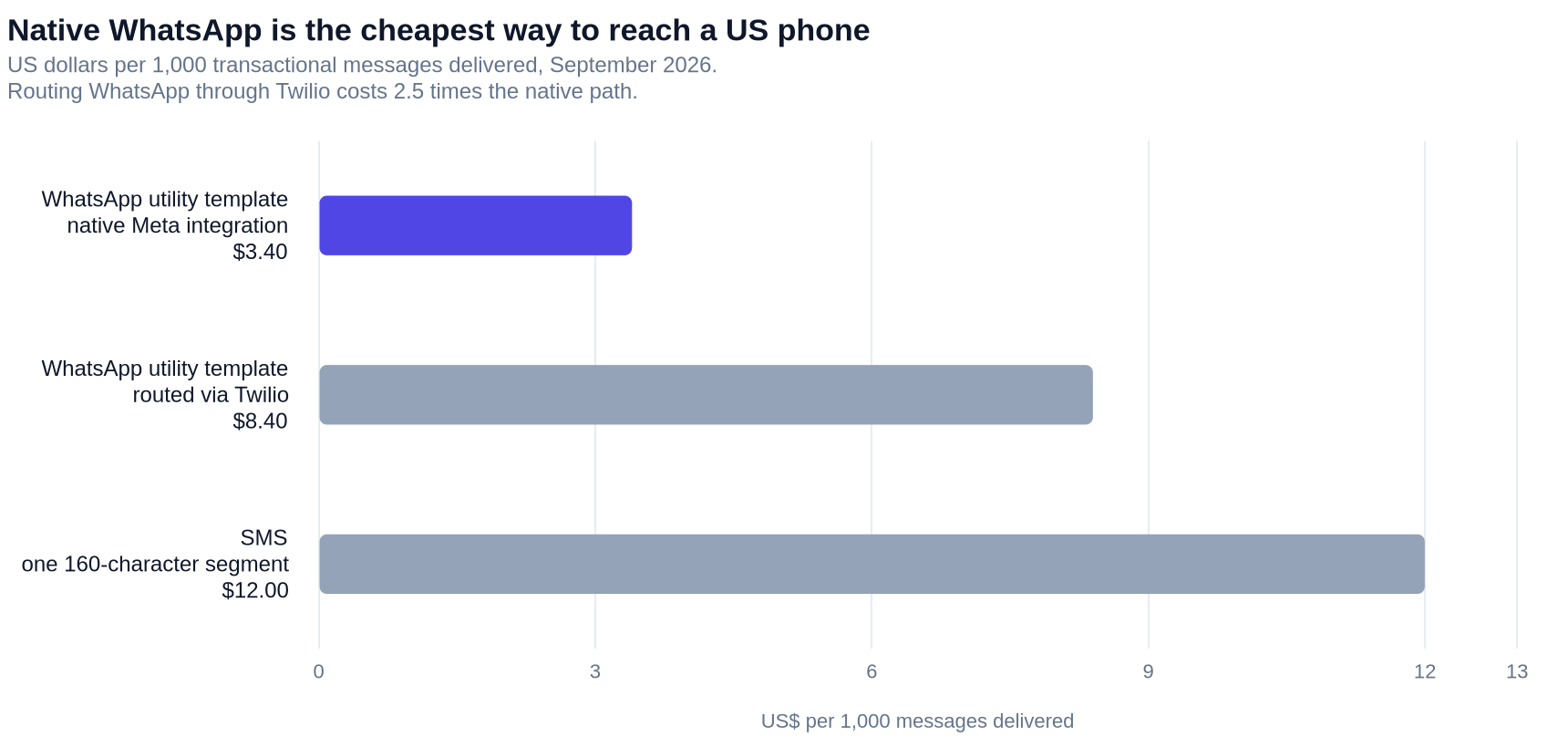
Meta moved to per-message pricing on 1 July 2025, charging only when a template message is delivered, at rates that vary by category and by the recipient's country calling code. For the case most readers care about, Customer.io's own billing page gives the figure: a utility template to a recipient in the United States costs $0.0034 per message. Twilio adds $0.005 per WhatsApp message on top, as of February 2026. For the comparators in the table below, an SMS segment over your plan limit costs $0.0120 (SMS billing) and email overages run at $0.12 per 1,000 (How we bill).
| Path | Cost per message, US recipient | Basis |
|---|---|---|
| $0.00012 | $0.12 per 1,000 emails, overage rate on essentials, premium and enterprise | |
| WhatsApp utility template, native Meta | $0.0034 | Meta per-message rate quoted by Customer.io |
| WhatsApp utility template via Twilio | $0.0084 | $0.0034 Meta plus $0.005 Twilio, February 2026 |
| SMS segment | $0.0120 | Overage rate per 160-character segment for accounts billed through Customer.io |
Two honest caveats. These are marginal rates: the cost of one more message once you are past your plan's allowance, not blended costs. And Meta's WhatsApp rates differ by country, so a US figure tells you nothing about India or Brazil. Compared like for like, though, the ranking holds: a WhatsApp utility template costs roughly a third of an SMS segment, and routing it through Twilio costs about two and a half times the direct path.
There is also a free tier hiding in the mechanics, and it has four weeks left. Since 1 July 2025 Meta has not charged for utility templates delivered inside an open customer service window—the 24-hour period that opens when a customer messages you. Meta's own worked example makes the difference concrete: an order confirmation sent while that window is open is free, while the same utility template sent at hour 30, after the window closed, is charged.
That ends on 1 October 2026. Meta's pricing page is unambiguous that from that date Meta "will charge for utility messages sent in an open 24-hour customer service window, as announced July 1, 2026". Nothing changes about when you can send a utility template, only about what it costs inside the window. The same date brings per-message charging for service messages, softened by a new free monthly tier of 1,000 service messages per business phone number.
So if your business case for transactional WhatsApp leans on the free reply window, it has a shelf life you can count in days. Model this quarter twice: once on today's rates, once on October's.
The four transactional paths, compared
| Transactional email | Transactional SMS | Transactional WhatsApp (native Meta) | Transactional WhatsApp (via Twilio) | |
|---|---|---|---|---|
| Template required | No—can send the full body via API | Yes | Yes | Yes |
| Third-party pre-approval | None | None | Meta, per template | Meta, per template, created in Twilio |
| Consent basis | Implicit | Implicit | Implicit—unless Meta calls it Marketing | Implicit—unless Meta calls it Marketing |
| Plans | Builder and above | Builder and above | Builder and above | Builder and above |
| API endpoint | /v1/send/email |
/v1/send/sms |
/v1/send/whatsapp |
/v1/send/sms |
| Link tracking default | On | On | On | On |
| Message frequency limit | Yes | Yes | Yes | Yes—but counts towards the SMS limit |
| Automatic retry after a limit block | No | No | No | No |
| Marginal cost, US | $0.00012 | $0.0120 | $0.0034 | $0.0084 |
The frequency-limit row deserves a note, because the launch documentation for channel-based limits said something narrower. The release note of 20 July 2026 stated: "You can limit the number of WhatsApp and SMS messages sent via Twilio, but not other vendors." The current limits table now lists WhatsApp through Meta/WhatsApp Business as limitable in its own right, with the Twilio route still folded into the SMS limit. If you planned your caps in July, re-read the table.
And limits behave differently for transactional messages than for automations. You assign one from a transactional message's Configure settings screen, but as the docs put it, "you can't assign automatic retries to one-time sends or transactional messages". A blocked order confirmation is marked undeliverable, and the only way it goes out is if somebody retries it by hand. For the wider mechanics of caps and skipped sends, we have written about channel-based message limits and what the automation rate limit discards.
Six things that bite
The transactional WhatsApp setup screen offers sensible defaults. Three of them are worth a deliberate decision, and three more traps live elsewhere in the docs.
Send to unsubscribed profiles defaults to on. For a password reset that is correct. For anything with a whiff of promotion it is the setting that turns a compliance question into a compliance incident. Decide per message, and see our guide to per-channel subscription preferences if a WhatsApp opt-out currently costs you an email subscriber.
Link tracking defaults to on, and Customer.io recommends pairing it with link shortening because tracked URLs get long. Shortened links look like https://a.cx.io/abcde12345, or e.cx.io in the EU data centre.
Shortened links expire after 90 days. So does the outer bound on scheduling: send_at accepts a timestamp up to 90 days in the future. A message scheduled at the far edge of that window and a link created today are on the same clock. Appointment reminders booked a quarter ahead are where this shows up.
Message retention can be switched off. The setting "prevents Customer.io from retaining your message content", and the docs point at password reset codes and verification tokens as the reason to use it. Turn it on for anything sensitive—then check what your delivery-log debugging depended on, because the body will not be there.
A media header needs a publicly reachable URL. The image you uploaded to Meta when you created the template is used for review only—it is not what gets sent. Customer.io's send guide is specific about the failure: "If the URL isn't publicly reachable, Meta rejects the send with a media upload failure (error code 131053)." Templates you build in Design Studio can carry an image, GIF or PDF, but not video, and you get a header or a media component, not both; templates built in WhatsApp Manager can use a video header.
One more, because Liquid behaves unusually in transactional messages: Customer.io will "send messages to your customers even if they have liquid errors". Set fallbacks—{{customer.first_name | default: "there"}}—because a WhatsApp template with a hole in it still goes out.
When not to do this
Almost every vendor-adjacent post stops before this section. Four situations where transactional WhatsApp is the wrong call today.
Your copy is still being tested. If the message is in its first quarter and you expect to rewrite it three times, the review queue will cost you more than the channel gains. Ship it on email, settle the copy, then submit it.
You are on Twilio and staying there. The native endpoint refuses you, and the workaround is the transactional SMS path with WhatsApp templates managed in Twilio's console. Worse, the door is closing. Accounts that set up Twilio after 30 July 2026 cannot send WhatsApp through it at all, and Customer.io notes that being able to add more than one SMS provider is itself the tell. If you have already moved to another SMS provider, Twilio WhatsApp is not available to you.
Your audience does not use WhatsApp. Penetration is the whole argument for the channel, and it is regional. Our guide to WhatsApp and LINE as international channels covers where that argument holds. Where it doesn't, an SMS confirmation with proper A2P 10DLC registration beats a WhatsApp message nobody opens.
Nobody owns the template inventory. Not a person who can approve copy—a person who checks template statuses, reads Meta's recategorisation emails and holds the list of which templates exist in which languages. Without that role the first REJECTED status lands silently and your order confirmations stop.
The pre-launch checklist
Six things to settle before the first send, in order:
- Confirm your integration path. Workspace Settings → WhatsApp tells you whether you are native or Twilio-routed. Everything downstream depends on it.
- Write the boundary down. Which messages are Utility, which are Marketing, and who gets to move one. Meta's guidelines are the arbiter, not your internal vocabulary.
- Inventory the templates you actually need. Message × language × variant. If the number surprises you, that is the finding.
- Decide the OTP question. Either accept the Meta console work for Authentication templates, or keep verification codes on SMS and email.
- Name the reviewer. One person, checking template statuses and category-change notices on a schedule.
- Set the per-message settings deliberately. Unsubscribed sends, link tracking, message retention and frequency limits, message by message—not once at the workspace level and never again.
Do those six and transactional WhatsApp is a good channel with an unusually cheap unit cost. Skip them and you have handed your receipt copy to an external editor without telling anyone.
The playwrights who worked under the Examiner of Plays produced plenty of good theatre. They just stopped pretending the process was theirs.
If you want a second pair of eyes on the boundary between your transactional and marketing templates before you launch, that is the kind of work our Customer.io team does. Tell us what you are planning to send and we will tell you what we would put on WhatsApp and what we would leave on email.
Frequently asked questions
Does Customer.io support transactional WhatsApp messages?
Yes. Customer.io added a dedicated transactional WhatsApp endpoint on 24 August 2026, POST /v1/send/whatsapp, available on the Builder, Essentials, Premium and Enterprise plans. Transactional messaging for WhatsApp via Twilio has existed since 18 June 2025 through the transactional SMS path.
Do WhatsApp order confirmations need a Meta-approved template?
Yes. Customer.io's documentation states that "WhatsApp requires that messages use content that Meta has reviewed and approved before you can send them", and that for transactional SMS and WhatsApp "you must use a template". You cannot send a WhatsApp message body through the API the way you can with transactional email.
Which Customer.io plans include transactional WhatsApp?
The transactional WhatsApp documentation lists Builder, Essentials, Premium and Enterprise. Customer.io does not charge for WhatsApp messages on any of them; Meta charges per delivered template message, and Twilio adds its own per-message fee if you route through Twilio.
Do I need explicit opt-in to send transactional WhatsApp?
Customer.io describes transactional WhatsApp as messages "your audience implicitly opts-into", and its transactional settings default to sending to unsubscribed profiles. That holds while Meta agrees your template is Utility or Authentication. If the template is categorised Marketing, Customer.io's docs note that profiles in North America must be opted into WhatsApp marketing to receive it.
How long does WhatsApp template approval take?
Customer.io's docs say Meta "typically reviews templates with an algorithm and approves or rejects them within minutes", but that "some templates go through a manual review process that can take up to 24 hours". Plan around the 24-hour case. In WhatsApp Manager the statuses are Active, In Review and Rejected.
Can I send a one-time passcode over WhatsApp from Customer.io?
Yes, but not with a template built in Customer.io. Meta permits one-time passcodes only in Authentication templates, and Customer.io's Design Studio cannot create Authentication templates—only Marketing and Utility. You build the Authentication template in Meta's WhatsApp Manager from its Template Library, with a copy-code or one-tap button, then select it in Customer.io.
Can I edit an approved WhatsApp template?
No. Customer.io's Design Studio documentation states that if a template is approved, "you'll have to submit a new template with your changes". While a template is in review you cannot change anything at all. Rejected templates can be edited and resubmitted.
Can I apply a message frequency limit to a transactional WhatsApp message?
Yes. From a transactional message's Configure settings screen you can enable "Assign message frequency limit?" and choose a workspace limit. WhatsApp sent through Meta/WhatsApp Business is limitable in its own right; WhatsApp sent through Twilio counts towards the SMS limit instead. Transactional messages cannot auto-retry after a limit blocks them—you retry manually.
What if I already send WhatsApp through Twilio?
Use the transactional SMS path instead; Customer.io's WhatsApp documentation says so directly, and the native endpoint returns a 403 for Twilio-routed workspaces. Templates stay in Twilio's Content Template Builder. Note that accounts which set up Twilio after 30 July 2026 cannot send WhatsApp through Twilio at all.
Is transactional WhatsApp cheaper than SMS?
Per message, yes, at least in the US. A utility template to a US recipient costs $0.0034 against $0.0120 for an SMS segment billed through Customer.io. Utility templates delivered inside an open 24-hour customer service window are free too, but only until 1 October 2026, when Meta starts charging for those. Rates vary by country, and the template-approval work is a real cost that does not appear on either invoice.
Can I put a tracked link in a WhatsApp template?
Yes. Link tracking is on by default for transactional WhatsApp, and Customer.io recommends using link shortening alongside it because tracked URLs are long. Shortened links expire after 90 days, which is worth checking against anything you schedule far ahead with send_at, since that also accepts a timestamp up to 90 days out.
Should order confirmations go by WhatsApp or email?
Email if the copy is still changing or the confirmation carries a promotion, because Meta categorises an order update with a promo as Marketing. WhatsApp if the copy is settled, the audience uses WhatsApp, and you want the message read. Sending inside an open 24-hour customer service window makes the utility template free, though Meta ends that on 1 October 2026.
Sources
- Customer.io, Set up a transactional WhatsApp message (updated 1 September 2026)
- Customer.io, Send a transactional WhatsApp message (App API reference)
- Customer.io, Getting started: key transactional concepts
- Customer.io, Create WhatsApp content templates
- Customer.io, WhatsApp: get started
- Customer.io, WhatsApp: create and approve templates in Design Studio
- Customer.io, Send a WhatsApp message
- Customer.io, Message frequency limits and Set up message frequency limits
- Customer.io, Billing for WhatsApp messages, Billing for SMS messages and How we bill
- Customer.io, Release notes: the 24 August 2026, 20 July 2026, 17 February 2026 and 18 June 2025 entries
- Meta, Template categorization (updated 21 May 2026)
- Meta, Pricing on the WhatsApp Business Platform (updated 5 August 2026)
- British Library, Lord Chamberlain's Plays collection guide
- Theatres Act 1968
Want this working in your Customer.io workspace?
It's what we do all day for SMBs—strategy, automations, deliverability and hands-on execution.
See how we work as a Customer.io agency →

