
Customer.io Shipped Geofences. The Blocker Is "Always Allow", Not the Fence

Once a year at Rogationtide, in the week containing Ascension Day, an English parish walked its own boundary. The party carried birch or willow boughs and thrashed each boundary mark on the way round, which is where the custom gets its name: beating the bounds. Sometimes the boughs were used on the children instead. Hungerford's town records carry a photograph captioned "Beating the Bounds, Jul 1913. 'Bumping'", and note that "sometimes the boys were themselves whipped or even violently bumped on the boundary-stones". Tradfolk puts the logic plainly: "Pain association as a memory aid was an important part of beating the bounds."
The parishes were not being cruel for sport. They had a boundary nobody could see and no map anyone would trust. So they invested in the only thing that could hold the line: a person who would still be alive in fifty years, and would still remember. Hungerford's records say it outright. "The object of taking boys is supposed to ensure that witnesses to the boundaries should survive as long as possible."
Customer.io shipped geofences on 30 July 2026. Drawing the boundary now takes about a minute. Everything that decides whether it works sits somewhere else: on a permission screen, on someone else's phone, in a decision they make once and rarely revisit. The fence is not the hard part. The witness is.
TL;DR:
- Our position: geofences are the wrong first mobile investment for almost every SMB. Build them only if you have physical locations and an app people already trust with background location.
- Geofences shipped on 30 July 2026 on Premium and Enterprise plans only, mobile app only, with no web equivalent.
- The feature depends on background location: Always on iOS, Allow all the time on Android. Customer.io's docs are blunt about what happens without it. "The device detects crossings only while your app is open in the foreground, so you miss most of them."
- It degrades silently rather than failing loudly, and nothing in the docs describes a workspace signal for it: a campaign reaching a tenth of its audience reports like one reaching all of it.
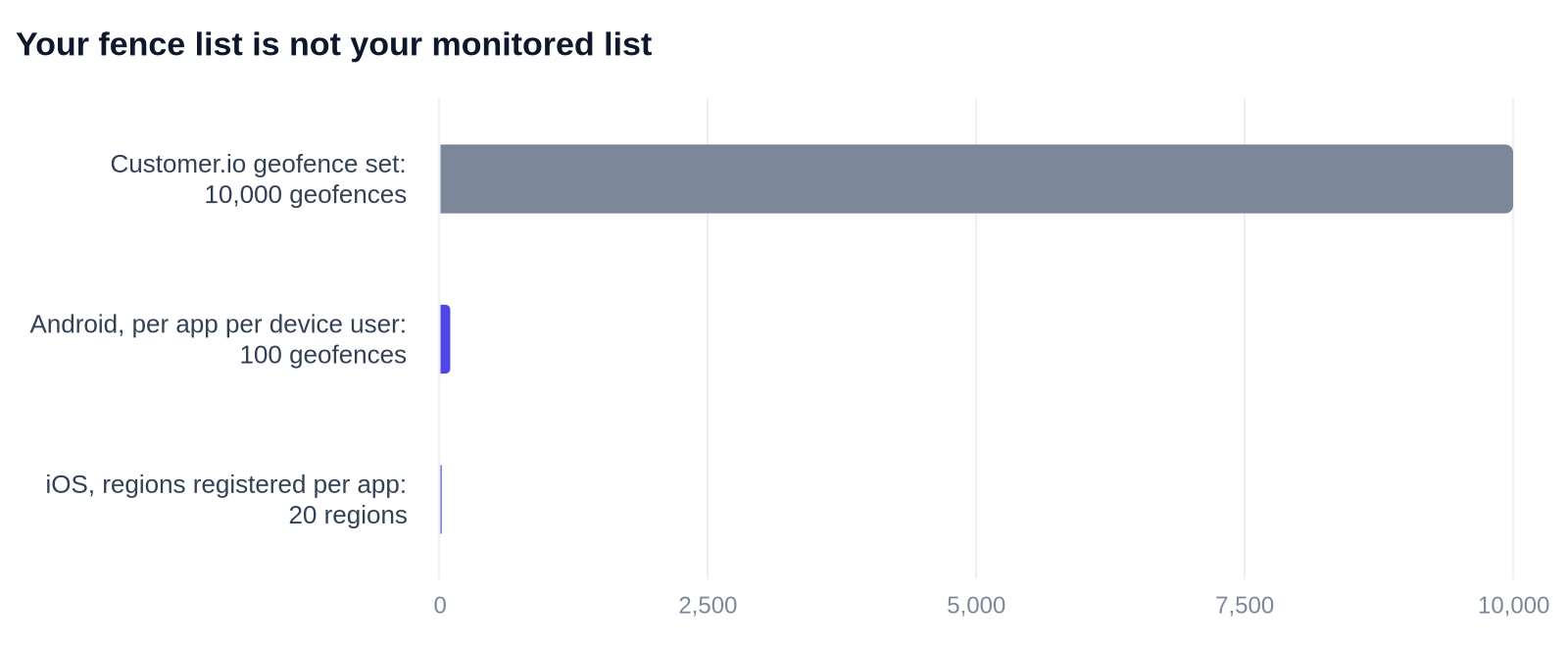
- A Customer.io geofence set holds 10,000 geofences. Android monitors 100 per app per device user. Apple documents 20 regions per app. The SDK sends the nearest ones and refreshes at most once every 24 hours.
- Three use cases survive the constraints: store arrival for click-and-collect, venue entry at events, and depot or site arrival for field teams. Dwell time, quiet hours, per-branch targeting and A/B testing do not exist.
- If you do not have physical locations and an app people already trust with background location, put the same effort into the notification inbox instead.
What actually shipped on 30 July 2026?
Geofences let you draw a circle around a real place and act when someone with your app crosses it. The release note is titled "Geofences: message people when they enter or exit a location", and lists three uses: trigger automations, group people into segments, and add geofence conditions to wait actions.
The docs fill in the rest. You group fences into a geofence set, and every surface acts on the set, never on an individual fence. That holds for the automation trigger, which is literally called "Geofence set". It holds for exit conditions, where geofence sets joined profile attributes, events and segments as the fourth condition type, something we covered in the exit conditions audit. It holds for wait until, and it holds for segments.
Two events land on the profile: Geofence Enter and Geofence Exit. Each carries the geofence_id of the fence crossed and the geoset_id of the set it belongs to. "The activities do not send back exact coordinates of your customers, only data for the geofence they crossed."
If the words automation and profile look unfamiliar where you expected campaign and person, that is the July rename, not a different product.
Geofences are Premium and Enterprise only, which puts them out of reach of everyone on Essentials. They are also mobile only. The Summer 2026 release page has no web equivalent to offer. It also explains the circle-only geometry as an operating-system constraint: "Both iOS and Android only support circular region monitoring natively, so custom shapes would require additional work beyond our backend." Polygons are "on our radar with no timeline to share yet".
Why is background location the whole feature?
Because without it, the fence does nothing useful, and nothing tells you.
Here is the sentence that should decide your roadmap, from Customer.io's own documentation: "Geofences depend on a permission your customers grant in your app: background location... Always on iOS, Allow all the time on Android. Without it, the device detects crossings only while your app is open in the foreground, so you miss most of them."
Read the failure mode carefully. It is not an error. A person with when-in-use permission still counts as a perfectly healthy profile. Their app still reports events. They simply never cross a fence unless they happen to be staring at your app as they walk through the door. The docs add the obvious follow-up: "People rarely have your app open at the moment they walk into a store."
So a campaign reaching a tenth of its intended audience and one reaching nearly all of it look identical in the UI. Both send. Both report opens. Nothing in the docs describes a workspace signal that would tell you which one you have.
What each platform actually asks the user
Apple's authorisation documentation sets out two levels, When in Use and Always, and a table of what each one buys you. The row that matters is whether the system will launch a terminated app to deliver an update. Under When in Use: "No. The user must launch the app." Under Always: "Yes for significant location change, visits, and region monitoring services..." Region monitoring is geofencing. If your app has been swiped away or evicted from memory, only Always gets it woken up.
Android is stricter about how the grant happens. Google's background location guidance says that from Android 11 onwards, "the system dialog doesn't include the Allow all the time option. Instead, users must enable background location on a settings page." There is no version of this where a user taps once and you are done. They have to leave your app, find the right row in system settings, and choose the strongest option on the screen.
Customer.io's own SDK guides concede the difficulty and tell you how to work with it. The iOS guide says to request when-in-use first, "the first time someone reaches a part of your app where location matters". Always comes later, "at a moment when the benefit is obvious... after someone saves a favorite store, or opts into arrival reminders". And plainly: "Don't ask for both permissions when you first launch your app." The Android guide is equally direct about the settings-page hop. The request "takes the person to system settings, where they choose Allow all the time themselves... so tell them what to pick before you send them there."
That is a mobile product change, not a marketing configuration. It needs a screen, copy, a trigger point in the app and a release. If your engineering team's next two sprints are already spoken for, your geofence project is not a Customer.io project at all.
What opt-in rate should you plan for?
We looked for a credible published benchmark for "Always" and "Allow all the time" grant rates and did not find one worth citing. The figures in circulation measure App Tracking Transparency, or general foreground location prompts, or pandemic-era app categories, none of which is the same permission. So we will not invent a number, and you should be suspicious of any article that quotes one.
Measure your own instead. Both platforms expose the authorisation state to your app, so your mobile team can report the share of installs on authorizedAlways and on ACCESS_BACKGROUND_LOCATION this week, before anyone builds a campaign. That single number is your real addressable audience for every geofence you will ever draw. If nobody in the business can produce it, that is your answer.
Why is your fence list not your monitored list?
Because the phone decides, and the phone has a much smaller budget than your workspace does.
startMonitoring(for:) reference.
| Layer | Geofences it will hold | Source |
|---|---|---|
| Customer.io geofence set | 10,000 | Set up geofences |
| Android, per app per device user | 100 | Google, geofencing |
| iOS, regions registered per app | 20 | Apple, startMonitoring(for:) |
One caveat on the iOS number, because it matters and nobody else will tell you. The sentence "An app can register up to 20 regions at a time" sits on the startMonitoring(for:) reference, which Apple now marks deprecated across iOS 5.0 to 27.0. The current article on monitoring proximity to geographic regions, which points you at CLMonitor instead, publishes no ceiling at all. Treat 20 as the documented order of magnitude rather than a promise about the newest API.
The gap between 10,000 and a couple of dozen is handled for you, and the handling has consequences. Customer.io's SDK "monitors the geofences nearest to the user, ranked by distance from the device's location". On iOS that list refreshes "within 24 hours for an active app, or sooner if the person travels a long distance". On Android it refreshes "at most once every 24 hours", or after roughly five kilometres of travel.
Three practical results:
- A new store can take a day to become real. Import it at 10am and devices that are not travelling may not learn about it until tomorrow. The Android SDK exposes
refreshFromCurrentLocation()for the cases where you cannot wait. - Dense estates lose their tail. If you have 400 branches in one city, a phone is watching the nearest 20 to 100, not the set.
- Detection needs a signal. Apple's reference adds that "the region monitoring service requires network connectivity". The basement car park under the shop is exactly where this gets interesting.
Which constraints will kill a plan?
These are the ones that change what you can build, all from the geofences documentation unless noted.
| Constraint | What the docs say | What it rules out |
|---|---|---|
| Background location required | Without it, "the device detects crossings only while your app is open in the foreground" | Any audience you have not already asked properly |
| Sets, not fences | Conditions apply to geofence sets, "not individual geofences" | "Welcome people to the Leeds branch only", unless Leeds is its own set |
| One-hour cooldown | "If a person enters, exits, then re-enters the same geofence within an hour, the SDKs only send one geofence enter event" | Re-entry prompts, queue and returns flows, anything measuring repeat visits within a shift |
| Latency | "Events may arrive within tens of seconds, but can take several minutes" | Anything worthless after five minutes, such as a message meant to catch someone at a till |
| No dwell time | Dwell-time triggers are listed under current limitations | "Been in store 10 minutes", browse-length offers, any distinction between a visitor and a passer-by |
| No time-of-day scheduling | Listed under current limitations | Quiet hours, opening-hours gating, anything that must not fire at 3am |
| No A/B testing | Listed under current limitations | Proving the geofence message beat the alternative |
| No anonymous profiles | Listed under current limitations | Pre-signup, browse-only and guest app users |
| Circular only | "You can't import polygon or custom shapes at this time" | Shopping centres, campuses, high streets, any venue that is not roughly round |
| Radius 100m to 10,000m | "Must be within 100-10,000" | Door-level precision. Google's own guidance recommends a 100m to 150m minimum anyway |
| Premium and Enterprise | Plan-gated | Everyone below Premium |
The passer-by problem deserves its own line, because it is the one teams discover late. Without dwell time, a fence cannot tell the difference between a customer walking into your shop and a commuter walking past it on the other side of the road. With a minimum radius of 100 metres, on a normal high street, that is most of the people you will trigger on.
Which use cases actually survive?
Three, in our assessment. The table below is our judgement, not data: the constraints are documented, the verdicts are ours.
| Use case | Survives? | Why |
|---|---|---|
| Store arrival for click-and-collect | Yes | The customer has an order waiting, so they already had a reason to grant location. Minutes of latency are tolerable. One event per arrival is all you need |
| Venue entry at an event | Yes | Big site, big radius, a crowd that installed the app for this specific day, and a welcome message that stays useful for an hour |
| Depot or site arrival for field teams | Yes | A work app on a work phone, where "Allow all the time" is a setup step rather than a favour |
| Retail promotion to passers-by | No | No dwell time, 100m minimum radius, no quiet hours, and the audience least likely to have granted background location |
| "Been in the store 10 minutes" offers | No | Dwell-time triggers do not exist |
| Branch-level targeting across a chain | No | Conditions act on sets, so per-branch means one set per branch |
| Competitor-location conquesting | No | Same permission problem, minus any reason for the customer to have granted it |
| Airport, hotel or travel arrival messaging | Depends | Strong if your app is the boarding pass or the room key. Weak if it is a booking app people open twice a year |
Notice the pattern. Every surviving case is one where the customer already had a reason to hand over background location before you had a reason to ask. That is the test, and it is not a marketing test.
What are the gotchas the launch page does not mention?
Four, all documented, none of them in the announcement.
Deleting a geofence strands people in automations. "Deleting a geofence does not log a Geofence Exited event on a person's profile." So if your automation is triggered by entering a set and exits on leaving it, removing a closed branch leaves everyone who entered it sitting inside the automation with no exit ever coming. Close a store, and your workspace quietly keeps a group of people in a flow about it.
A shared ID updates fences you did not open. Fences can be shared across sets by ID, which is useful. The import behaviour is the trap. Choosing "Add and update" means this: "if the geofence shares an ID with other geofences, every geofence with that ID updates to match the new settings, even if the geofence is in a different geofence set". One CSV can change a set nobody asked you to touch.
Editing a live radius moves people. "If you expand the radius of a geofence that's part of an automation trigger, the automation could suddenly trigger for more people in the area. Similarly, if you shrink the radius, people could suddenly exit the automation." Geometry edits are audience edits.
Geofence data barely leaves the building. Events export through data warehouse syncs with type = geofence, and that is it: "Geofence events don't currently come with destination actions in other data out integrations." If your attribution lives in a warehouse you are fine. If it lives in a downstream tool fed by destination actions, geofence events are not coming.
One more, on the privacy question, because it is the first thing legal will ask. The transition event carries no coordinates. But the SDK does send the device's position to fetch nearby fences: "When the SDK refreshes nearby geofences, it sends the device's current coordinates without a profile identifier so Customer.io can return nearby fences." Unlinked to a profile, but sent. That distinction belongs in your privacy notice, in the same spirit as the consent work around open tracking.
Should you build geofences? The decision boundary
Build them only if all four of these are true.
- You have physical locations customers walk into. Not offices. Places with a door and a reason to be there.
- Your app already has a reason to hold background location, and you have measured the grant rate. A number someone has actually looked at this month, not an assumption.
- You are on Premium or Enterprise.
- The message is worth more on arrival than tonight, and it still works five minutes late. If tonight's email does the same job, send the email. It will reach everyone.
Fail any one of them and do not build it. Specifically, do not build geofences if you are web-only, if your app has no honest reason to ask for always-on location, or if the plan depends on dwell time or quiet hours, because neither exists.
What to do with the effort instead
For most SMBs the honest answer is that geofencing is the third or fourth best mobile investment available, and the first one is boring: give your messages somewhere to live. The no-code notification inbox costs a fraction of the engineering and works for every user regardless of permission state, which is the opposite of the trade you make with geofences. It is the same reasoning we applied to live notifications: shipped is not the same as ready for your roadmap.
The second is behavioural triggers, which fire for everyone and need no permission at all. We rebuilt Frive's programme on Customer.io around journey mapping and behavioural triggers, and their open rates went from 13.6% to 60.5%, with clicks from 1.9% to 9.4%. That is timing, and none of it needed to know where anybody was standing. Our earlier advice on Customer.io's GPS-accurate location data pointed the same way: use location for send times, not for geo-targeting. Geofences do not change that for most teams, they just make the wrong option available.
If you run more than one app in a single workspace, check how your apps are configured before you add location work on top. Geofencing multiplies whatever mess is already there.
If you are building it anyway, do this in order
- Measure the current always-authorised share of your installs. Stop here if it is tiny and nobody will fund a permission flow.
- Build the two-stage permission request the SDK guides describe, with a real in-app moment that earns the ask.
- Ship it, wait a release cycle, measure the grant rate again.
- Only then draw fences, and only for the three use cases above.
- Build one geofence set per action you want to take, not one per region on a map.
- Write down what happens when a location closes, before it closes.
We do this kind of Customer.io work for SMBs as an agency engagement, and most of it looks less like geofencing and more like the unglamorous plumbing underneath it. If you want a second opinion on whether location is worth your next sprint, tell us what your app already asks for.
Frequently asked questions
Does Customer.io support geofencing natively now?
Yes. Geofences shipped on 30 July 2026 on Premium and Enterprise plans. You can trigger an automation, add an exit condition, gate a wait until step, or build a segment on someone entering or exiting a geofence set, without a third-party location tool. It works through the Customer.io mobile SDKs, so it applies to app users only.
What permission does a geofence need on iOS and Android?
Background location: "Always" on iOS and "Allow all the time" on Android. Customer.io's docs say that without it "the device detects crossings only while your app is open in the foreground, so you miss most of them". Apple's documentation confirms that only Always authorisation lets the system launch a terminated app for region monitoring. Your app has to request it, and the docs are explicit about that: "Your app asks for that permission; our SDKs never prompt on their own."
Why did my geofence event arrive four minutes late?
That is within documented behaviour. Customer.io states that "events may arrive within tens of seconds, but can take several minutes", and that timing varies with the operating system, device movement, location accuracy, background restrictions and network availability. Apple's region monitoring reference also notes that the service requires network connectivity. Design messages that are still useful several minutes after the crossing.
Can I trigger on someone staying inside a geofence?
No. Dwell-time triggers are listed under current limitations in the geofences documentation, so there is no way to distinguish someone who has been in a shop for ten minutes from someone who walked past the door. You only get enter and exit transitions. Customer.io invites feature requests for this at [email protected].
Can I stop geofence messages at night?
Not with geofence scheduling, because "scheduling based on time of day" is listed under current limitations. The workaround is downstream: put the geofence trigger into an automation and gate the send there with your own time condition, since the trigger itself carries no schedule.
What is the maximum geofence radius in Customer.io?
10,000 metres, with a minimum of 100 metres. The docs state the radius "must be within 100-10,000" and that it is expressed in metres. Google's geofencing guidance separately recommends a minimum radius of 100 to 150 metres for reliable results, so the bottom of Customer.io's range is already at the edge of what a phone does well.
Can I use polygon geofences?
No. Every geofence is a centre point plus a radius, and the docs say "you can't import polygon or custom shapes at this time". Customer.io's Summer 2026 release page explains why: "Both iOS and Android only support circular region monitoring natively, so custom shapes would require additional work beyond our backend." Polygons are described as "on our radar with no timeline to share yet".
Do geofences work for anonymous app users?
No. Anonymous profiles are listed under current limitations, and the segmentation docs note that only profiles with mobile SDK support for geofencing can join a geofence segment. In practice that means a geofence campaign reaches identified, logged-in app users who have also granted background location, which is a smaller group than most plans assume.
Which Customer.io plans include geofences?
Premium and Enterprise. The feature page and the release note both state it, and there is no Essentials equivalent. If geofencing is the reason you are considering an upgrade, price the permission work alongside the plan difference, because the plan is the cheaper half.
Does Customer.io store my customers' coordinates?
Not on the event. Each transition carries only the geofence_id and the geoset_id, and the docs say "the activities do not send back exact coordinates of your customers, only data for the geofence they crossed". The SDK does send the device's current coordinates when it refreshes the nearby fence list, but the docs say it does so "without a profile identifier". Both facts belong in your privacy notice.
How many geofences can one set hold, and how many does the phone actually watch?
A geofence set holds up to 10,000 geofences from a file under 32 MB. The device watches far fewer. Android allows 100 geofences per app per device user, and Apple's startMonitoring(for:) reference documents 20 regions per app. That Apple page is now deprecated, and the current CLMonitor article states no limit at all. Customer.io's SDKs bridge the gap by monitoring "the geofences nearest to the user, ranked by distance from the device's location".
Does a geofence work if the app is closed?
Only with background location granted. With "Always" on iOS, Apple's documentation says the system will launch a terminated app for region monitoring. With When in Use it will not: the table in Apple's authorisation guide reads "No. The user must launch the app." On Android the equivalent is "Allow all the time", which from Android 11 onwards the user must select on a settings page rather than in the permission prompt.
What happens if someone crosses the same fence twice in an hour?
You get one event. The docs state a cool down period of one hour: "if a person enters, exits, then re-enters the same geofence within an hour, the SDKs only send one geofence enter event." This quietly rules out flows built on repeat visits within a shift, queue-and-return behaviour, or anything that counts trips in and out of the same place.
Can I A/B test a geofence-triggered message?
No. A/B testing for geofence triggers is listed under current limitations. If you need evidence that a location-triggered message works, build the comparison yourself: hold back a portion of the geofence set's audience inside the automation and compare outcomes. Treat it as a rough read, not a supported test.
What background-location opt-in rate should I expect, and how do I judge mine?
Do not plan against an industry figure; we could not find a credible published benchmark for "Always" or "Allow all the time" grants, as opposed to App Tracking Transparency or foreground location numbers. Judge it against your own baseline instead. Have your mobile team report the share of installs currently on authorizedAlways and on ACCESS_BACKGROUND_LOCATION. That is the ceiling on every geofence campaign you will ever run. Re-measure after you ship a proper permission flow, to see whether the ask moved it.
Sources
- Customer.io, Set up geofences. Updated 1 September 2026.
- Customer.io, Geofences: message people when they enter or exit a location. Release note, 30 July 2026.
- Customer.io, Summer 2026 product release. 6 August 2026.
- Customer.io, Automation triggers. Updated 4 September 2026.
- Customer.io, Exit conditions. Updated 1 September 2026.
- Customer.io, Wait until. Updated 1 September 2026.
- Customer.io, Data-driven segments. Updated 1 September 2026.
- Customer.io, iOS SDK geofencing.
- Customer.io, Android SDK geofencing.
- Apple, Requesting authorization to use location services.
- Apple,
startMonitoring(for:). Deprecated, iOS 5.0 to 27.0. - Apple, Monitoring the user's proximity to geographic regions.
- Google, Create and monitor geofences.
- Google, Request background location permission.
- Wiltshire and Swindon History Centre, Beating the Bounds: A Parish Tradition.
- Hungerford Virtual Museum, Beating the Bounds.
- Tradfolk, Customs uncovered: Beating the Bounds.
All sources accessed 11 September 2026.
Want this working in your Customer.io workspace?
It's what we do all day for SMBs—strategy, automations, deliverability and hands-on execution.
See how we work as a Customer.io agency →

