
Customer.io Live Notifications Are Not a Lifecycle Channel, and They Should Not Be on Your Roadmap

In 1725 the Solari family began making tower clocks in Pesariis, a village high in the Carnia mountains of Friuli. In 1948 two of the brothers, Remigio and Fermo, left the family firm and set up a new company in Udine. There, as Shannon Mattern's history of the flap board records, Remigio began experimenting with a hinged flap that could turn over to show a new character. That flap became the split-flap board—the clattering departure display that ran European stations and airports for the next half-century. Gino Valle's alphanumeric teleindicators for airports and railway stations won Solari the Compasso d'Oro in 1962, cited by the awarding jury for the intensity of a design solution that resolved into extraordinary simplicity and clarity. MoMA holds a Solari split-flap flight information display—a 1996 example—in its architecture and design collection.
Now the part that matters here. The board had no input the operations system did not drive.
The flaps turned because a train moved, a gate changed, a flight landed. The board was wired to the operations system and to nothing else. It was the most-watched display in the building, and it was not an advertising surface. Every character on it was there because a fact about the world had changed.
Customer.io shipped live notifications on 24 July 2026, and they work exactly the same way. Which is the whole problem with how they are being read.
TL;DR:
- Live notifications have no message editor and no automation step. Customer.io's own docs say so in those words. Your backend starts, updates and ends them through four App API endpoints, and there is nothing for a lifecycle marketer to operate.
- They are Premium or Enterprise only, need a supported SDK version on one of five platforms, and need engineering to own the update loop. On iOS that also means a widget extension target and your own SwiftUI views; on Android, at minimum enabling a built-in template.
- You cannot report on them in aggregate. Customer.io "doesn't currently expose a public aggregate endpoint, reporting-webhook event, or live-notification-specific CSV export", and iOS delivered metrics are not always reported.
- Build one only when you have a monotonic state your customer is already waiting on—a delivery, a queue position, a match, a countdown they opted into. Everything else fails the test.
- For everything else, send the push and tick "Add to Notification Inbox", which shipped 22 July 2026 and needs no app work beyond an inbox you have already published.
- One honest advantage worth conceding: on iOS, Live Activities do not require push permission, so they reach people who denied it. With Android opt-in down from 85% to 67% in a year, that is not nothing.
What a live notification actually is
A live notification is a single notification that keeps changing while it sits on the lock screen. On iOS it is built on Apple's Live Activities, appearing on the Lock Screen and in the Dynamic Island. On Android it is built on Google's Live Updates, in the notification shade, with a promoted treatment on Android 16.
The live notifications overview describes the canonical shapes: a delivery tracker that moves from "Preparing your order" to "Out for delivery" to "Delivered", live updates for a sporting match, a flight tracker counting down to arrival. One notification, many updates, then an end.
That last point is the structural difference from every other channel you run. A push is sent once and is then gone or dismissed. A live notification is started, updated repeatedly, and ended—and the whole time it occupies one slot rather than accumulating twelve.
Read the sentence Customer.io put in the release note
The release note of 24 July 2026 contains a sentence that does most of the qualifying work for you:
"This is a developer-forward feature, available on Premium and Enterprise plans."
Unpack everything hiding in eleven words. Premium or Enterprise—Essentials and Builder accounts are out, full stop. Developer-forward—not "developer-friendly", not "developer-assisted". The feature is operated from code and the docs are not being coy about it. And behind both, unstated: a native or cross-platform app you actually ship, on a recent enough SDK, plus a backend service willing to own a message loop that runs for hours.
If any of those four is missing, the evaluation is finished and you have saved yourself a planning cycle.
There is no automation step. That is not a gap in the docs
This is the sentence the post exists for. From the overview page, updated 24 August 2026:
"Live notifications are managed almost entirely through code. You don't compose or send them the way you do other channels in Customer.io—there's no message editor and no automation step."
No message editor. No automation step. Read that against the machinery a lifecycle team actually operates. No workflow action to drag in. No segment, no audience, no send button. No A/B test, no send-time optimisation, no template, no preview, no test send.
Your server calls four endpoints—POST /v1/live_notifications/start, /update, /end, and a GET on the instance ID for status. That is the entire operating surface, and it lives in the App API alongside the other things your engineers drive programmatically. If your team already treats templates and content as code, this will feel familiar to them and to nobody else.
Customer.io's Summer Release listed "more than ten new features, including geofences, live notifications, an in-app notification inbox, and expanded support for SMS providers". A flat comma-separated list, everything at the same altitude. Three of those four are things a marketer configures. One is a rewrite of your backend. That flattening is where the roadmap requests come from.
The argument that should end the conversation: you cannot report on it
Every other channel in Customer.io answers "how did it do?" in aggregate. This one does not.
The monitoring documentation is unusually direct about it. Customer.io "doesn't currently expose a public aggregate endpoint, reporting-webhook event, or live-notification-specific CSV export". What you get instead is a per-profile Live notifications tab showing that person's last 30 days, a status endpoint you can call per instance, and the Messages API filtered with type=live_notification.
Then it gets worse in a way that should stop a measurement-minded team cold. iOS delivered metrics "aren't always reported", because the SDK cannot confirm delivery while the app is suspended or terminated. Android can. iOS, the platform where this feature is most visible and most desirable, is the one where you cannot reliably count what arrived.
So consider what you would put in a monthly deck. Not open rate, because there is no open. Not delivery rate, because iOS will not tell you. Not incremental conversion against a holdout, because there is no holdout mechanism—the notification is started by your order service, not by a workflow that could split an audience. What remains is per-person forensics, which is a support tool, not a reporting one.
A channel a lifecycle team cannot measure is not a channel that team can be held accountable for. That is the argument to make in the roadmap meeting, and it is stronger than any objection about build cost.
What Customer.io genuinely adds, stated fairly
Customer.io holds your push tokens, and that is a genuine saving worth stating plainly.
The release note puts it this way: Customer.io "manages the push tokens, so your server targets people by identifier rather than calling APNs or FCM directly". That is a genuine saving. Direct APNs and FCM integration means certificates, key rotation, two different payload formats, per-device token storage, and cleaning up tokens as devices churn. Handing that to a platform that already holds the tokens because your SDK registered them is exactly the right division of labour.
The per-profile timeline is also useful in a way that will not show up in a business case but will show up in your support queue. Every start, update and end delivery is recorded with the payload it carried, with statuses of active, ended, expired or failed. When a customer says the tracker froze at "Out for delivery", somebody can look.
There is a third thing in its favour, and it is a design decision rather than a feature. Message limits do not apply here. Limits cap messages sent from your workflows, and a live notification is not sent from one. A delivery tracker updating a dozen times in an afternoon does not feel like twelve messages, because each update replaces the last rather than stacking. That is correct behaviour, and it is only correct because the surface is operational.
The one advantage worth conceding
On iOS, Live Activities do not require push notification permission. They arrive for customers who denied push. Android still requires standard notification permission, so this is an iOS-only effect—but it is a real one, and it is the strongest case anyone will make for building this.
How real depends on how much permission you are losing, and the trend is not kind. Batch's Great Push Notifications and Mobile Engagement Benchmark 2025 measured messages sent between July 2024 and July 2025. It found that "in just one year, Android opt-in rates have fallen from 85% to 67%. On iOS, opt-in rates have slightly declined as well—from 58% last year to 56% now". The overall average is 61%, and Batch attributes the Android collapse to the Android 13 consent change.
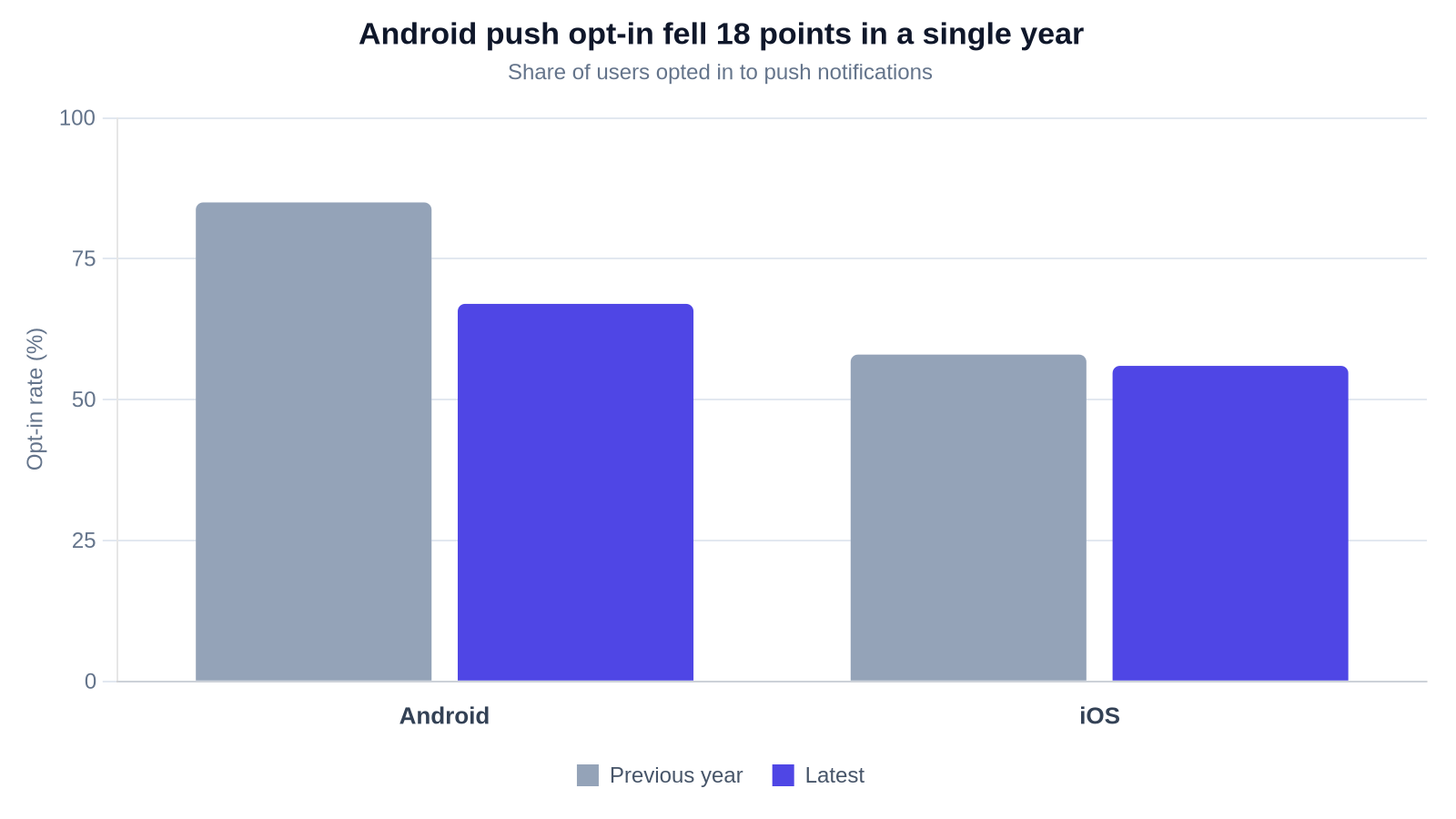
| Platform | Previous year | Latest |
|---|---|---|
| Android | 85% | 67% |
| iOS | 58% | 56% |
| Overall average | — | 61% |
On Batch's numbers, close to half of iOS app users are unreachable by push, and the people you lose are worth money. Airship's Mobile App Push Notification Benchmarks for 2025 draws on aggregate customer data from January to December 2024. It found that customers opted in to push make 13% more purchases than opted-out customers, rising to 39% at top-performing apps. A surface that reaches the opted-out anyway is worth something—but only to people who already have a reason to look. That is the same population a live notification is for, so the advantage does not widen the use case. It just makes the narrow one pay better.
The build is not symmetrical, and Android is the cheaper first platform
The brief version of this feature—"it works on iOS and Android"—hides a real asymmetry in what your engineers have to write.
Every SDK now ships two built-in templates, a multi-step tracker and a countdown timer. On Android, those templates are rendered by the SDK. Your developers call enableLiveNotificationTypes, optionally set an accent colour, a small icon and a logo, and the SEGMENTS and COUNTDOWN_TIMER types work. Rendering code is needed only if you define a custom type.
On iOS the templates ship as a separate package, but the surrounding work does not go away. You need a widget extension target, an ActivityAttributes model conforming to CIOActivityAttribute for push-to-start, SwiftUI views for both the Lock Screen and the Dynamic Island, and NSSupportsLiveActivities in the app's Info.plist. The iOS documentation puts the boundary bluntly: the SDK never renders the activity itself.
If you are piloting, pilot on Android with a built-in template. You will learn whether the use case holds for a fraction of the iOS cost, and the thing you learn transfers.
| SDK | Minimum SDK version | Minimum OS |
|---|---|---|
| iOS | 4.7.0 | iOS 16.2; push-to-start requires iOS 17.2 |
| Android | 4.20.0 | All SDK-supported versions; Android 16 adds the promoted "Live Updates" treatment |
| React Native | 6.6.1 | Same as iOS and Android |
| Flutter | 4.2.0 | Same as iOS and Android |
| Expo | 3.7.0 | Same as iOS and Android |
Minimum versions per the live notifications overview, 24 August 2026. Android 13 and above also needs POST_NOTIFICATIONS. The promoted Android 16 treatment needs the optional POST_PROMOTED_NOTIFICATIONS permission—without it, live notifications still render, just as ordinary ongoing notifications.
The test that qualifies a use case
Customer.io's own guidance is the best test anyone has published, and it is one sentence: "your customer can say exactly why they're seeing the notification." I ordered something. I follow this team. I joined the waitlist. The docs finish the thought—"if you'd have to explain why someone's getting it, it probably belongs in a different channel like push or email instead."
Add one requirement of my own and you have a working filter. The state has to actually move during the window the customer is watching. A status that changes twice over four days is a push. A status that changes five times over forty minutes is a live notification.
| Qualifies | Why | Fails | Why |
|---|---|---|---|
| Deliveries and orders | "Preparing your order" to "Out for delivery" to "Delivered"—the customer started it and is waiting | Promotions and sales | The customer did not ask; there is no state |
| Live scores for teams the user follows | Explicit opt-in, continuous change | Re-engagement and win-back | Nothing is progressing; the point is that nothing is |
| Trips and arrivals | A ride on the way, a flight counting down | Announcements and product news | One fact, delivered once—that is a push |
| Waitlists and queues | "You're fourth in line" to "Your table is ready" | Anything static | An unchanging live notification is a worse push |
| Countdowns the customer chose to track | Anticipation for a moment they opted into | Anything slower than the attention window | The customer will not be looking when it changes |
There is a hard guardrail in the docs too: don't put a promotion in a delivery tracker, and don't leave the tracker running after the order arrives. Both are the same mistake—treating an operational surface as a marketing one. Also note that notifications expire automatically after six hours, which quietly disqualifies multi-day shipping trackers whatever else you think of them.
The reason contextual beats promotional here is measurable elsewhere in the same Batch dataset. The open rate for contextual campaigns is 14.4%, against 4.19% for generic ones.
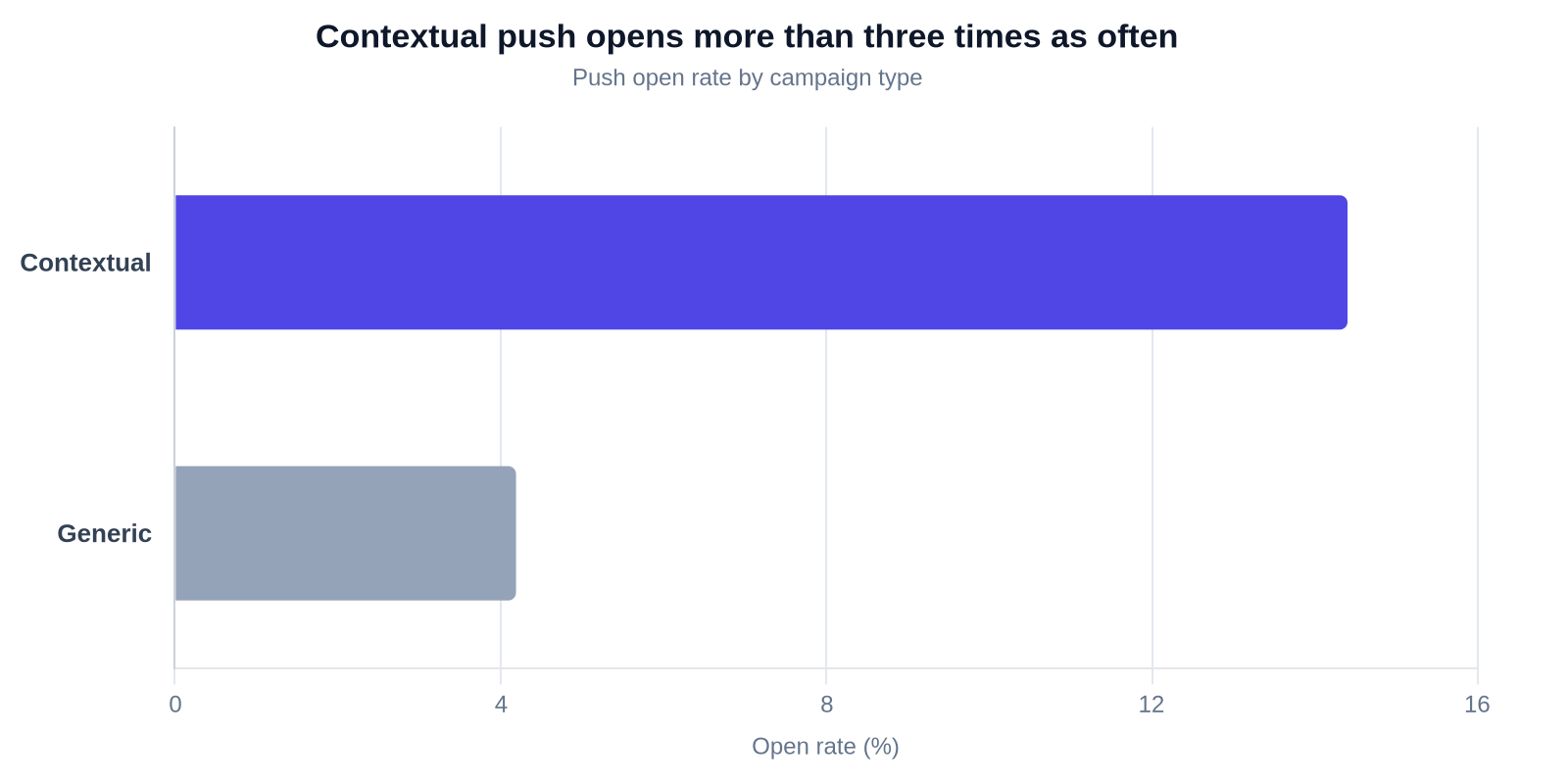
| Campaign type | Open rate |
|---|---|
| Contextual | 14.4% |
| Generic | 4.19% |
That gap is a fact about relevance, not about surfaces. It is why a real state machine earns a live notification—and equally why a well-triggered ordinary push beats a badly-reasoned live one. We saw the same effect building automation for Frive, the UK whole-foods nutrition company. Open rates went from 13.6% to 60.5% and clicks from 1.9% to 9.4%, on the strength of behavioural triggers rather than a new channel. Nothing about that programme needed an app.
What to build instead, which is what most of you should build
On 22 July 2026, two days before live notifications, Customer.io shipped something far less exciting and far more useful to most teams: a copy of a push, stored in the notification inbox. The release note names the problem exactly right—"push notifications are easy to miss: people dismiss them by accident, or don't have a device that can receive them."
The setting is called "Add to Notification Inbox", in the push's Settings panel. You need a published inbox, a standard rich push rather than a custom payload, and an automation or API-triggered broadcast. Nothing else: no app work, no plan upgrade, no engineering time. The inbox copy becomes its own delivery with its own metrics, and Customer.io sends it even when the push itself cannot be delivered.
That last clause is the one to sit with. The most common real complaint behind a live notifications request—"our messages disappear and people can't find them again"—is solved by a checkbox. We covered the dismissed-push problem when the inbox first shipped, and the inbox stopped needing a developer at all some time ago.
| Live notification | Push | Push with inbox copy | |
|---|---|---|---|
| Who operates it | Your backend engineers | Lifecycle team | Lifecycle team |
| Message editor | None | Yes | Yes |
| Automation step | None | Yes | Yes, a setting on the push |
| Message limits apply | No | Yes | Yes |
| Lifespan | Expires automatically after 6 hours | Until dismissed | Inbox copy expires 60 days after sending |
| Aggregate reporting | None published | Standard | Its own delivery, its own metrics |
| App work to ship | SDK plus rendering code | SDK | None beyond a published inbox |
| Plan required | Premium or Enterprise | — | — |
The same instinct applies one rung down. Before anyone builds a welcome modal, three in-app triggers already exist and cost nothing. The cheap thing first is not a compromise; it is how you find out whether the expensive thing was ever the answer.
Nobody has published adoption data, and that is part of the answer
Apple opened App Store submissions for iOS 16.1 on 18 October 2022, telling developers to "take advantage of Live Activities". Now try to find a credible, current number for how many people engage with them.
I looked, and came up empty. Apple's Live Activities guidelines and Google's Live Updates documentation are design and engineering references that publish no engagement data. Airship's 2026 benchmark sits behind a form. The most-cited consumer figures for Live Activities come from a survey run in 2023, old enough that quoting it in 2026 would be worse than saying nothing.
That absence is evidence. Push has benchmarks from Batch and Airship because thousands of companies run it at scale and vendors compete to publish the numbers. When a surface has been available since October 2022 and nobody has published an engagement benchmark, the likeliest explanation is concentration. Adoption sits in a handful of verticals—food delivery, ride-hailing, live sport—where the use case is obvious and the companies are large.
If you are not in one of those verticals, you would be building without a benchmark, without aggregate reporting, and without a way to prove it worked. Three absences is enough.
The three calls to make this quarter
Do you qualify? Premium or Enterprise; a native or supported cross-platform app; a recent enough SDK version; and a backend team that will own an update loop. Four conditions, all necessary. Most teams stop here.
Do you have the use case? A state your customer opted into by doing something, that moves several times inside the window they are paying attention, and that ends cleanly within six hours. If you cannot name the three to five states in the exact words the customer will read, you do not have it yet.
What do you build instead? Send the push, tick the inbox setting, and put the effort into the trigger rather than the surface. Contextual beats generic by more than three to one, and that gap is available to you today without shipping an app release.
If the answer to the first two is yes, the useful work in front of your lifecycle team is not a campaign. It is the mapping Customer.io's own docs ask for before developers start. What starts the notification. The three to five states it moves through, with the exact words the customer sees. What ends it, where a tap lands, and how a person opts in. That is a specification, and it is genuinely the marketer's job—the same job as deciding which tool belongs to which team rather than assuming a new feature belongs to yours. The same discipline applies to every mobile SDK capability that arrives looking like a channel, including location tracking in the mobile SDK: the capability is not the use case.
The Solari board never carried an advertisement because the people who built it understood what it was for. Everyone looked at it precisely because it only ever told them the truth about their train. Put a promotion on that board and you do not gain a channel—you lose the board.
If you want the build scoped honestly before it reaches a roadmap, that is the kind of work we do as a Customer.io agency. Tell us what you are trying to ship and we will tell you whether it needs an app release.
Frequently asked questions
Can a marketer trigger a Customer.io live notification without a developer?
No. Customer.io's documentation states there is "no message editor and no automation step" for live notifications. They are started, updated and ended by your own server calling the App API, so there is nothing for a marketer to configure, schedule or send. The marketer's role is specifying the notification types and their states before developers build them.
What is the difference between a live notification and a push notification in Customer.io?
A push is composed in Customer.io, sent once from an automation or broadcast, and counts towards message limits. A live notification is started by your backend through the App API, updated repeatedly while it sits on screen, and does not count towards message limits. Push announces something new; a live notification keeps someone current on something they already care about.
Do I need Premium for Customer.io live notifications?
Yes. The release note of 24 July 2026 states that live notifications are "available on Premium and Enterprise plans". Essentials and Builder accounts cannot use the feature regardless of engineering capacity.
Do live notifications work on both iOS and Android?
Yes, and also on React Native, Flutter and Expo. iOS needs SDK 4.7.0 and iOS 16.2, with iOS 17.2 required for push-to-start. Android needs SDK 4.20.0, with Android 16 adding the promoted "Live Updates" treatment. React Native needs 6.6.1, Flutter 4.2.0 and Expo 3.7.0.
Do frequency caps or message limits apply to live notifications?
No. Customer.io's documentation states that message limits cap messages sent from workflows. Live notifications are driven by your app and the API rather than a workflow, so they "never count toward a limit or get held back by one". This is deliberate: each update replaces the existing notification rather than creating a new one.
How long does a live notification stay on screen?
Until your server ends it, until the person dismisses it, or until it expires automatically after six hours. The six-hour ceiling is documented on the live notifications overview and rules out multi-day tracking use cases such as standard parcel shipping.
Can I see whether a live notification was delivered?
Partially. A person's profile has a Live notifications tab showing their last 30 days, with statuses of active, ended, expired or failed. You can also query a single notification's status by instance ID, or list deliveries via the Messages API. There is no public aggregate endpoint, reporting-webhook event or live-notification-specific CSV export, and iOS delivered metrics are not always reported because the SDK cannot confirm delivery while the app is suspended.
Do live notifications require push notification permission?
On iOS, no. Live Activities do not require push notification permissions, so they reach customers who denied push. On Android, standard notification permission is required, which means POST_NOTIFICATIONS on Android 13 and above.
Which platform should we build live notifications on first?
Android. The Android SDK renders its two built-in templates for you—a multi-step tracker and a countdown timer—so developers enable the type and optionally set branding. On iOS you need a widget extension target and your own SwiftUI views for the Lock Screen and Dynamic Island, because the iOS SDK never renders the activity itself.
What should I use instead of a live notification for a promotion?
A push notification, with a copy stored in the notification inbox. Customer.io shipped that on 22 July 2026 as a setting called "Add to Notification Inbox". It requires a published inbox, a standard rich push and an automation or API-triggered broadcast, and needs no app work. Putting a promotion inside a live notification is explicitly warned against in the documentation.
What do I need to give my developers before they can start?
Customer.io's documentation asks for five things per notification type. What starts it; the three to five states it moves through, with the exact words the customer sees; what ends it; where a tap lands as a deep link; and how users opt into it. It also asks you to separate the static facts, such as an order number, from the status that changes.
Is a live notification a transactional message?
Not technically, but the documentation recommends thinking about it that way. Each one is triggered by something the customer did, so it is expected—closer to a receipt than to a promotion—and it sits outside the frequency maths you apply to promotional messages.
Sources
- Live notifications overview, Customer.io Docs, updated 24 August 2026
- Live notifications: real-time updates without opening your app, Customer.io release notes, 24 July 2026
- Monitor live notifications, Customer.io Docs
- Live notifications, App API reference, Customer.io Docs
- Set up Live Activities (iOS), Customer.io Docs
- Set up Live Updates (Android), Customer.io Docs
- Store a copy of a push in your notification inbox, Customer.io release notes, 22 July 2026
- Send a push notification, Customer.io Docs
- Customer.io's Summer Release: Meet your customers where they are, Customer.io release notes, 30 July 2026
- The Great Push Notifications and Mobile Engagement Benchmark 2025, Batch
- Mobile App Push Notification Benchmarks for 2025, Airship
- Solari history, Solari di Udine
- Shannon Mattern, "Fifty Years of Flap Boards", Media of Communication
- Teleindicatori alfa-numerici per aeroporti, stazioni ferroviarie, ADI Design Museum, Compasso d'Oro 1962
- Split Flap Board Flight Information Display System, The Museum of Modern Art, object 500.2004
- App Store submissions now open for iOS 16.1 and iPadOS 16.1, Apple Developer news, 18 October 2022
- Live Activities, Apple Human Interface Guidelines
- Live updates, Android Developers
Want this working in your Customer.io workspace?
It's what we do all day for SMBs—strategy, automations, deliverability and hands-on execution.
See how we work as a Customer.io agency →

