
Customer.io LLM Actions Now Take a Shared Knowledge Library. It Can't Read Your Brand Guidelines PDF

The University of Chicago Press opened its doors in 1891 with its own composing room. Its typesetters were expected to set complex scientific material and to work in fonts as then-exotic as Hebrew and Ethiopic. Everyone was making their own calls. So, as the Press's own history records, "the staff of the composing room drew up a style sheet, which was then passed on to the rest of the university community". That sheet mattered enough that it was preserved in the cornerstone of the new Press building in 1903.
"That sheet grew into a pamphlet, and by 1906 the pamphlet had become a book." The book was Manual of Style: Being a compilation of the typographical rules in force at the University of Chicago Press—200 pages, 50 cents plus 6 cents for postage. The digitised first edition shows what went in: rules first, with specimens of the types in use relegated to an appendix.
Note the form the thing took. Not a portfolio of beautifully printed pages, not a sample book—rules, written as text, in a form a compositor could act on at the bench.
Which brings us to the thing every marketing team is about to get wrong.
TL;DR:
- Customer.io shipped reusable knowledge sources for LLM actions on 30 July 2026. Attach a file, a Google Drive doc, or a query over recent events, and save it to a workspace-scoped Knowledge Library. You then reference it by name in the prompt instead of pasting the same text into every prompt that needs it.
- The one file your team already owns is the one it cannot read. The docs are explicit: "The LLM action can't read PDFs, images, or .doc/.docx files." Files must also be "less than 5MB". Your brand guidelines PDF, your pitch deck and your Word doc are all rejected. Extract the rules as plain text.
- A shared source is production configuration, not a convenience. Customer.io documents that "after you replace a file, your LLM actions that use the knowledge source start pulling from the new upload". The docs never say when an edit to a linked Google Drive doc lands. Assume immediately, and decide who holds edit access before you attach it.
- Context is priced per profile, not per library. Credit consumption "depends on the model you select, the size of the prompt, and the amount of context sent with the request". Credits are spent every time a profile reaches the action and every time you click Preview response.
- Only 44% of organisations have a measurement framework for generative AI, 31% for agentic AI, and 47% have neither or don't know, per Adobe's 2026 research. A shared, mutable context store is exactly the object that needs one.
You have the same three paragraphs in nine prompts
Here is what a mature Customer.io workspace running LLM actions actually looks like six months in. There are nine or ten actions live. Seven of them open with the same block of brand voice rules. Five repeat the product description. Three carry a do-not-say list that someone assembled after a legal review and pasted around by hand.
Then someone tightens the voice rules in one action and not the other six. Now your win-back email and your onboarding email are being written to different standards, and nobody can tell you which is current without opening all nine.
Customer.io fixed the mechanical half of this on 30 July 2026. The release note names the problem it solves. You can now attach "a file, a Google Drive doc, or query recent events as a knowledge source", and reuse it "across LLM actions, instead of pasting the same text into every prompt".
The mechanical half is easy. The half nobody is writing about is that you have just created shared mutable state inside live automations, and shared mutable state is a governance object.
What a knowledge source actually is
A knowledge source is a named piece of reference material attached to an LLM action's prompt, saved once and reusable across actions. It is not memory and it is not fine-tuning. It is context, sent to the model with every request. The model holds nothing between calls, so whatever you attach is the whole of what it knows beyond the prompt itself.
The LLM actions documentation gives you three types:
| Source type | What you attach | What it's for |
|---|---|---|
| File upload | A text-based file under 5MB | Rules and reference material you want frozen at a known version |
| Google Drive | A connected account and "a text-based file, like a Google Doc or Sheet" | Material a team edits regularly and wants live |
| Recent events | An event query—you pick the event, add property filters, and set the recency window, limit and ordering | Behavioural context on the individual profile, without hand-building a summary |
You add one from an LLM action, save it, and then "reference the name of the knowledge source in your prompt" along with instructions for how the model should use it. Save it to the Knowledge Library—"a workspace-scoped collection of reusable sources"—and it appears in an Add from library picker on every other action. Customer.io's framing is that you "set up context once and drop it into any LLM action instead of recreating it each time".
Two details from that page do more work than they look like they do.
First, the same sources are available to the Agent, so "you can use them as context in other requests". Whatever you write here is not scoped to the automation you wrote it for.
Second, the whole feature sits behind a Beta notice. As of the docs page's 19 August 2026 revision, LLM actions carry the line "This feature is new and we're actively working on it" directly under the title. Build on it, but expect the surface to move—which is another argument for keeping your sources short and legible rather than sprawling.
That "Recent events" type is also quietly the most interesting of the three, because it unlocks data an LLM action otherwise cannot see. The docs' own capability table lists "Events unrelated to the automation trigger" as something you can reach, per the documentation, only "through knowledge sources when setting up an LLM action". Objects and relationships get no such escape hatch: an action "can only process objects or relationships that triggered the automation".
The file constraint that will catch you first
The action cannot read your brand guidelines. The documentation states it in one line: "The LLM action can't read PDFs, images, or .doc/.docx files." There is a size ceiling too—"the file must be less than 5MB"—but the size limit is not what will stop you. The file types are.
| What your team already has | Will it work? | What to do |
|---|---|---|
| Brand guidelines PDF | No—PDFs aren't readable | Extract the voice rules and the banned-words list into a plain text or Google Doc source |
| Pitch deck (.pptx, or exported PDF) | No | Pull out the product and pricing facts as a short text source |
| Tone of voice doc (.docx) | No | Save it as a Google Doc or paste it into a text file |
| Google Doc or Google Sheet | Yes, via the Google Drive source type | Connect the account and pick the file |
| Text file under 5MB | Yes, via File upload | Upload it |
| A screenshot of the brand guidelines | No—images aren't readable | Retype the rules |
| A link to your brand page | No—"the LLM can't crawl any sites" | Copy the relevant text in |
There is a reason to be glad about this. A 40-page brand guidelines PDF is 90% typography, logo clear-space and photography direction, none of which an LLM writing a subject line can act on. The useful part is perhaps 300 words: how we sound, what we never say, how we refer to the product. That is the style sheet, not the sample book.
So write the 300 words. Then keep writing them shorter, because every word in that source is read on every profile that reaches the action.
A Google Drive source is a live dependency
This is the section that will save someone a bad Monday.
The documented behaviour for file uploads is unambiguous: "After you replace a file, your LLM actions that use the knowledge source start pulling from the new upload." Replace the file, and every action attached to it changes what it tells the model. No deploy, no version number, no review step.
What the documentation does not say is when an edit inside a linked Google Doc propagates. There is no stated refresh interval, no "re-read on every run" guarantee, and no cache window on the page. Customer.io's own pitch for the Knowledge Library is that "every LLM action can reference the same, up-to-date material", which points strongly at live reads, but "points strongly at" is not a documented contract.
Treat that ambiguity as the finding, not as a gap to fill with optimism. Two rules follow.
Assume a Drive edit lands immediately. If you cannot prove from the docs that there is a delay, plan as though there is none. Anyone with edit access to that document can change what your live automations tell the model, at any time, without touching Customer.io.
Pick your source type by whether you want the content frozen. Use File upload for anything you want pinned to a reviewed version—a legal do-not-say list, a compliance line. Use Google Drive where live editing is the point, and only where you trust the edit list.
This is the same problem the blog has raised for the Agent and never for workflow actions. We argued for locking five things before you let the AI Agent loose, and for treating MCP write access as a change-management question with audit logs. A shared knowledge source is the same class of object with a friendlier interface: a Google Doc is a much softer target than an API token, and it now steers production copy.
The industry is not, on the whole, ready for this.
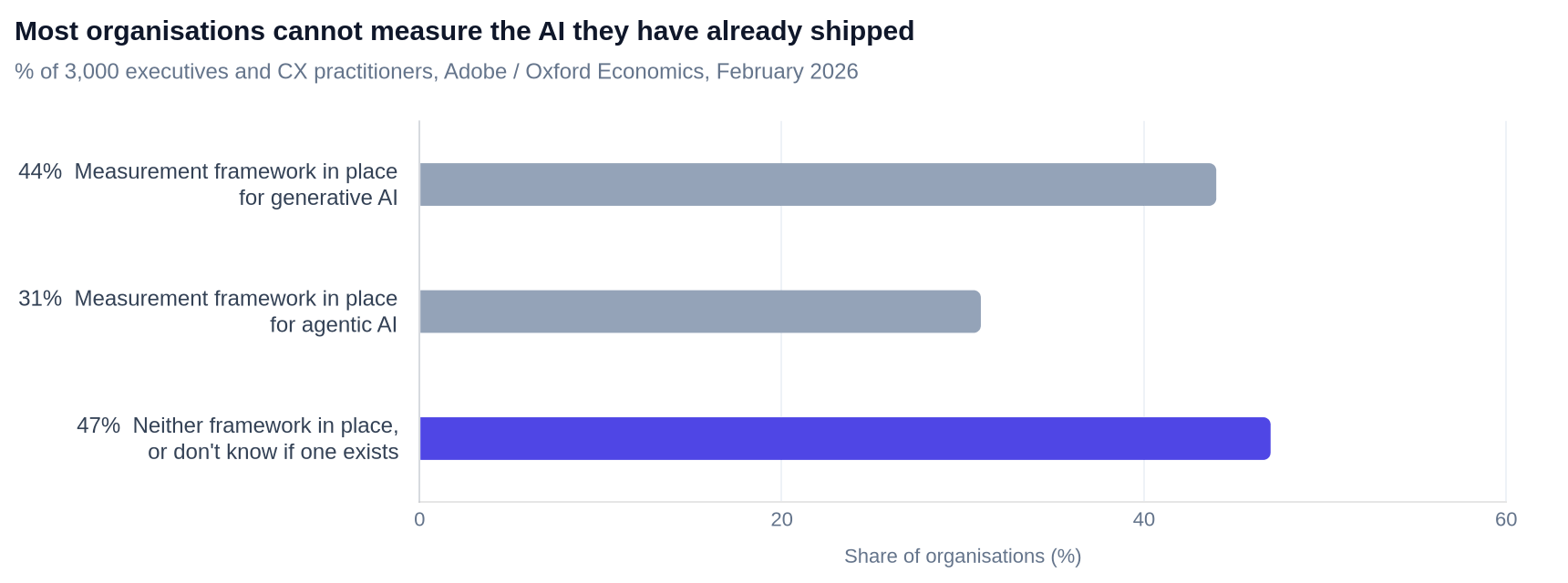
| Measurement framework for… | Share of organisations |
|---|---|
| Generative AI—framework implemented | 44% |
| Agentic AI—framework implemented | 31% |
| Neither in place, or unsure whether one exists | 47% |
Adobe's figures come from surveys of 3,000 executives and CX practitioners plus 4,000 customers, fielded online and by telephone from October to November 2025. The same research found that "only a minority—between roughly one-fifth and one-third—say generative AI is integrated across multiple functions", so most teams are still in pilots. Knowledge sources arrive at precisely the moment when pilots start becoming production, and 47% of organisations either have no measurement framework or cannot say whether they have one. Either way, nobody notices when a shared source starts producing worse copy.
What this does to your credit bill
A knowledge source is not a new line item. It is a bigger input, charged on every run.
The AI credits page settles the categorical question first: "Only LLM actions consume AI credits in your account. Other AI features—including the Agent, segment builder, content analysis, and in-app message suggestions—don't use AI credits." So attaching a source to a Library costs nothing. Attaching it to an action does, every time the action fires.
Consumption "varies based on three factors: The model you choose, The size of the input (your prompt), The output (the model's response)". The LLM actions page says the same thing with the relevant word in it: credits depend on "the amount of context sent with the request". It also spells out when the meter runs—"when a profile reaches the action in an automation and when you use Preview response to test it". A separate callout puts it flatly: "Testing your prompt costs AI credits."
That last point catches people during the build. You will iterate on a prompt twenty times. Each Preview response is a paid model call, at whatever size your attached context now is.
Then there is the model multiplier, which dominates everything else. Customer.io publishes relative burn rates against Gemini 2.5 Flash Lite as the 1x baseline:
| Model | Credit burn, relative to Gemini 2.5 Flash Lite |
|---|---|
| Google Gemini 2.5 Flash Lite | 1x |
| Google Gemini 3 Flash Lite | ~2.5x |
| Google Gemini 2.5 Flash | ~3x |
| Google Gemini 3 Flash | ~5x |
| Anthropic Claude Haiku 4.5 | ~10x |
| Google Gemini 2.5 Pro | ~12.5x |
| Google Gemini 3 Pro | ~20x |
| Anthropic Claude Sonnet 4.6 | ~30x |
| Anthropic Claude Opus 4.6 | ~50x |
| Anthropic Claude Opus 4.7 | ~50x |
A 2,000-word shared context on Claude Opus is a different financial object from the same context on Flash Lite, by a factor of about fifty. Additional credits cost $10 per 100,000, and purchased credits do not expire, whereas the introductory credits expire after 90 days.
Don't model this—measure it. Customer.io shows you a "token count per source against a per-action budget, so you can see how much context you're spending before you run the action". So the method is:
- Read the token count the UI gives you for the source you are about to attach.
- Count how many profiles reach that action in a typical month. That number, not your library size, is the multiplier that matters.
- Run Preview response on a representative profile and watch the credit usage monitor move.
- Multiply by step 2, compare against $10 per 100,000 credits, and decide whether the extra 400 words of brand voice are worth it.
We covered the underlying arithmetic in our credits-first playbook for LLM actions and forecast what happens when the introductory credits run out. Knowledge sources change one variable in that model: the size of the input, on every single call.
One more thing worth knowing before you go live: "when your account runs out of AI credits, LLM actions use their configured fallback values instead of calling the model". Your automation does not stop. It quietly stops being intelligent. Set fallbacks that are safe to send.
The three knowledge sources to write first
Same shape as the three custom skills we told you to write for the Agent, and for the same reason: a small number of well-scoped artefacts beats a library nobody maintains.
1. Brand voice and banned words. Six to ten voice rules, then a hard list of words and claims you never make. Keep it prescriptive: "never say 'guaranteed'" beats "aim for an energetic tone". Leave out logo usage, colour palettes, typography and anything an LLM writing copy cannot act on. This is the one to freeze as a File upload if legal has signed off the banned list.
2. Product and pricing facts. The five to fifteen facts the model keeps getting wrong—plan names, what each tier includes, the trial length, the integrations you do and do not have. Models invent plausible product details, and a short factual source is the cheapest correction available. Include an explicit instruction: if a fact is not in this source, do not state it.
3. A recent-events query on the profile's own behaviour. This is the one people will skip, and it is the one that changes output quality most. Instead of hand-building a summary in Liquid, Customer.io's templating language, query the events directly—pick the event, filter on properties, set the recency window and limit. It gives the model the last few things this person actually did.
There is a fourth artefact worth mentioning, which is not a knowledge source: the naming schema and event data plan that make the third source possible. When we migrated AIRE Health off an internal custom email system, the data plan and naming schema were the deliverable that made everything after it work. Campaign conversion went from 7.0% to 17.8%, a 154% increase. A recent-events knowledge source is only as good as your event names.
A governance checklist for a shared library
Run this before you attach anything to a live automation. It takes twenty minutes and it is the difference between configuration and drift.
- Name every source so its blast radius is obvious. "Brand voice—LIVE, used by 6 automations" is a better Google Doc title than "Brand voice v3". The person about to edit it needs to know.
- Decide the edit list per source, not per library. The Knowledge Library is workspace-scoped, so assume anyone who can build an LLM action can reach every source in it. The tighter control is on the Drive document itself.
- Freeze what legal signed off. Compliance-sensitive content goes in as a File upload, not a live Drive link. Customer.io's own guidance is blunt on the wider point: "Don't communicate sensitive information or updates with LLM actions."
- Write down which actions depend on which source. There is no dependency view documented. Keep the list yourself, in the same place you keep your campaign inventory, and update it when you attach a source.
- Check the token count before and after. It is displayed per source against a per-action budget. Record the before figure so you can price a change later.
- Re-run Preview response on three real profiles after any source change—a high-engagement one, a dormant one, and one with sparse data. Sparse profiles are where a fat shared context does the most damage, because the model fills the gap.
- Diarise a quarterly read of every source. Reference material rots. A pricing source with last year's plan names is worse than no source.
If your team is new to LLM actions and this list reads as a lot, that is a signal about sequencing rather than about the feature. Our guide to which Customer.io Routines to turn on and which to leave paused makes the same argument: enable the narrow things first. If you'd rather build the habit with someone alongside you, that is what our Customer.io and email marketing training is for.
One vocabulary note while you are in the docs: Customer.io now says "automations" where it used to say "campaigns", and "profiles" where it said "people". We covered what the rename changes and what it doesn't—your API payloads are unaffected, your playbooks need editing.
When not to use a knowledge source
Three cases where pasting the text into the prompt is still the right answer.
The context is used by exactly one action and nobody else will edit it. A shared object adds coordination cost. One action, one owner, no reuse—leave it in the prompt.
The content is short and stable. Three lines of tone guidance that haven't changed in a year do not need a library entry. The Library earns its keep on material that is either long or frequently edited.
You cannot yet name who owns the content. An unowned shared source is worse than duplication, because duplication is at least visible in each prompt. If nobody owns the brand voice document, fix that first, then attach it.
And a fourth, which is about a different feature entirely. If what you are encoding is a process—the steps a task should follow, the order of operations, the checks—that is a custom skill for the Agent, not a knowledge source. Knowledge is reference material the model reads. A skill is a procedure it follows.
Frequently asked questions
Can a Customer.io LLM action read a PDF?
No. The Customer.io documentation states that "the LLM action can't read PDFs, images, or .doc/.docx files". This rules out the brand guidelines PDF, an exported pitch deck and a Word document—the three artefacts most marketing teams reach for first. Extract the rules as plain text or a Google Doc instead.
What file size and file types can I upload as a knowledge source?
The docs say "the file must be less than 5MB", and the readable formats are text-based files. For the Google Drive source type, Customer.io tells you to "connect your account and choose a text-based file, like a Google Doc or Sheet". PDFs, images and .doc/.docx files are excluded regardless of size.
How many knowledge sources can one LLM action use?
Customer.io does not publish a maximum count. It publishes a budget on volume instead. "As you add sources, Customer.io surfaces a token count per source against a per-action budget, so you can see how much context you're spending before you run the action." Watch the token count in the UI rather than counting sources.
Do knowledge sources consume extra AI credits?
Not as a separate charge, but yes on every run. The AI credits page says consumption "varies based on three factors: The model you choose, The size of the input (your prompt), The output (the model's response)". The LLM actions page confirms that credits depend on "the amount of context sent with the request". A knowledge source is part of that input, so the cost lands once per profile reaching the action, in proportion to how much you attached.
Does previewing an LLM action cost AI credits?
Yes. Credits are spent "when a profile reaches the action in an automation and when you use Preview response to test it". A callout on the same page says plainly that "testing your prompt costs AI credits". Budget for the build iterations, not just the live sends.
If someone edits the Google Drive doc, does my running automation change?
Assume yes and govern accordingly. Customer.io documents propagation for uploaded files: "after you replace a file, your LLM actions that use the knowledge source start pulling from the new upload". It describes the Library as the way "every LLM action can reference the same, up-to-date material". It does not publish a refresh interval for Google Drive sources, so the safe operating assumption is that an edit reaches production immediately, with no deploy step and no review.
Where do knowledge sources live, and can other workspaces see them?
They live in the Knowledge Library, which Customer.io describes as "a workspace-scoped collection of reusable sources". Scoped to the workspace means every LLM action in that workspace can pull from it via the Add from library picker, and workspaces do not share libraries. If you run separate production and staging workspaces, you will be maintaining the source twice.
Can the Customer.io Agent use the same knowledge sources as my LLM actions?
Yes. The docs state that "knowledge sources are available to the Agent, so you can use them as context in other requests". Write your sources knowing they may be read outside the automation you built them for. Note the billing asymmetry too: only LLM actions consume AI credits, and the Agent does not.
What is the difference between a knowledge source and just writing a longer prompt?
Maintenance, not capability. Both end up as context in the same request, so the token cost is comparable. The difference is that a knowledge source is defined once and referenced by name from many actions, so a correction lands everywhere at once instead of in the prompt you remembered to open.
Should brand guidelines be a knowledge source or a custom skill?
A knowledge source. Ask whether the artefact is something to consult or something to carry out: voice rules and a banned-words list are reference material, so they belong in a source. "Draft the email, check it against the voice rules, then check the send window" is a procedure.
Can an LLM action read a web page or a URL instead?
No. The capability table on the LLM actions page is explicit that websites, articles and other online content cannot be processed: "N/A, the LLM can't crawl any sites". Media files like images and videos are out too. If the content lives on a web page, copy the relevant text into a source.
What happens to my LLM actions when the AI credits run out?
They stop calling the model and fall back. Customer.io states that "when your account runs out of AI credits, LLM actions use their configured fallback values instead of calling the model". The automation keeps running, so your fallback values are live copy—write them as though they will be sent, because they will. Note also that AI credits "are not available to customers on Trial plans".
Is this feature finished?
Not per the documentation. As of its 19 August 2026 revision, the LLM actions page carries a Beta notice: "This feature is new and we're actively working on it." That is a reason to keep sources small and documented, and to re-read the page before making a change you cannot easily undo.
Knowledge sources are the right feature. They will also be the first place a shared, editable document quietly starts steering what you send. Write the rules, not the sample book—then decide who is allowed to change them.
If you want a second pair of eyes on a Customer.io workspace before you wire AI into live automations, get in touch.
Sources
- LLM actions: generate data & decisions with AI. Customer.io Docs, updated 19 August 2026. The canonical page for knowledge sources, the 5MB and file-type constraints, the per-action token budget, the capability table and the Beta notice.
- Add reusable knowledge sources to LLM actions. Customer.io release notes, 30 July 2026. The ship date and the workspace-scoped Knowledge Library.
- AI credits. Customer.io Docs, updated 17 August 2026. Which features consume credits, the three factors that determine consumption, the per-model burn rates, pricing at $10 per 100,000 credits, and fallback behaviour when credits run out.
- Adobe 2026 AI and Digital Trends Report. Adobe, research by Oxford Economics, 19 February 2026. Surveys of 3,000 executives and CX practitioners plus 4,000 customers, fielded online and by CATI from October to November 2025. Source of the 44% / 31% / 47% measurement-framework figures and the pilots-versus-production ranges.
- About the Chicago Manual of Style. University of Chicago Press. The 1891 opening, the composing-room style sheet, the 1903 cornerstone, and the 1906 first edition at 200 pages and 50 cents.
- Manual of style, being a compilation of the typographical rules in force at the University of Chicago Press. University of Chicago Press, 1906, digitised at the Internet Archive. Confirms the title, publisher and year of the first edition.
Want this working in your Customer.io workspace?
It's what we do all day for SMBs—strategy, automations, deliverability and hands-on execution.
See how we work as a Customer.io agency →

