
Customer.io webhook integration: one reusable configuration per destination, not a copy in every automation

The first copy of a webhook works. Someone builds an onboarding automation, drags in a Send and receive data action, pastes the CRM's URL and a bearer token into it, and it posts a lead. The second copy works too: a win-back automation needs the same CRM, so the same URL and token get pasted again.
The third copy is the one that breaks. Not on the day it is built, but on the day the token is rotated. Three automations now hold three pasted copies of a credential that no longer exists. Whoever rotated it fixes the two they remember. The third returns 401 to an empty room until a lead goes missing.
That failure comes from where the configuration lives, not from the destination. Since 14 January 2026 Customer.io has given it a better home, and this post is about using it properly.
TL;DR: Build one reusable webhook configuration per destination, in Workspace Settings > Webhook configuration, and let every automation reference it. The configuration holds the method, the endpoint URL and the headers, including auth, and changes take effect immediately across every automation that uses it. The request body and the response mapping stay in each automation's action, because they describe what that automation wants, not what the destination is. Store the response in journey attributes, which expire when the journey ends, and promote a value to a customer attribute only when something outside the automation needs it. Throttle with a per-automation rate limit of 1 to 60,000 requests a minute, or a Random Delay block, because there is no global limit. And check the tool first: a webhook action retries for about an hour, a Data Pipelines destination for about three hours, a reporting webhook for 7 days.
What a reusable configuration holds
Customer.io's reusable webhooks page puts the pitch in one line: "Define your webhook URL, headers, and auth details once, and reference them in any automation." The release note of 14 January 2026 adds the security angle. Team members can pick a configured webhook "without exposing API credentials to your whole team" (release note, 14 January 2026).
What goes in, from the same page: a Name, an optional Description, a Method and an Endpoint URL, then any Headers you need, with a Test Webhook before you save. That is the whole object. Once it is in an automation, the page says, that is where you will "specify the Body or store data on attributes for use later on".
The split is the whole design, so here it is written down.
| In the configuration, once per destination | In the automation's action, once per use |
|---|---|
| Method: GET, POST, PUT, DELETE or PATCH | Request body, JSON or form-encoded, with Liquid |
Endpoint URL, with basic auth as https://user:[email protected] where needed |
Response mapping to journey or customer attributes |
Headers, including Authorization and Content-Type |
Sending behaviour: Draft by default, or Send automatically |
| A name and description other team members see | Conversion tracking, rate limit, Wait before continuing journey |
Headers accept Liquid in both the name and the value, with the same data as the request body, plus message and campaign when fired from an automation or broadcast. The docs' own example is two correlation headers:
X-CIO-Message-Id: {{message.id}}
X-CIO-Campaign-Id: {{campaign.id}}
Put those in the configuration, not the action, and every caller identifies itself to the receiving system without anyone remembering the header.
What it cannot hold, and who can make one
Three constraints from the same page decide the rollout.
It cannot hold a body. Two automations that send different payloads to one endpoint share the configuration and write their own bodies.
It cannot be edited quietly. Changes "take effect immediately across your automations and broadcasts", so test before you save. A configuration cannot be deleted while any automation or broadcast still uses it.
Not everyone can create one. Account admins and Workspace managers create and choose configurations; Authors can only select one. The docs are explicit: "Currently, team members with custom roles cannot create or configure reusable webhooks." If your builders run on custom roles, the integration owner needs a standard admin role for this job. The execute permission is the other place roles bite.
One per destination, and what a destination is
The rule is one configuration per destination. The useful question is what counts as one, and the answer differs by tool.
Slack. An incoming webhook gives you a URL shaped like https://hooks.slack.com/services/T00000000/B00000000/XXXXXXXXXXXXXXXXXXXXXXXX. Slack's developer docs say it is "specific to a single user and a single channel" (Slack developer docs). The same page warns that "Your webhook URL contains a secret." So for Slack the destination is the channel: one configuration for #sales-alerts, one for #support-alerts, each named for its channel in the description. The URL is the credential, which is the value a reusable configuration exists to hide.
A CRM. The destination is the API host plus the credential: one for HubSpot, one for Salesforce, one for Close. Check first whether the native sync already does the job: the HubSpot integration and the Salesforce sync move records without a webhook. A webhook action is for what the sync does not do: open a task, add a note, update one field the moment a person reaches a step.
A data warehouse or analytics tool. Usually not a webhook action at all. Customer.io's data-out integrations cover "analytics platforms, CRMs, support tools, advertising platforms, messaging platforms, and more" (data-out overview). If the request is send this event to the warehouse, the answer is a destination, not a webhook step. The three routes are compared below.
The automation is the caller, not the owner
Once the configuration exists, every automation that uses the destination does four things and nothing else.
1. Select the configuration. Drag a Send and receive data action in, click Edit Request, and pick the configuration from the dropdown (reusable webhooks).
2. Write the body this automation needs. The body says what the automation wants: a lead with these fields, a Slack message with this text. Liquid works inside it, and Content-Type: application/json is pre-filled. Keep it small and specific to the step; the json filter and the other payload traps are in the webhooks troubleshooting post.
3. Map the response to journey attributes. On the Response tab, reference the reply with the response key and dot notation. The docs' example is a reply with a weather key, stored as response.weather; arrays use bracket notation, with [0] as the first element (webhook actions). The docs' rule for which type to use is two lines: customer attributes if you want the data outside the automation, journey attributes if you do not. Journey attributes shipped on 22 December 2025 so that webhook data no longer sat on the person, where it "could clutter up your workspace" (release note). The limits are 100 per journey, a 128-byte name and a 100 KiB value. "After the journey ends, we automatically delete the journey attribute data."
4. Branch on what came back. A journey attribute works in any condition in the workflow. A multi-split branch can route people on the value the API returned, and a message can read it as {{journey.<attribute_name>}} (set journey attributes). That is what makes the webhook a step in a journey rather than fire-and-forget.
A worked example for a CRM that returns a lead score, constructed to show the shape, with illustrative field names.
| Step | Where it lives | What it holds |
|---|---|---|
| Configuration named CRM (production) | Workspace Settings | POST, the CRM's leads endpoint, Authorization: Bearer ..., X-CIO-Campaign-Id: {{campaign.id}} |
| Body | The onboarding automation's action | email from customer.email through the json filter, plus a static source of onboarding |
| Response | The same action | journey attribute lead_score from response.score |
| Branch | The next block | lead_score over a threshold goes to the sales-handoff path |
The win-back automation calls the same configuration with a different body and a different branch. If the CRM moves to a new host, one edit in Workspace Settings fixes both.
When the response does not arrive
When an action sets attributes, the person waits at that step until the update finishes or every retry fails. If all retries fail, the update "will not execute, and the person will move to the next step of the workflow" (webhook actions). So the journey attribute can be missing, and a message referencing a journey attribute Customer.io cannot retrieve will fail to send (set journey attributes). Give the branch a path for the missing case, or put a default filter in the message.
Better still, set the default first. Since 2 March 2026 a Set journey attributes action can set a value directly, from profile data, trigger data, Liquid or JavaScript (release note). The branch after the webhook then always has something to read. Our journey attributes post covers the Liquid side, including the {% render_liquid %} wrapper for stored values that contain Liquid.
Throttling: rate limit, random delay, or both
Customer.io sends webhooks "as fast as possible", with no guaranteed rate, and they "may be delivered in bursts" (webhook actions). A segment-triggered automation that matches thousands of people hits a rate-limited API all at once. Two controls do different jobs.
The automation rate limit. On the webhook channel of any automation you can set 1 to 60,000 requests per minute. Every webhook action in that automation shares it, and requests over the limit queue and drain at that rate. You set it per automation, because, in the docs' words, "There's no global rate limit." People carry on while their request waits, unless you turn on Wait before continuing journey; turn it on whenever a later step reads the response. What a rate limit does further down the workflow is in automation rate limits and skipped messages.
The Random Delay block. Since 5 December 2025 you can hold people for a random time between a minimum and a maximum, on a flat distribution (release note). The docs page says plainly: "This can help you avoid overloading rate-limited API endpoints with webhook requests." (random delay). You can change the bounds while the automation is live.
The boundary between them: a limit is a promise about rate, a random delay is a promise about spread. If the destination publishes a limit, set the automation rate limit at or under it. If the trigger is a bulk segment refresh, add a random delay too, so it does not land as a wall at the top of the first minute. If you forget both, Customer.io reads the 429 responses (too many requests) and works out a rate from the previous 10 minutes. That is a safety net, not a design.
For Slack, Customer.io's own destination page states that "Slack limits incoming webhooks to roughly 1 message per second per webhook URL." (Slack destination). An automation posting to a channel at scale needs a limit of 60 a minute or lower.
Which tool: webhook action, reporting webhook or Data Pipelines
A reusable configuration is only the answer when a webhook action is the right tool. Three outbound routes exist, and they differ on who writes the payload, what triggers them, and how long Customer.io keeps trying.
| Webhook action | Reporting webhook | Data Pipelines destination | |
|---|---|---|---|
| Triggered by | One person reaching a step | Any message event in the workspace | Source calls: identify, track and so on |
| Payload | Yours, in the action body | Customer.io's event JSON | Mapped through the destination's actions |
| Scope | That automation | Workspace-wide; cannot be limited to one automation | The sources you connect |
| Timeout | 16 seconds | 4 seconds | Not stated on the overview page |
| Retries | Up to 11 over approximately 1 hour | Exponential backoff over 7 days | Up to 14, maximum window about three hours |
| Rate control | Per-automation limit, random delay | None you set; batches of roughly 40 per workspace | Not stated on the overview page |
| Credentials held | In a reusable configuration | On the reporting webhook | In the destination's settings |
Sources: webhook actions, reporting webhooks, data-out overview.
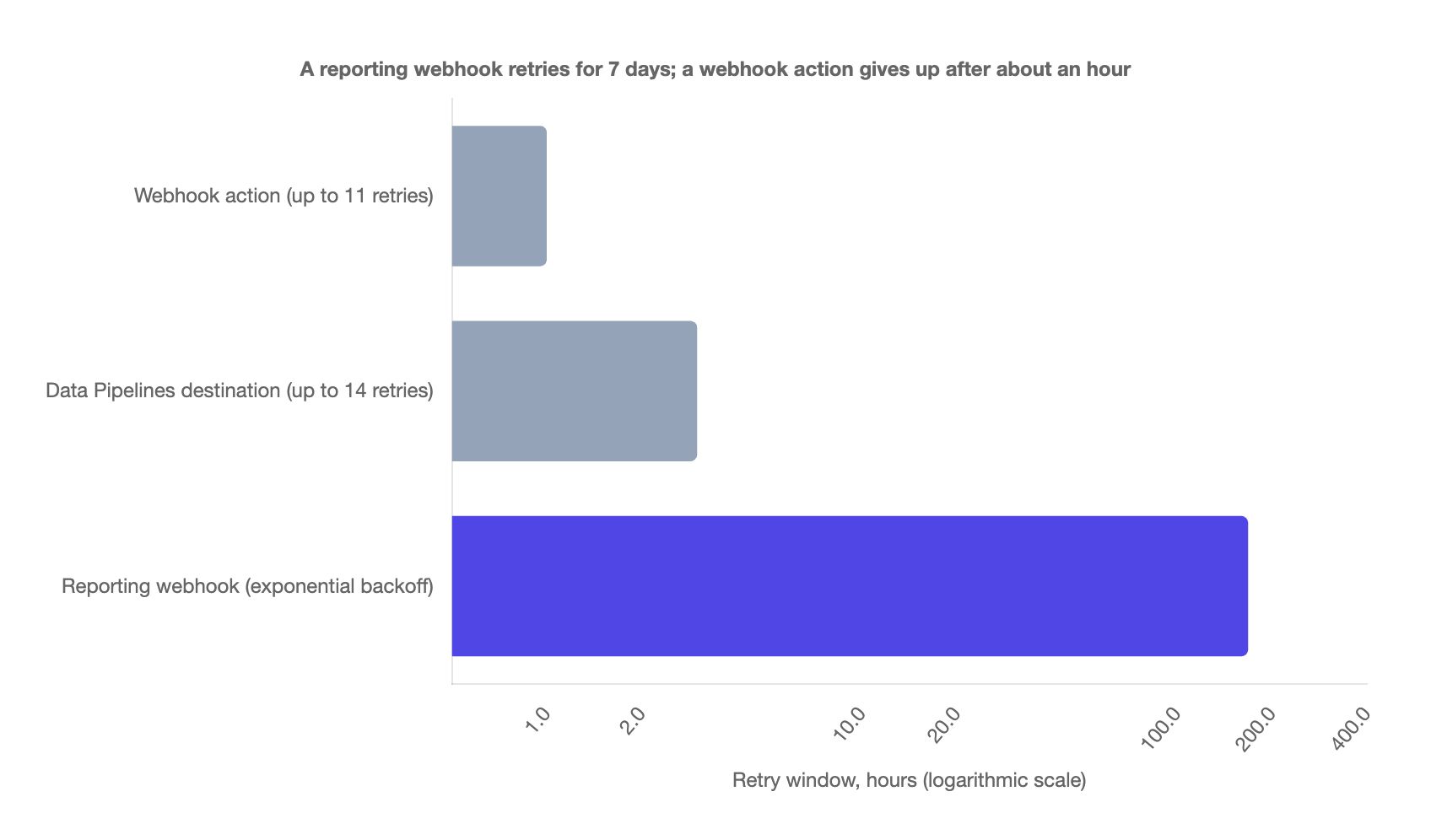
| Route | Retry window | Retries |
|---|---|---|
| Webhook action | approximately 1 hour | up to 11 |
| Data Pipelines destination | about three hours | up to 14 |
| Reporting webhook | 7 days (168 hours) | exponential backoff |
The 168 is arithmetic, 7 days times 24; the other two are the docs' figures. An afternoon's outage at the receiving end is survivable for a reporting webhook and fatal for a webhook action.
The decision, in three lines:
- When this person reaches this step, tell that system and use the reply. Webhook action, with a reusable configuration.
- Tell that system about every send, open, click and bounce. Reporting webhook: you do not write the payload and cannot scope it to one automation. Webhook actions versus reporting webhooks is the long version.
- Send our events and traits to the warehouse, the ad network, the analytics tool. A Data Pipelines destination. Data Pipelines versus Segment covers when that layer earns its place, and the integration guide sets all three beside reverse ETL and the APIs.
When not to do this
Reusable configurations are the default, not a law. Four cases where I would not reach for one.
One automation, one destination, no shared credential. A test webhook to a capture URL, or a one-off broadcast to an endpoint nothing else will call, gains nothing from a configuration. Paste it, and move it the day a second automation needs it.
The credential differs per person. A configuration holds one set of headers. A per-customer token has to be Liquid in the action, read from an attribute, which puts a secret on the profile: a data plan question before it is a webhook question.
A native integration already covers the job. A HubSpot or Salesforce sync, a Data Pipelines destination, a reporting webhook. A webhook action built to replace any of them is more maintenance with a shorter retry window.
Nobody with an admin role owns integrations. Custom roles cannot create configurations, so a workspace built on them ends up with configurations made once by whoever had admin that week and never updated. Decide who owns Workspace Settings first. When that is us, it is part of the Customer.io agency work, and each configuration is named in the client's data plan.
Rolling it out in an existing workspace
- List the destinations, not the webhooks. Open every automation with a Send and receive data action and note the host and credential each uses.
- Create one configuration per destination, with the correlation headers, and use Test Webhook before saving.
- Switch each action to the configuration, delete the pasted headers, and send a test with test data only, as the docs advise (webhook actions).
- Move response mappings to journey attributes where the value is only used inside the automation.
- Set the rate limit on each automation that calls a limited API, with a random delay where the trigger is a bulk segment refresh.
- Rotate the credential on purpose, and watch one edit fix every automation. That is the test nobody ran when the copies were pasted.
If you have inherited a workspace with webhooks pasted into a dozen automations and want it untangled before the next key rotation, tell us what the destinations are.
Frequently asked questions
What does a reusable webhook configuration in Customer.io contain?
A reusable webhook configuration holds a name, an optional description, the HTTP method, the endpoint URL and the headers, including auth (reusable webhooks). The body and the response mapping live in each automation's webhook action.
Can a reusable webhook configuration include the request body?
No, the body is written in each automation's Send and receive data action after you select the configuration (reusable webhooks). Two automations can share one configuration and send different payloads.
Who can create reusable webhook configurations in Customer.io?
Account admins and Workspace managers can create and choose configurations, and Authors can only select one (reusable webhooks). Team members with custom roles currently cannot create or configure them.
What happens to other automations when I edit a reusable webhook configuration?
Changes take effect immediately across every automation and broadcast that references the configuration (reusable webhooks). Test before you save.
Should I store a Customer.io webhook response as a journey attribute or a customer attribute?
Store a webhook response as a journey attribute when only this automation needs it (webhook actions). Use a customer attribute when a segment or another automation needs it later. Journey attributes are deleted when the journey ends.
How do I stop a Customer.io webhook action overloading a rate-limited API?
Set a rate limit on the automation's webhook channel, between 1 and 60,000 requests per minute (webhook actions). Add a Random Delay block before the step if the trigger is bursty (random delay). There is no global limit.
Should I use a webhook action or a Data Pipelines destination to send Customer.io data to Slack?
Use a webhook action when the Slack message depends on one person reaching one step. Use the Data Pipelines Slack destination when a channel should hear about every occurrence of an event (Slack destination). The destination posts plain text only.
Sources
- Customer.io, Configure reusable webhooks, documentation, updated 13 September 2026.
- Customer.io, Send and receive data with webhook actions, documentation, updated 14 September 2026.
- Customer.io, Set journey attributes, documentation, updated 22 October 2026.
- Customer.io, Randomized delay, documentation, updated 14 September 2026.
- Customer.io, Data-out overview, documentation, updated 1 September 2026.
- Customer.io, Reporting webhooks, documentation, updated 16 October 2026.
- Customer.io, Slack destination, documentation, updated 14 September 2026.
- Customer.io, Release notes, read 23 October 2026. Entries dated 5 December 2025, 22 December 2025, 14 January 2026 and 2 March 2026.
- Slack, Sending messages using incoming webhooks, developer documentation, read 23 October 2026.
Want this working in your Customer.io workspace?
It's what we do all day for SMBs—strategy, automations, deliverability and hands-on execution.
See how we work as a Customer.io agency →

