
Vero to Customer.io: The Data Model Is the Migration, Not the Emails

On 26 April 1956 a converted Second World War oil tanker, the SS Ideal X, left Port Newark, New Jersey, for Houston with 58 metal containers on its deck. The boxes were 35 feet long, the same length as the standard truck trailers of the day, and they were loaded in under eight hours. Breakbulk cargo, handled piece by piece, could take several days. Five days after leaving Newark the ship arrived in Houston.
The voyage was the idea of Malcolm McLean, a trucking entrepreneur who, The Geography of Transport Systems records, had watched longshoremen load cargo piece by piece. A box of a standard size could move between ship, truck and train without being unpacked. The Ideal X carried the equivalent of just over 100 twenty-foot units. Port Houston now moves that volume in under five minutes.
That is the shape of a Vero to Customer.io migration. The emails are the cargo, and they move in an afternoon. The data model is the box, and everything downstream has to fit it.
TL;DR: Vero's data model is users and events. Customer.io's is people, objects, relationships and events. Objects count against the same allowance as people: the 5,000 profiles on the $100 Essentials plan cover people and objects together, and each extra profile costs $0.009. Vero's Starter plan is $54 a month billed monthly for 5,000 profiles, 10,000 emails and 160,000 tracked events. Customer.io Essentials includes 1 million emails a month, a hundred times Vero Starter's allowance. Almost none of what you built in Vero survives unchanged. Audiences become segments over a different shape of data. The account-level logic you faked with user attributes becomes objects and relationships. Your event names become the vocabulary every segment depends on. Scope it as a model rebuild with an email export attached, and it takes weeks. Scope it as a list import, and you discover the model in production.
What Vero's model actually is
Vero's own developer documentation sets out seven concepts. Five of them decide what a migration has to rebuild: a User, an Event, a Campaign, an Audience and a Message. A User represents a user of your product. Vero describes itself as "best suited to post-signup use cases where you have a unique, database identifier for each of your users", though it also supports pre-signup tracking by email address. An Event is an action taken by a user at a point in time. The documentation is candid about where the rest of your business lives. Events "typically relate to a User and some other object, e.g., an Order, a Campaign, etc."
Read that sentence again if you are planning a migration. In Vero, the order, the account, the subscription and the course are all inside the event payload. They are properties on a thing that happened, not things in their own right. A Campaign then links a trigger, an audience and a message, where an audience is "a list of one or more users".
That is a clean model and it is the reason so many product-led teams got a long way on Vero quickly. Two nouns, one of which is a log. You can hold the whole workspace in your head.
It also means that every piece of structure your business has beyond a person did a thing is currently expressed as a convention rather than as data. The account tier lives in a user attribute. The seat count lives in a user attribute that a nightly job overwrites. Whether anyone at the account has finished onboarding lives in a user attribute on the admin's record, because there was nowhere else to put it.
Those conventions are load-bearing, undocumented and invisible in an export.
What changes the moment you land in Customer.io
Customer.io keeps people and events, and adds two things.
Objects. Customer.io's documentation calls an object "a grouping mechanism in Customer.io, a way to associate people with an account, online courses, or recreational sports leagues". Objects carry their own attributes and changes to them can trigger messages. What they cannot do is receive messages or perform events. The docs put the targeting the other way round: when you target an object, you are sending to the people related to it. That is how account-level messaging with Customer.io custom objects works.
Relationships. People and objects are joined by relationships, and relationships carry attributes of their own. If someone is related to three account objects, you can set an attribute like role on each relationship, so the same person is an owner on one account and a member of the others.
That last sentence is the whole migration in miniature. In Vero, owner of account A, member of account B has no home. You either pick one and flatten it onto the user, or you encode it in a string and parse it in Liquid. In Customer.io it is a relationship attribute you can segment on.
There are boundaries worth knowing before you design anything. Objects relate to people, and the docs state flatly that "you can't relate objects to objects". If your model has accounts that belong to parent organisations, that hierarchy does not exist natively. Relationship attributes also cannot be set from inside a workflow. The Create or update person action writes to a profile, not to an object or a relationship, so anything you want to stamp on a relationship comes through the API or the UI.
Collections sit alongside objects, and they behave differently enough to catch people out. A collection is data that exists independently of people and objects. It is free on Premium and Enterprise, missing from Essentials, and syncs neatly from a spreadsheet, but relationships to a collection "do not persist beyond the workflow". Collections are reference data, not structure.
What a migration rebuilds
Here is what a Vero build is made of, and what each part becomes.
| What you have in Vero | What it becomes in Customer.io | Why it is not a copy |
|---|---|---|
| User records with attributes | People with attributes | Direct, and the easiest part of the whole job |
| Events with object data in the payload | Events plus objects plus relationships | The order or account inside the payload becomes a first-class record you create, update and relate |
| Audiences (lists of users) | Segments | Segments are computed from people, events, objects and relationship attributes, so the rules change shape, not just syntax |
| Campaigns with a trigger, an audience and a message | Automations with a visual workflow | One campaign often becomes one automation, but the branching you faked with separate campaigns usually collapses |
| Attributes standing in for account state | Object attributes and relationship attributes | This is the part nobody scopes, and the part that decides whether the migration was worth doing |
The fifth row is the migration. Everything above it is mechanical.
Work out, before you export anything, which of your user attributes are genuinely about the person and which are about something the person belongs to. plan_tier, seats_used, trial_ends_at, account_created_at, csm_name: none of those are facts about a human being. They are facts about an account that you wrote onto every human at that account because Vero gave you nowhere else to write them.
Each one is now a decision. Object attribute, relationship attribute, or leave it on the person because one person only ever belongs to one account and the join is not worth the complexity. Getting this right is the difference between a workspace that answers new questions and a workspace that is Vero with a bigger bill.
The same holds for teams leaving Klaviyo: the events and attributes are the migration, not the templates. The general sequence is in our complete ESP migration guide.
AIRE Health came to Customer.io from an internal, custom-built email system rather than from Vero, and the move still turned on the data: we built an event data plan alongside the campaign redesign. Campaign conversion went from 7.0% to 17.8%, a 154% increase.
The bill is not the comparison you think it is
Both platforms publish a 5,000 number and they count different things.
| Vero Starter | Customer.io Essentials | |
|---|---|---|
| Headline price | $54 per month, billed monthly (10% less prepaid annually) | $100 per month, billed monthly |
| What 5,000 buys | 5,000 user profiles | 5,000 profiles, people and objects |
| Emails included | 10,000 per month | 1 million per month |
| Events | 160,000 tracked per month | Not metered separately on the published plan |
| Object types | Not applicable | 2 on Essentials, 10 on Premium |
| Workspaces | Projects, not charged per project | 2 on Essentials |
| Overage | Notified by email to discuss a custom Professional plan | $0.009 per extra profile, $0.12 per extra 1,000 emails |
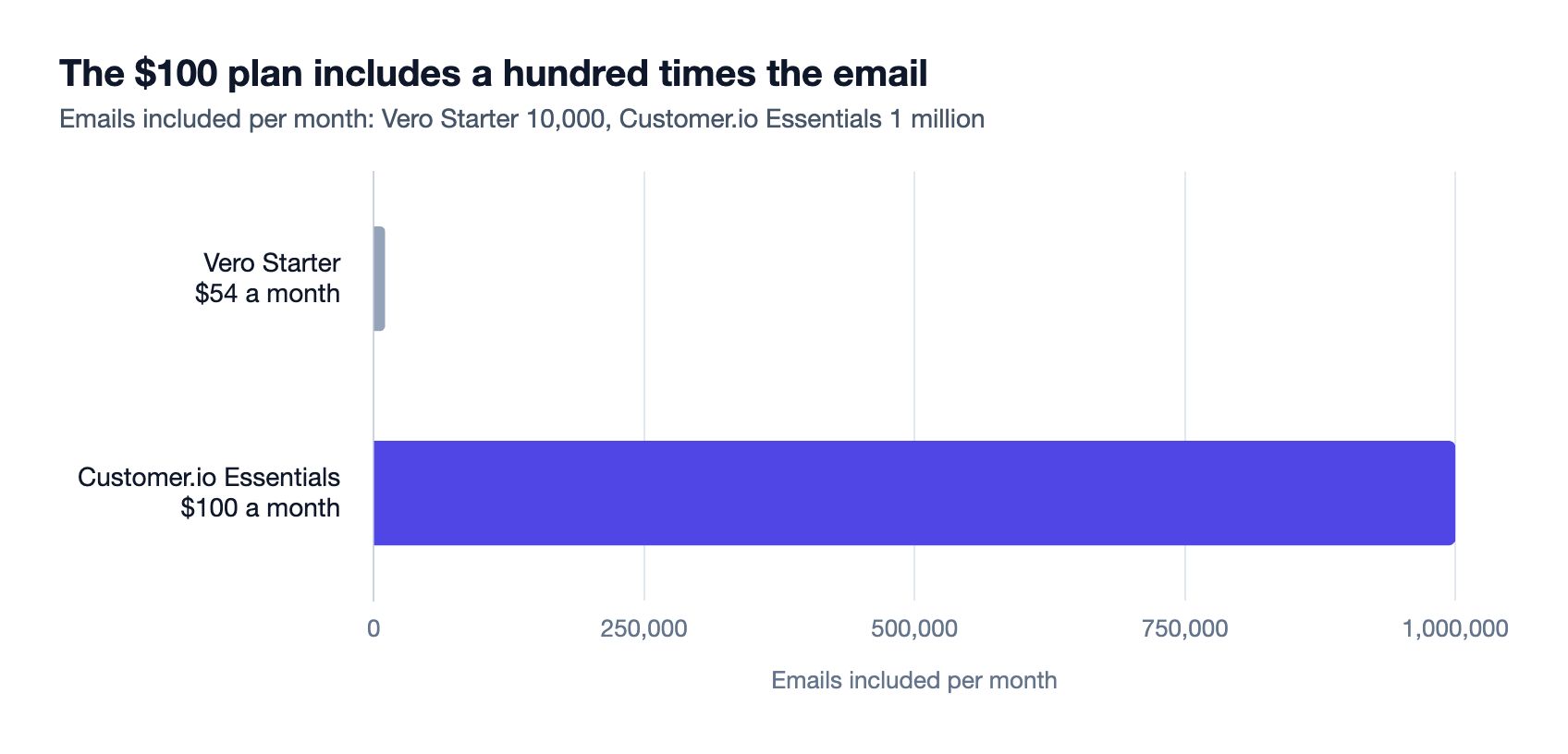
Two things fall out of that comparison.
The first is that a B2B workspace uses up its Customer.io profile allowance faster than the same audience used Vero's allowance. Work an example, using arithmetic rather than a measurement: take 4,000 people spread across 1,200 accounts. Model the accounts as objects and you are at 5,200 profiles, over the Essentials allowance, before you have created a single subscription or cart object. Customer.io's own documentation tells you to watch this: "since objects count towards billing, it's best practice to review them monthly and delete the objects you don't need".
The second is that the email allowances are not comparable at all. Vero's Starter plan includes enough email for two sends a month to a 5,000-person list. Customer.io's Essentials plan includes a hundred times that. The gap cuts both ways. Inside Vero Starter's 10,000 emails a month, which simple arithmetic puts at about 2,000 people emailed weekly, Customer.io at $100 is the dearer product. Above that allowance you are comparing with Vero's custom Professional plan, which has no published price, so get a quote before you call either one cheaper.
One honest caveat on Vero's published pricing. The Starter plan's summary lists "5,000 user profiles". The feature table further down the same page gives "Total profiles" as 5,000 for Starter, and then, under customer data management, gives "User profiles" as "Unlimited" for both Starter and Professional. Those are not the same claim. Ask Vero which governs your account before you build a cost model on either, and get the answer in writing.
If you run several Vero projects, note the workspaces row: Vero does not charge per project, and Essentials includes two workspaces. If your projects split by market, read why one Customer.io workspace per country is the expensive way to go multilingual first.
The order that works
1. Inventory the conventions, not the data. List every user attribute in Vero and mark each one as person, account, or unclear. The unclear pile is your real backlog.
2. Design the object types before you import anything. Essentials gives you two object types, Premium gives you ten. Two is usually enough, and it forces a useful conversation about whether subscription is a separate thing from account at all. Remember that objects cannot relate to other objects, so any hierarchy has to be flattened deliberately rather than discovered later.
3. Fix the event names while you have the chance. A migration is the only time you get to rename events without breaking anything, because nothing is depending on them yet. Vero events are the historical log of what people did; in Customer.io those names become the vocabulary every segment and automation is written against. Decide the naming schema now and write it down.
4. Set up one integration per application. Your website and your mobile app should be separate data-in integrations, each with its own API key. Customer.io gives two reasons, debugging and filtering: "if you use one API key for all your data, it'll be harder to filter the data you send out of Customer.io". This costs nothing on day one and is painful to unpick later. A CRM counts too: the same page lists it as its own source type, and setting up the Customer.io Salesforce sync is a job of its own.
5. Import people, then objects, then relationships. Relationships can be set when you create an object with the identify action, or later with add_relationships. Note two limits as you go. object_id has a default limit of 150 characters. object_type_id defaults to 1 when you leave it out, which is a quiet way to file every object under your first object type by accident. Rehearse the whole sequence in a Customer.io test workspace before it touches production.
6. Rebuild the automations last, and rebuild rather than transcribe. Vero campaigns and Customer.io automations are not the same primitive. If you split a campaign in two because Vero's trigger types did not cover your case, confirm the split is still needed before you copy it across.
7. Keep Vero sending until a segment you rebuilt matches the numbers. Not until the import finishes. Until a segment you can name returns the population you expect.
When not to move
Your model genuinely is users and events. A consumer product with no accounts, no seats and no orders worth modelling gains little from objects and relationships. On Customer.io that business still pays $0.009 for every profile over 5,000, objects or not. Vero pitches its per-channel pricing at product-led businesses. If that describes you, stay, and get more out of the Vero you already have.
You send hardly any email. At 10,000 emails a month, Vero's included volume is not the constraint, and $54 against $100 is a real difference on a small budget.
You are mid-incident on deliverability. Changing platform in the middle of a reputation problem changes two variables at once and you will learn nothing from either.
Nobody owns the data model. The migration is a schema project. If there is no one who can decide whether plan_tier is a person attribute or an account attribute, and make it stick, the move will reproduce the Vero conventions in a more expensive product. Sort out the ownership first.
You need object-to-object hierarchy today. Customer.io's docs say it does not exist. If your model is organisations containing accounts containing seats, find out how you will flatten it before you commit, not after.
What the move actually buys you
One thing, mostly: questions you could not previously ask.
Take everyone at an account whose trial ends this week, where the person is an owner rather than a member, and where the account has more than five seats. That is a segment in Customer.io. In Vero it is a nightly job writing flattened attributes. Each of those flattened attributes is a small piece of infrastructure you maintain forever, and the reason migrations get approved is usually that somebody has finally counted them.
A standard box let the Ideal X's cargo move between ship, truck and train without being unpacked. Customer.io is not the risky part of this move. The box is. Design the data model first, and the cargo moves itself.
If you are scoping a move off Vero and want the model settled before the export runs, schema design is the part we do. Tell us what your model looks like.
Frequently asked questions
Can I export my Vero data and import it into Customer.io directly?
The people and the events, yes. Vero's pricing page says you can export your data at any time, and Customer.io takes people and events in through its data-in integrations, from a server, a database or a data warehouse. What does not transfer is the shape. Vero has no objects or relationships, so the account, order or subscription data sitting inside your event payloads has to be rebuilt as objects and related to people separately. Budget for that step, because it is not in the export.
Do objects count towards my Customer.io profile limit?
Yes. Customer.io's pricing page counts "profiles (people + objects)" together: 5,000 on the Essentials plan at $100 a month, with additional people and object profiles at $0.009 each. The documentation recommends reviewing objects monthly and deleting ones you do not need, and the app has an Objects without relationships filter to find them.
What is the difference between an object and a collection in Customer.io?
An object is related to people directly and the relationship persists until you delete it. A collection is queried inside an automation and the association ends when the person exits it. Objects are tiered in pricing; collections are free on Premium and Enterprise plans and not available on Essentials. Use objects for accounts, courses and subscriptions that people belong to, and collections for reference data you would otherwise keep in a spreadsheet.
Can Customer.io model accounts that belong to parent organisations?
Not directly. The documentation states that while you can relate objects to people, "you can't relate objects to objects". A two-level hierarchy has to be flattened, usually by holding the parent's identifier as an attribute on the child object and on the relationship. Decide how you will do that during the design step, because retrofitting it means rewriting every segment that depends on it.
How much does Customer.io cost compared with Vero?
The published entry plans are $54 a month for Vero Starter and $100 a month for Customer.io Essentials, both billed monthly, and both quote 5,000 profiles. Vero's 5,000 is user profiles; Customer.io's is people plus objects. Vero includes 10,000 emails a month against Customer.io's one million. Vero counts events, at 160,000 a month, and Customer.io's published Essentials plan does not count them separately. Model your own volumes on both before you take either headline at face value.
Should I rename my events during the migration?
Yes, if they need it. A migration is the only moment when nothing depends on your event names. In Customer.io those names become the vocabulary that every segment, automation trigger and Liquid reference uses. Agree a naming schema, write it down, and apply it during the import rather than promising to tidy up later.
How long does a Vero to Customer.io migration take?
The export and import are days. The schema design, event renaming and automation rebuild are weeks, and the length depends almost entirely on how much account-level logic is currently flattened onto user attributes. A workspace that genuinely is people and events moves quickly. A B2B workspace with seats, plans and account state faked onto profiles takes longer.
Sources
- Vero, Vero Customer Engagement Platform Pricing, read 28 September 2026.
- Vero, Platform Core Concepts, developer documentation, read 16 September 2026.
- Customer.io, Pricing and plans, read 28 September 2026.
- Customer.io, Getting started with objects and collections, documentation, updated 14 September 2026.
- Customer.io, Relationships, documentation, updated 14 September 2026.
- Customer.io, Getting started with incoming integrations, documentation, updated 1 September 2026.
- Port Houston, From Ideal X to Houston, 70 Years Later, 30 April 2026.
- The Geography of Transport Systems, First Containership, Ideal-X, 1956, read 28 September 2026.
Want this working in your Customer.io workspace?
It's what we do all day for SMBs—strategy, automations, deliverability and hands-on execution.
See how we work as a Customer.io agency →

