
Customer.io inbox previews: do you still need Litmus?
In May 1924, at Western Electric's Hawthorne plant in Cicero, Illinois, Walter Shewhart wrote a memo to his manager. He held a doctorate in physics from Berkeley and had joined the company in 1918 to help improve the quality of its telephone hardware. The memo proposed a chart that plotted measurements over time between limits. According to the Institute for Healthcare Improvement, it was designed "to give at a glance the greatest amount of accurate information" to the plant's inspectors. It split variation in two. Chance-cause variation is built into any process; assignable-cause variation has a reason you can find and remove (Quality and Safety in Health Care).
The control chart went round the world. Hawthorne itself did not change. By the time Joseph Juran left the plant in 1941, you could walk through it without seeing a control chart. Production was judged on schedules and productivity, and in Juran's words, "Quality was left to the inspection department" (Quality and Safety in Health Care).
Email rendering tests have lived in an inspection department of their own for years: a separate Litmus or Email on Acid login, run after the email is built. On 15 September 2026, Customer.io put one inside the Design Studio editor. Two weeks in, anyone paying for a testing tool should ask whether it still earns its renewal.
TL;DR: Customer.io shipped inbox previews in Design Studio on 15 September 2026: real screenshots of your email in named clients and devices, such as the Gmail app on iPhone 16. Every paid plan gets 25 a month, shared across the account, and one preview is one client. By simple arithmetic, that is five emails checked on five clients. Design Studio already validates links, images and accessibility and shows a SpamAssassin score. For a Design Studio team that reviews about five layouts a month on the clients its readers open, the built-in previews replace a paid rendering tool. Keep a paid tool for emails built outside Design Studio or screenshots by the hundred: Mailgun Inspect, from $99 a month, or Litmus. Keep Litmus for spam placement and authentication tests, monitoring after send and approvers without a Customer.io login. As of 28 September 2026, Litmus publishes no price.
What shipped on 15 September 2026
The release note is short. Design Studio can now generate "real screenshots of your email from specific clients and devices", such as the Gmail app on iPhone 16 or Pixel 9. It pitches the feature for the moment a recipient says your email looks wrong: preview that client "instead of sending a test email or relying on services outside of Customer.io". That clause is aimed at Litmus and Email on Acid.
In the editor you click Review and test, open the Inbox preview tab and run a preview. You can filter the list by device type, client, OS version, browser, or light and dark mode, or describe what you are testing and let Customer.io's agent recommend clients. Send for previews returns a snapshot of each (Review your email). Any teammate can open a saved set for free, for two months.
Two things the docs do not say: how many clients are on the list, and how long a set takes to come back. The page gives no total, so neither does this post. The feature is in Beta, so check the allowance again before your renewal. New to Design Studio? Start with our Design Studio guide.
The catch: 25 screenshots a month
The constraint sits in the announcement's last paragraph. Every paid plan gets 25 no-cost inbox previews per monthly billing cycle, shared across the whole account. Trial accounts get none (Inbox preview credits).
The unit is the screenshot, not the email: "Previewing one email across 10 clients uses 10 preview credits." So 25 credits is five emails on five clients a month, or two and a half emails at ten clients. That is our arithmetic on the allowance, not a Customer.io figure.
Three rules on the same page shape how far the 25 go:
- Re-running the Last generated run is free, unless a preview in it is five or more days old or the email has changed.
- The free 25 do not roll over. Bought credits never expire, and the free ones are used first.
- There are no overages. When credits run out, previews stop until someone buys more on the Plans & billing page.
The page publishes no price for extra credits, so look at your billing page before you plan around them.
For scale, Litmus's own default client list is 35 previews (Validity help centre). One default Litmus run spends more screenshots than Customer.io gives you in a month.
What Design Studio already checks
Most of what a paid QA suite sells was already in Design Studio.
- The Review panel validates Liquid, links, images and accessibility, flags a missing unsubscribe link, and adds a 0 to 100 readiness score (Review your email). Our readiness score post explains how that score behaves.
- The code editor's developer tools add a link validator, an image validator, a SpamAssassin score and an accessibility checker. The checker runs many AXE 4.3 rules plus custom email rules (Validate your email).
- Preview mode simulates blocked images, blocked
<style>blocks, four colour-vision filters and three forced dark modes: Outlook, Google and Gmail iOS (Preview email in Design Studio).
So accessibility checks and link and image validation are not reasons to keep Litmus. If you build in Design Studio, you already have them.
Where simulation stops
Forced dark (Outlook) matches Outlook webmail and Outlook on Mac or Android. It does not represent the Outlook Windows desktop app or the Outlook iOS app (Preview email in Design Studio).
That gap is what a real screenshot fills. Use the free simulations while you build, then spend credits on the clients they cannot stand in for. For the styling side, see dark mode in Design Studio. The docs do not say inbox previews show images-off rendering; the Block images simulation is the documented tool for that.
What Litmus and Mailgun Inspect cost in September 2026
Litmus
Litmus belongs to Validity. From 1 August 2025, emailexpert reported, the plan that had been Litmus Plus became Core at $500 a month, up from $199. It kept five full users and 2,000 email previews a month (emailexpert).
On 28 September 2026, Litmus published no price at all: litmus.com/pricing opened a sales form headed "Litmus is now part of Validity Engage" (Litmus). Your renewal quote is the only Litmus price that counts.
Litmus's pages list what it sells, without saying which plan includes what. There are previews on 100+ email clients including dark mode, and Email Guardian monitoring, which alerts you when a client change puts a live email at risk. Spam Testing runs across 25+ spam filters (Litmus email testing). It checks authentication, including DKIM, SPF, DMARC and BIMI, and runs placement filters for Gmail, Outlook, Yahoo and others (Litmus spam testing).
Mailgun Inspect, formerly Email on Acid
On 28 September 2026, Email on Acid's pricing page sold Mailgun Inspect. Email on Acid says subscribers move across from June 2026, annual plans at the end of their term. Existing previews and tests will not be transferred (Email on Acid pricing).
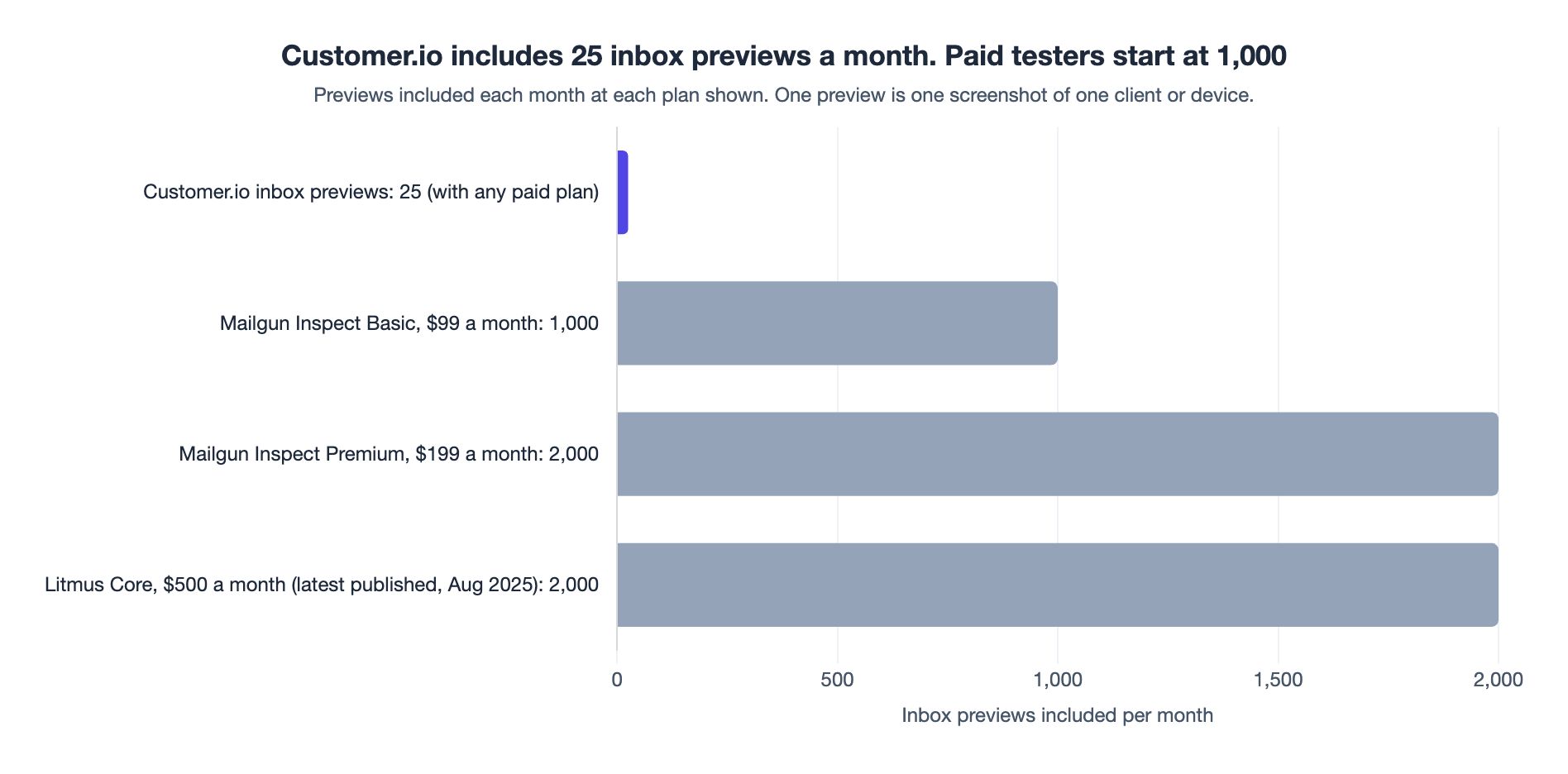
Mailgun publishes its prices. Basic is $99 a month for 1,000 previews; Premium is $199 a month for 2,000. Both have unlimited users, 100+ clients and devices, and $0.15 per extra preview. Premium adds accessibility tests, HTML code analysis, link and image validation and spam content checks (Mailgun Inspect pricing). Spam content checks read the email, the same job as Design Studio's SpamAssassin score.
At twelve times the monthly price, a year of Litmus Core at the most recent published price we found is $6,000 and a year of Inspect Basic is $1,188. Both are our arithmetic. Customer.io's 25 cost nothing extra on a paid plan.
| Option | Monthly price | Previews included per month | Source |
|---|---|---|---|
| Customer.io inbox previews | Included with any paid plan | 25 | Customer.io docs |
| Mailgun Inspect Basic (formerly Email on Acid) | $99 | 1,000 | Mailgun pricing |
| Mailgun Inspect Premium (formerly Email on Acid) | $199 | 2,000 | Mailgun pricing |
| Litmus Core (most recent published price we found, August 2025) | $500 | 2,000 | emailexpert |
Side by side
| Customer.io inbox previews | Litmus | Mailgun Inspect | |
|---|---|---|---|
| Price | Included; extra credits bought in-app | Not published | $99 or $199 a month |
| Clients and devices | Not stated in the docs | 100+ | 100+ |
| Where it works | Design Studio emails only | Other tools via ESP sync, extension or pasted HTML | Any email service provider |
| Spam checks | SpamAssassin score | 25+ filters, authentication, placement | Spam content checks (Premium) |
| Accessibility, links, images | Yes | Yes | Premium and Contract |
| Monitoring after send | Not in the docs we read | Email Guardian | Not on the pricing page |
Vendor pages read on 28 September 2026.
Preview the clients your readers open
With 25 credits, client choice is the whole game. Customer.io's Email clients tab, under Analysis, shows each client's share of opens, human opens and clicks. The docs' own advice: "If most of your audience reads in Outlook, you'll want to test your templates there." (Email client metrics)
Two cautions from the same page. A significant share of Apple Mail Protected opens count as machine opens, so rank clients by human opens and clicks. And the tab is a Premium and Enterprise feature, with data from 15 April 2025 onwards. The email client metrics walkthrough covers reading it.
On Essentials, you do not get the tab. Use the pattern the release note describes: when a recipient reports a broken email, preview that client, and let the reports build your list.
The tab reports Gmail or iPhone, while the preview list asks for a named app on a named device. Pick one device per top client, add a dark variant for the one or two that matter most, and stop.
When to keep Litmus
The rule. Suppose you build in Design Studio, and a normal month brings five or fewer new or changed layouts, each checked on about five clients. Then the 25 free previews cover your render check, and the paid tool can go at renewal.
Keep a paid tool if any of these is true. The first two suit either tool; the last three are Litmus jobs on the evidence here.
You build outside Design Studio
Inbox previews live in Design Studio only. Drag-and-drop emails convert one at a time. For rich text or code editor emails, or HTML from elsewhere, the docs recommend rebuilding with components. Pasting the code into the code editor is the alternative (Convert emails to Design Studio). The steps are in this guide to converting emails to Design Studio. Until an email moves, it has no inbox previews.
You need screenshots by the hundred
An agency, or a team shipping several layouts a week across a wide client list, spends 25 credits fast. Mailgun Inspect Basic, at $99 a month for 1,000 previews, is the cheapest published allowance we found. Before you pay it, compare the price of extra Customer.io credits on your billing page with Inspect's $0.15 per extra preview.
You need spam placement and authentication tests
A SpamAssassin score reads the content. Litmus's spam test also checks DKIM, SPF and DMARC, and shows how placement filters at Gmail, Outlook and Yahoo treat the email before it goes. That is worth paying for when you send from several domains or tools, or when inbox placement is already slipping. The fixes themselves live in your setup: the deliverability guide covers authentication and reputation.
You need monitoring after send
Litmus Email Guardian alerts you when a client change puts a live email at risk. Nothing in the Customer.io docs we read does that job.
Your approvers have no Customer.io login
Design Studio has feedback rounds, version history and a PDF report, but its share links need a Customer.io login (How to collaborate). Outside approvers review from a test email, a downloaded preview or a PDF. Litmus share links are public, and viewing them never counts against your previews (Validity help centre). If your sign-off chain runs outside the account, that is worth paying for.
Fewer moving parts, fewer previews
The cheapest way to need fewer screenshots is to send emails with less to break. When we redesigned Bikinilists' emails, our plain-text version beat the graphics-heavy original, with a 140% increase in click-through rate. That result was about engagement, not rendering, but it points the same way: every background image and custom font is one more thing to check. Our email design examples show how simple an email can go and still look designed.
A monthly preview budget
Treat the 25 as a budget. Where we would start:
- Use the free passes first. Clear the Review panel and run the simulations. The AI review in Design Studio is another free check.
- Spend credits when the layout changes, not the copy. A new template or changed component earns a preview; a new subject line does not.
- Preview your top clients only. Take the list from the Email clients tab, or from reported problems.
- Re-run inside five days. An unchanged re-run of the last set is free.
- Keep a few back. A re-check after a fix costs a credit per client, reports will come, and saved previews expire after two months.
Put the inspection where the work is
Shewhart's chart mattered only on the floor where parts were made, and at Hawthorne, by 1941, it had not got there. Customer.io has put a rendering check where Design Studio emails are built, with a budget that makes you choose what is worth inspecting. For a Design Studio team that previews with a plan, 25 screenshots a month is enough.
Weighing a Litmus renewal? Our Customer.io agency team reviews testing setups. Send us your client list and renewal date and we will tell you which side of the line you are on.
Frequently asked questions
Does Customer.io have inbox previews like Litmus?
Yes: since 15 September 2026, Design Studio can generate real screenshots of an email in specific clients and devices, such as the Gmail app on iPhone 16 (release note).
How many free inbox previews does Customer.io include each month?
Customer.io includes 25 no-cost inbox previews per monthly billing cycle on any paid plan, shared across the account. Each client you select uses one credit, and the free credits do not roll over (Inbox preview credits).
Do Customer.io inbox previews work for emails outside Design Studio?
No: inbox previews are a Design Studio feature on paid plans, and trial accounts cannot use them (Review your email). To preview a drag-and-drop, rich text or code editor email, first convert or rebuild it in Design Studio.
Can Customer.io inbox previews show dark mode?
Yes: you can filter the preview list by light or dark mode (Review your email). Preview mode also simulates forced dark mode for free.
Does Customer.io check emails for spam before sending?
Design Studio shows a SpamAssassin score, which rates how likely the content is to be filtered as spam (Validate your email). The Design Studio docs describe no authentication checks or placement filters; Litmus Spam Testing runs both.
How much does Litmus cost in 2026?
As of 28 September 2026, Litmus does not publish a price, and its pricing address opens a Validity sales form (Litmus). The most recent published price we found, reported by emailexpert, was $500 a month for Core from 1 August 2025, with 2,000 previews (emailexpert).
What happened to Email on Acid?
Email on Acid has been succeeded by Mailgun Inspect, and Email on Acid says its subscribers move across from June 2026 (Email on Acid pricing).
Which email clients should I preview in Customer.io?
Preview the clients your readers use, ranked by human opens and clicks in the Email clients tab on Premium and Enterprise plans (Email client metrics). On Essentials, start from the clients recipients report problems in.
Sources
- Customer.io, Design Studio: preview your email in real inboxes, release note, 15 September 2026.
- Customer.io, Review your email for quality and accessibility, updated 15 September 2026.
- Customer.io, Inbox preview credits, updated 15 September 2026.
- Customer.io, Validate your email, updated 1 September 2026.
- Customer.io, Preview email in Design Studio, updated 1 September 2026.
- Customer.io, Email client metrics, updated 1 September 2026.
- Customer.io, Convert emails to Design Studio, updated 24 September 2026.
- Customer.io, How to collaborate, updated 14 September 2026.
- Validity help centre, How previews are counted in Litmus, read 28 September 2026.
- Litmus, Email testing, read 28 September 2026.
- Litmus, Litmus spam testing, read 28 September 2026.
- Litmus, Contact sales, where
litmus.com/pricingresolves, read 28 September 2026. - emailexpert, Litmus from Validity introduces significant price hikes, read 28 September 2026.
- Email on Acid, Pricing, read 28 September 2026.
- Mailgun, Inspect pricing, read 28 September 2026.
- Institute for Healthcare Improvement, 100th anniversary of the Shewhart chart, Rebecca Steinfield and Robert Lloyd, 18 September 2024.
- M Best and D Neuhauser, Walter A Shewhart, 1924, and the Hawthorne factory, Quality and Safety in Health Care, April 2006.
Want this working in your Customer.io workspace?
It's what we do all day for SMBs—strategy, automations, deliverability and hands-on execution.
See how we work as a Customer.io agency →

