
Customer.io's Wait Until Now Chains Delays. Here's the Audit That Deletes Your Branches

On 10 September 1874, two trains met head-on outside Norwich on a single line belonging to the Great Eastern Railway. The inspector had telegraphed an order, realised his mistake, and sent a cancellation. The reply came back: "Mail Gone."
Single lines were worked at the time by a method called train staff and ticket. One wooden staff existed per section, and holding it meant the section was yours. That worked until a second train needed to follow the first before the staff came back. So railways added a paper ticket. The driver of the first train was shown the staff and given a ticket, and the staff itself travelled with the last train. Two artefacts to express one rule. The LMS Society's account of single line working puts the weakness plainly: the method only held "if the actual sequence of trains was in accordance with the timetable".
Edward Tyer's answer, patented in March 1878 after the Thorpe collision, was not a better procedure. It was one instrument that held the whole condition. Matched machines at each end of a section were electrically interlocked so that only one tablet could be out at a time, and custody of that tablet was the driver's authority to occupy the section. One object, one rule, no paperwork stapled to the side of it.
Customer.io shipped its version of that idea on 26 August 2026, and almost nobody has noticed what it means for automations they already have.
TL;DR: Customer.io's Wait Until block changed on 26 August 2026. A single path can now chain delay steps, so "hold 2 days and then until the next Friday at 9 AM" is one path instead of two blocks. Conditions inside a path can now be combined with And or Or and nested into groups, where the release note confirms that "previously, conditions in a path were always joined with And". And relationship conditions now work in Wait Until blocks for automations triggered by segments and events. The right response is a deletion pass on the automations you already run, not a new build. Collapse any branch that differs only in timing or in which condition fired first. Keep the branch when the paths send different content, report separately, or need something to happen partway through the wait.
What actually shipped on 26 August 2026
Three changes, in one release note, under a title that only advertises the first one.
| Change | What it replaces | Where it bites |
|---|---|---|
| A Delay path inside Wait Until, chaining Time Delay, Time Window and Randomized Delay steps | Separate Time Delay, Time Window and Randomized Delay blocks strung along the workflow | Any wait that is "a minimum period, then a specific day and time" |
| Conditions combined with And or Or, with nested groups | Conditions in a path, which were always joined with And | Any wait where two different states should produce the same next message |
| Relationship conditions in automations triggered by segments, events and more | Relationship conditions limited to automations triggered by objects or relationships | B2B account-level waits inside automations you already trigger off a segment |
The first is the headline. The second is the one that explains the shape of your workspace. The third is the one B2B teams have been building round for months.
Take them in turn.
The Delay path. The release note's own example is the useful one: "a single path can hold a profile for 2 days and then until the next Friday at 9 AM". The Wait Until documentation lists the three steps you can chain. The Time Window step is more capable than most people realise: you can pick which occurrence to wait for, so "the second Friday" is a setting rather than a workaround.
And, Or, and nested groups. The release note is unusually direct about the old behaviour: "Previously, conditions in a path were always joined with And." Read that again if you run a mature workspace. It means every time you wanted "move on when either of these two things is true", the platform made you express it as two paths. Two paths means two branches on the canvas. Now a single path holds (attribute A and attribute B) or (segment C), with groups nested as deep as the logic needs.
Relationship conditions. The 3 March 2026 release note had already extended relationship conditions to any object rather than just the triggering one. August extended them by trigger type. The reference documentation is actually broader than the release note: you can set relationship-based conditions "for any automation except automations triggered by webhooks". If your account-level automations are segment-triggered, as many are, that limitation is gone.
Why your workspace has branches it does not need
Two constraints created two different kinds of clutter, and the fix differs depending on which one you have.
The And-only constraint created surplus paths. You wanted one outcome from either of two states. The block would only join conditions with And, so you built path 1 and path 2, and then either converged them or, more often, gave each one its own copy of the next message. That second habit is how workspaces end up with near-identical emails whose only difference is which condition let the profile out of the wait.
The one-delay-per-block constraint created surplus blocks. A wait that reads "hold at least two days, then send on the next Friday morning, and spread the sends so we do not hammer the endpoint" was three blocks in a row. Every one of them is a place where someone can insert something, change something, or misread the order.
Neither kind of clutter is business logic. It is a record of what the tool could not express at the time you built it. That is worth saying out loud, because the instinct on reading a release note is to go and build something new with it. The higher-value move here is subtraction.
We have seen what disciplined subtraction and addition both look like on the same programme. When we grew Slimfy's cart abandonment sequence from six emails to nine, we added one at a time until click-through stopped. The depth was discovered rather than guessed, and it added $27,000 a month after three months. The rule cuts both ways. A piece of structure earns its place by doing something measurable, or it goes.
The audit: find every branch whose only difference is the wait
Run this on your live automations, oldest first. Older automations carry more scar tissue, because they were built against tighter constraints.
1. List every Wait Until block with more than one path. For each one, write down what the profile receives immediately after each path. If two paths lead to the same message, or to two messages that differ only in a word, the paths are candidates.
2. Ask what the paths are actually distinguishing. There are only three honest answers. The paths send different content. The paths need to report separately. Or the paths exist because the block could not hold Or. Only the third is scar tissue.
3. Collapse the third kind into one path. Move both condition sets into a single path, join them with Or, and nest the groups so (plan is pro and seats is greater than 5) or (plan is enterprise and trial has ended) is one expression. Delete the duplicate downstream message.
4. Find every run of consecutive delay blocks. A Time Delay followed by a Time Window, or either of those followed by a Randomized Delay, with nothing between them. Those runs collapse into one Delay path. The documentation gives the test in one sentence: use separate blocks "when you need something else to happen partway through the wait". If nothing happens in between, nothing justifies the separate blocks.
5. Look at your segment-triggered B2B automations for attribute round trips. If you are writing account state back onto the profile with a webhook just so a Wait Until can see it, that round trip can now be a relationship condition. Check the automation is not webhook-triggered, which is the one exclusion.
6. Re-check the ceiling before you save. A chained Delay path has a hard limit, covered below. Collapsing three blocks into one path can push you into it.
What collapsing actually saves
Not every wait gets smaller, and it is worth knowing which ones do before you start.
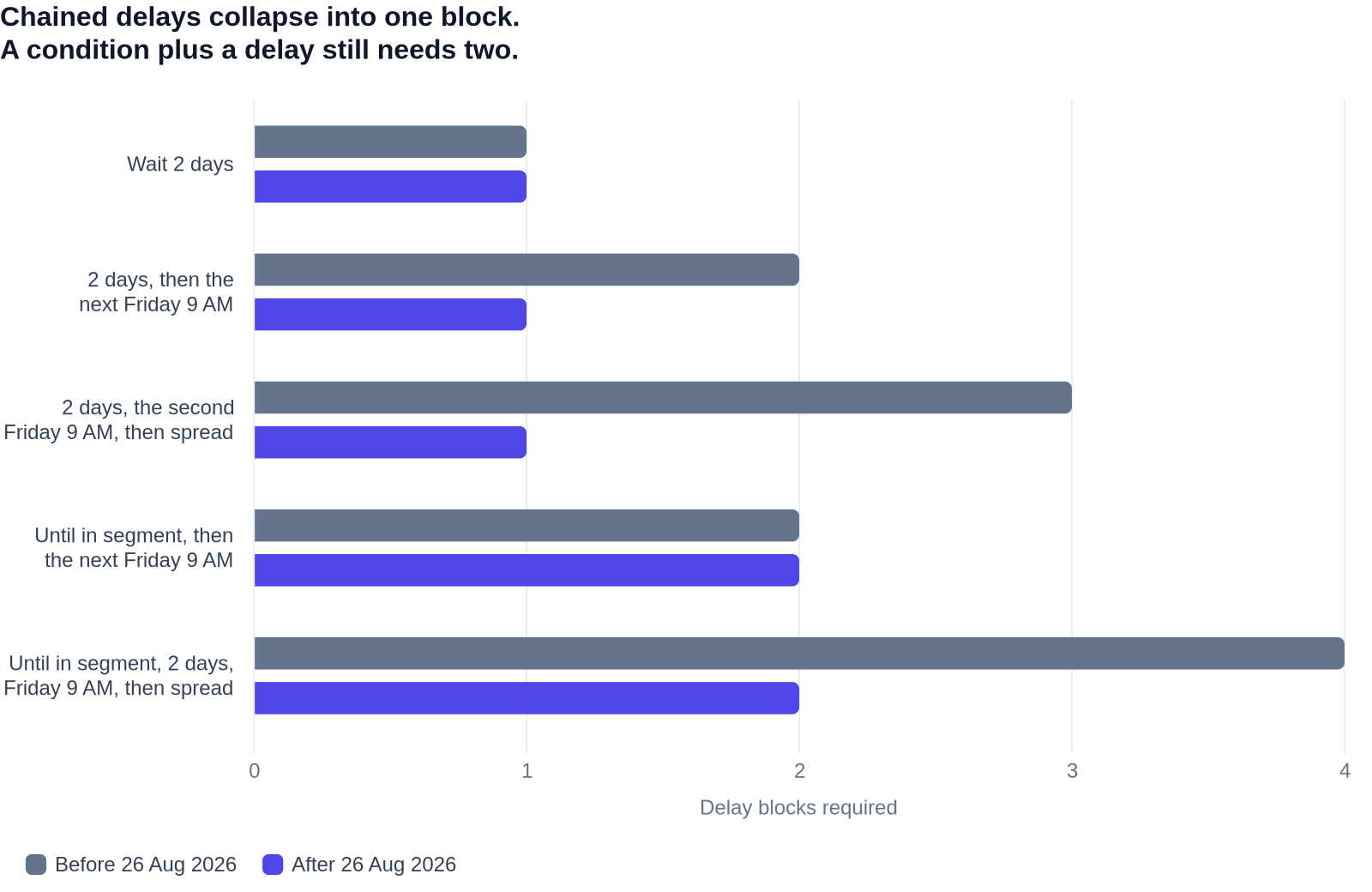
The counts below are construction counts, not measurements. Each row is the number of delay blocks required to express one wait, before and after the change, message blocks excluded. Build the same shapes yourself and you will get the same numbers, which is the point of showing them.
| Wait shape | Blocks before 26 Aug 2026 | Blocks after | Why |
|---|---|---|---|
| Wait 2 days | 1 (Time Delay) | 1 (Time Delay) | A plain delay was never the problem |
| Wait 2 days, then until the next Friday at 9 AM | 2 (Time Delay, Time Window) | 1 (Wait Until, Delay path) | Both steps live in one path |
| Wait 2 days, then until the second Friday at 9 AM, then spread the send | 3 (Time Delay, Time Window, Randomized Delay) | 1 (Wait Until, Delay path) | All three steps chain in order |
| Wait until in segment, then until the next Friday at 9 AM | 2 (Wait Until, Time Window) | 2 (Wait Until, Time Window) | A path cannot hold a condition and a delay |
| Wait until in segment, then 2 days, then until Friday at 9 AM, then spread | 4 | 2 | The three delays collapse, the condition stays separate |
Memorise the fourth row. It carries the most common misreading of the release note.
One path holds one type. That is the catch
Customer.io's documentation says it in a single line: "A path can't contain multiple types, but you can use other workflow actions to chain together your desired outcome."
So a path is a Conditions path, or a Delay path, or an Event time path (available in event-triggered automations only), or a Max time path. Never two of those at once. "Wait until they join the segment and then hold until Friday morning" is still two blocks, because the condition and the delay are different types. What changed is that the delay half of that pair can now be three chained steps instead of three blocks.
If you take one thing from this post into the workspace, take that sentence. It is the difference between a refactor that saves twenty minutes and an afternoon spent fighting a builder that will not let you save.
The limits worth knowing before you start deleting
Four constraints govern how far the collapse goes, plus one inconsistency in the documentation itself.
Twenty paths per block. Each Wait Until action can have up to 20 paths. That is generous, and combining conditions with Or inside a path means you will need far fewer of them than before.
Under 365 days for a chained delay. The documentation is explicit: "If your delay chain could exceed 365 days, you can't save the path; shorten the chain, or use a Max time path instead to guarantee profiles move on." A chain of "wait 300 days, then until the next quarter start" can breach that ceiling without looking like it does. If your renewal automations run on long horizons, check this before you collapse anything.
Leftmost path wins. Paths are numbered from 1 and read left to right. "A profile progresses down the first path they satisfy; if a profile satisfies more than one path at the same time, they take the path farthest to the left." Collapsing two paths into one Or path removes that ordering question entirely, which is a quiet second benefit: one fewer thing that behaves differently from how it reads.
Time zones are documented on the block, not on the path. The standalone Time Window block can match a recipient's own time zone, which requires you to send a timezone attribute and lets you set a fallback. The Wait Until documentation describes the Time Window step inside a Delay path as "wait until a specific day and time, like the next Friday at 9 AM" and says nothing about time zones. That is a gap in the documentation rather than a stated limitation, so confirm the behaviour in your own workspace before you collapse a time-zone-sensitive send. Do not assume it carries over.
Then the inconsistency. The release note is tagged for the Builder, Essentials, Premium and Enterprise plans. The Wait Until reference page is tagged for Essentials, Premium and Enterprise only. Two pages, different plan tags, same feature. Check your own workspace rather than trusting either one.
Keep the branch when it earns its place
Collapse when the paths differ only in timing, or only in which condition fired first. Keep the branch in three cases.
The paths send different content. Obvious, and still worth stating, because "nearly the same email" is not the same as "the same email". If the two versions say different things to people in different states, that is business logic and it stays.
The paths report separately. This is the one that catches people. If you read the two branches as separate lines in your reporting, collapsing them merges the numbers, and you lose a comparison you may have been relying on for months. Decide that deliberately, not by accident, halfway through a tidy-up.
Something has to happen partway through the wait. A message, a webhook, an attribute update, an exit check. The documentation draws this line itself: use separate blocks "when you need something else to happen partway through the wait". A single Delay path runs start to finish with nothing in the middle.
Everything else is a candidate. In practice, on an automation more than a year old, that is a lot of the canvas.
When not to run this audit
Anything attached to a live holdout test. Changing the shape of an automation mid-flight breaks comparability, and a holdout is worthless if the treatment arm changed halfway through. Finish the test, then refactor. If you are not running holdouts on your lifecycle automations, that is a separate conversation worth having.
Automations currently under audit. Compliance reviews, deliverability investigations and post-incident reviews all need the workspace to sit still.
Branches that are load-bearing for reporting, where you have not yet decided what replaces the comparison.
Live automations with people waiting in them right now. You can edit a live Wait Until, and the platform tells you what happens when you do. Profiles who have already waited longer than a shortened condition "will move on (or exit the automation)". Delete a Wait Until and you choose whether the people inside it "Continue to the next action" or "Exit the automation immediately". Those are real sends to real people. We wrote up what silently strands or double-sends people when you edit a live automation, and the same cautions apply here.
The shape this leaves you with
A smaller automation that sends exactly what it sent before is a strange deliverable to be proud of. It is also the one that pays. Fewer blocks means fewer places for a change to go wrong, fewer paths to reason about when something misfires at 2am, and a canvas a new team member can read without a guided tour.
The related moves are worth making in the same sitting. Exit conditions got the same treatment on 8 July 2026, and we wrote the exit audit at the time. Auditing exits and waits together is more efficient than doing them separately. If your automation is long enough that the audit feels daunting, the real answer may be three small automations linked by a send event rather than one long one. If you are branching to hold state that only matters inside the automation, journey attributes are the scratchpad you actually wanted. And if you add a Randomized Delay while collapsing, understand how rate limits walk people past messages they never received first.
For the underlying model, our guide to building Customer.io automations that convert covers the structure this audit assumes. The argument for conditions over timers is why Wait Until deserves the attention in the first place.
Tyer's instrument was still working a British line as of 2015, on the Stranraer route between Girvan and Dunragit, because it expressed the whole rule in one place. The automations that age well are built the same way. Some workspaces grow branches faster than they grow revenue. If yours has, we do this for a living. Tell us what you are looking at.
Frequently asked questions
Can I chain two delays in one Wait Until block?
Yes, since 26 August 2026. Add a Delay path to the Wait Until action and chain Time Delay, Time Window and Randomized Delay steps in the order you want them. The release note's example is "a single path can hold a profile for 2 days and then until the next Friday at 9 AM". Before that date you needed a separate block for each step.
What is the difference between a Delay and a Wait Until in Customer.io?
A Delay waits out a period of time. A Wait Until holds a profile until they meet a condition, such as entering a segment or performing an event. The 26 August 2026 change blurred the line by letting a Wait Until block contain a Delay path, so a single block can now hold either kind of wait. The difference in behaviour is unchanged: a delay always ends, a condition may never be met, which is why conditional waits need a Max time path.
Can one Wait Until path hold both a delay and a condition?
No. The documentation states that "a path can't contain multiple types". Each path is a Conditions path, a Delay path, an Event time path (event-triggered automations only) or a Max time path, and never a mixture. To wait for a condition and then hold until a specific time, you still need two blocks. This is the most common misreading of the release note.
Can Wait Until conditions use Or now?
Yes. Within any Conditions path you can combine conditions with And or Or. The release note confirms the old behaviour explicitly: "Previously, conditions in a path were always joined with And." That constraint is why many workspaces contain two paths that lead to the same message.
Can I nest condition groups in a Wait Until path?
Yes. You can nest groups of conditions to build logic such as (attribute A and attribute B) or (segment C), which the documentation gives as its own example. Nesting is what lets you replace several single-purpose paths with one expression.
Do relationship conditions work in a segment-triggered automation?
Yes, as of 26 August 2026. The reference documentation goes further than the release note and says you can set relationship-based conditions "for any automation except automations triggered by webhooks". Webhook-triggered automations are the single exclusion. An earlier change on 3 March 2026 had already allowed conditions on any object rather than only the triggering one.
How many paths can one Wait Until block have?
Up to 20. In practice you will need fewer now that a single Conditions path can hold Or logic and nested groups, since several of those paths previously existed only to express alternatives.
Which path does a profile take if it matches two at once?
The leftmost. Paths are numbered starting at 1 and read left to right. The documentation states that "if a profile satisfies more than one path at the same time, they take the path farthest to the left". Collapsing alternatives into one Or path removes the question entirely.
Does Wait Until still have a maximum wait?
Yes, in two forms. A chained Delay path must total less than 365 days or you cannot save it, and the documentation suggests using a Max time path instead if your chain could exceed that. Separately, a conditions-only wait has no upper bound at all, so a profile can wait indefinitely unless you add a Max time path.
What happens to people already waiting when I edit or delete the block?
Editing a condition can release people immediately. The documented example reduces an Event time condition from seven days to two. Profiles who have already waited more than two days "will move on (or exit the automation)". Those who have not yet waited two days keep waiting. If you delete a Wait Until entirely, Customer.io asks whether the people inside it should "Continue to the next action in the automation" or "Exit the automation immediately".
Can I wait until the next Friday at 9 AM in the recipient's time zone?
The standalone Time Window block can match the user's time zone, which requires you to send a timezone attribute and lets you set a fallback. The Wait Until documentation describes the Time Window step inside a Delay path without mentioning time zones either way. Treat that as undocumented rather than unsupported, and confirm the behaviour in your workspace before you move a time-zone-sensitive send into a Delay path.
Why did someone skip the wait entirely?
Because they already met the condition when they arrived. The documentation is explicit: "If a profile meets your wait conditions before they enter the wait, they'll skip it entirely." The evaluation that decides whether they skip happens on arrival, before the wait begins. Segments carry a related trap. If your condition is "not in segment", profiles who were never in that segment skip the wait. They have to be in the segment first in order to leave it.
Is Wait Until available on the Builder plan?
The documentation contradicts itself. The 26 August 2026 release note is tagged for Builder, Essentials, Premium and Enterprise. The Wait Until reference page is tagged for Essentials, Premium and Enterprise only. Check your own workspace rather than trusting either page, and treat Builder availability as unconfirmed.
How do I tell whether a branch is load-bearing for my reporting?
Ask what you would lose if the two branches became one line. Pull the last quarter of results for each branch separately and check whether anyone has acted on the difference between them. If nobody has looked at the split, or the two numbers track each other, the branch is not load-bearing and collapsing it costs you nothing. If the split drives a decision, keep it, or replace it with an attribute you can segment on after the fact so the shape of the automation is not doing your reporting for you.
Should I edit the live automation or rebuild it?
Edit, in almost every case. Rebuilding means migrating everyone currently in the automation, which creates exactly the stranding and double-send risks this audit is meant to reduce. The exception is an automation so tangled that you cannot predict what an edit does, which is itself a sign the audit is overdue. Edit during a quiet sending window, change one block at a time, and check who is waiting before you touch anything.
Sources
- Customer.io, Chain multiple delays together in a single Wait Until block, release note, 26 August 2026.
- Customer.io, Wait until..., product documentation, updated 1 September 2026.
- Customer.io, Greater control over relationship conditions in wait until blocks, release note, 3 March 2026.
- Customer.io, Time window, product documentation, updated 1 September 2026.
- Customer.io, Set your own exit conditions for automations, release note, 8 July 2026.
- Grace's Guide, Edward Tyer, on the 1878 patent following the Thorpe accident.
- LMS Society, Single Line Working and Tablet Exchange Apparatus, Part 1, on train staff and ticket working and Tyer's March 1878 patent.
- Railway Signs and Signals of Britain, Electric Token Block, on electrical interlocking and the token as the driver's authority.
- Wikipedia, Tyer's Electric Train Tablet, on the Thorpe accident as the system's origin and its continued use on the Stranraer Line as of 2015.
- Broadland Memories, Thorpe Rail Disaster 1874, on the cancelled telegraph order.
- NerveCentral, How We Made $27,000 per Month with a Cart Abandonment Campaign.
Want this working in your Customer.io workspace?
It's what we do all day for SMBs—strategy, automations, deliverability and hands-on execution.
See how we work as a Customer.io agency →

