
Customer.io Design Studio API: Build, Review and Publish Emails from Code

On 6 October 2026 Customer.io published a release note with one sentence that matters. "You can now take an email through its whole lifecycle with the Design Studio API: create it from your own HTML, review and test it, link it to a workflow, and publish changes later." (Customer.io release notes, 6 October 2026)
Until that day the API was an import tool. The 18 March 2026 endpoints let a script create, update and delete emails and components, and add translations. That is why our earlier post treated Customer.io templates as code you back up. But the script stopped at the door of the editor. Someone still had to open Design Studio to run the review, send a test, link the email and press publish.
Now nobody has to. An email is no longer a thing you click together in a canvas and hope nobody overwrites. It is a file with a version history that a pipeline can render, check, test, link and publish, the way a deployment pipeline treats a web page.
TL;DR: Since 6 October 2026 the Design Studio API covers the whole path from HTML to a live automation, in 46 endpoints by my count of the published spec. Four things still need the editor. It cannot manage emails built in other editors or global styles and brand rules, and a component change reaches each email only when that email is published, one at a time. It also cannot send to your audience, and nothing starts an automation by API. The line is about twenty templates or a second language. A 20-template, two-language workspace is 200 calls per full build, by arithmetic, and the review endpoint checks one language at a time, exactly like the editor's panel. Below that line the canvas is faster, and the API is for the odd bulk change.
What the API covers
Design Studio now has its own API section with a downloadable OpenAPI spec. It runs on the same host as the App API, api.customer.io or api-eu.customer.io for EU workspaces, and takes the same App API key as a bearer token.
The API's checks are the editor's checks. The review panel and its readiness score shipped on 7 July 2026 and inbox previews on 15 September 2026. The API exposes both in full.
The lifecycle, with the endpoint for each step and what the published spec says about it:
| Step | Endpoints | What to know |
|---|---|---|
| Organise | /v1/design_studio/folders |
Folders hold emails, SMS and components; the folder endpoints return folders only |
| Create and edit | /v1/design_studio/emails |
name is the only required field; content and envelope can wait until you link |
| Translate | .../emails/{id}/languages |
A translation created without content copies the default email's content and envelope |
| Version | .../emails/{id}/versions |
A version is saved on every publish; you can save, inspect, restore and delete your own |
| Render | GET .../render |
Compiled HTML with Liquid left intact |
| Preview | POST .../preview |
Liquid evaluated against sample data you send; every undefined variable is reported |
| Review | GET .../review |
The editor's review panel as JSON: a readiness score, a status per check, a fix per finding |
| Test send | POST .../test_send |
A real send through your sending domain, tracking pixel included by default |
| Inbox previews | POST .../inbox_previews |
Real screenshots per client; uses credits; returns a run_id to poll |
| Link | POST .../link |
Attaches the email to one workflow: a transactional message, a one-time send, or an action in an automation or API-triggered broadcast |
| Publish | POST .../publish |
Pushes the saved content to the linked workflow, every translation included |
| Components | /v1/design_studio/components |
Create, update and delete custom components by tag name |
| SMS | /v1/design_studio/sms |
Create, link and publish SMS, if your workspace writes SMS in Design Studio |
Two rules run through the table. The first is from the link and publish reference: "A Design Studio email doesn't send anything on its own." Creating an email puts a draft in the workspace. Linking attaches it to one workflow. Publishing pushes the draft into that workflow, and until you publish, what Design Studio holds and what the automation sends can differ.
The second is that sending is somebody else's job. The integration guide is blunt: "There is no endpoint that triggers automations." Transactional messages, one-time sends and API-triggered broadcasts fire through the App API, as before.
What still needs the editor
The integration guide has a section called "What you can't do through the API", and it is the most useful paragraph in the docs. Four things stay in the editor.
Emails built in other editors. "The API only manages content made with Design Studio." A drag-and-drop email is invisible to it. Convert first: automatic conversion to Design Studio has been available since 29 June 2026.
Global styles and brand rules. Colour palettes, font families, button formatting and brand rules are set in Design Studio > Styles and nowhere else. If you want an API-created email to pull from global styles, somebody sets those up in the UI first, and the same goes for brand variants.
Publishing a shared change everywhere. "Publishing works one email at a time." Update a custom component through the API and the component changes, but the emails that reference it keep sending their published content until each is published again. A header used in sixty emails means sixty publishes.
Sending. The API gets an email to the point where a workflow can send it.
Three smaller gaps come from the spec. The review's failed-components check is always skipped on the API, so the review endpoint never reports a custom component that fails to compile; only the editor's panel does. The SMS endpoints work only for workspaces that set up SMS on or after 30 July 2026 and so write SMS in Design Studio. And a 404 from the review or preview endpoint can mean the design_studio_api_manage feature is not enabled for the workspace, not that the email is missing.
The pipeline, in order
The integration guide's seven steps are the right order. What follows adds what we have learnt from building client emails in Design Studio every week.
1. Write the HTML in standard component syntax. The guide recommends the standard components, <x-base>, <x-section>, <x-paragraph>, <x-cta> and the rest, for a practical reason. A plain HTML email can be edited in the visual editor only in part: text inside a <div> or a <table> needs wrapping in <x-edit-text> first. Write in components and the marketer who opens the email next month can still change a headline.
2. Create an App API key. Keep the write key with as few people as possible. The delete endpoints are real and there is no undo.
3. Push the HTML. The content travels in a JSON body as a string, and the guide names unescaped HTML as the most common cause of a 400 Bad Request. Set the transformers in the same request: CSS inlining, unused CSS removal to stay under Gmail's 102 KB clipping limit, accessibility fixes, UTM parameters. They are per email, so the pipeline sets them every time.
4. Preview, review, test. preview returns the final HTML with Liquid evaluated against your sample data and lists every undefined variable, the check the review endpoint deliberately leaves out. review returns the readiness score and the findings: "An error drops the score to 60 or below", and an error is something that could stop the send or break compliance. test_send goes to up to 25 addresses per request through your real sending domain. Its accepted: true is not a delivery receipt: "Acceptance isn't proof of delivery."
5. Inbox previews, where the template earned them. Submit the client IDs, poll the run_id, fetch each capture.
6. Link, then publish. Link once, to a transactional_message, a newsletter (the API's name for a one-time send) or a campaign_action for an automation or API-triggered broadcast. If that target already has a different Design Studio email, the request fails with a 409 unless you pass force: true, which unlinks the other email. Then publish. A single-language publish returns done inline; a multi-language publish may return pending with a publish_id to poll. A 422 can mean Liquid errors, an archived destination, a destination linked to different Design Studio content, a workspace with no language attribute, or a language group over the limit of 50 variants.
7. Send from the workflow. The App API for transactional, one-time and API-triggered sends. The automation for everything else.
Rehearse all seven in a test workspace first.
Versions: the git half
The versioning endpoints are what make emails as code more than a slogan.
Design Studio saves a version automatically on every publish, and the versions endpoint lets a pipeline save its own, with a name and a description. Save a version identical to the last one and the API returns that version with created: false rather than a duplicate, so a nightly job does not litter the history.
Restore is the rollback, with two constraints. It touches only the email itself: if a referenced custom component's code changed since the version was saved, the latest component code renders. And a restore edits the draft in Design Studio only; if the email is linked, you publish again to push the restored content live.
Pair that with a repository. The email's HTML lives in git, with the pull request as the review. The pipeline creates or updates the email, saves a version named after the commit, runs preview and review, test-sends to the reviewer, and publishes on merge. The unpublished_changes endpoint answers the question every deploy script asks: is the linked workflow behind the draft? The editor has version history too, but nobody diffs it in a pull request.
What a build costs in calls
The spec is precise about what runs per email and what runs per language, and that arithmetic is where the twenty-template line comes from.
Take 20 templates in two languages, so 40 language variants, a figure worked out rather than measured. Create, link and publish run once per email. Review, preview and test send run once per variant, because each checks or sends a single translation per call. That is 10 calls per template and 200 calls for a full build, by arithmetic.
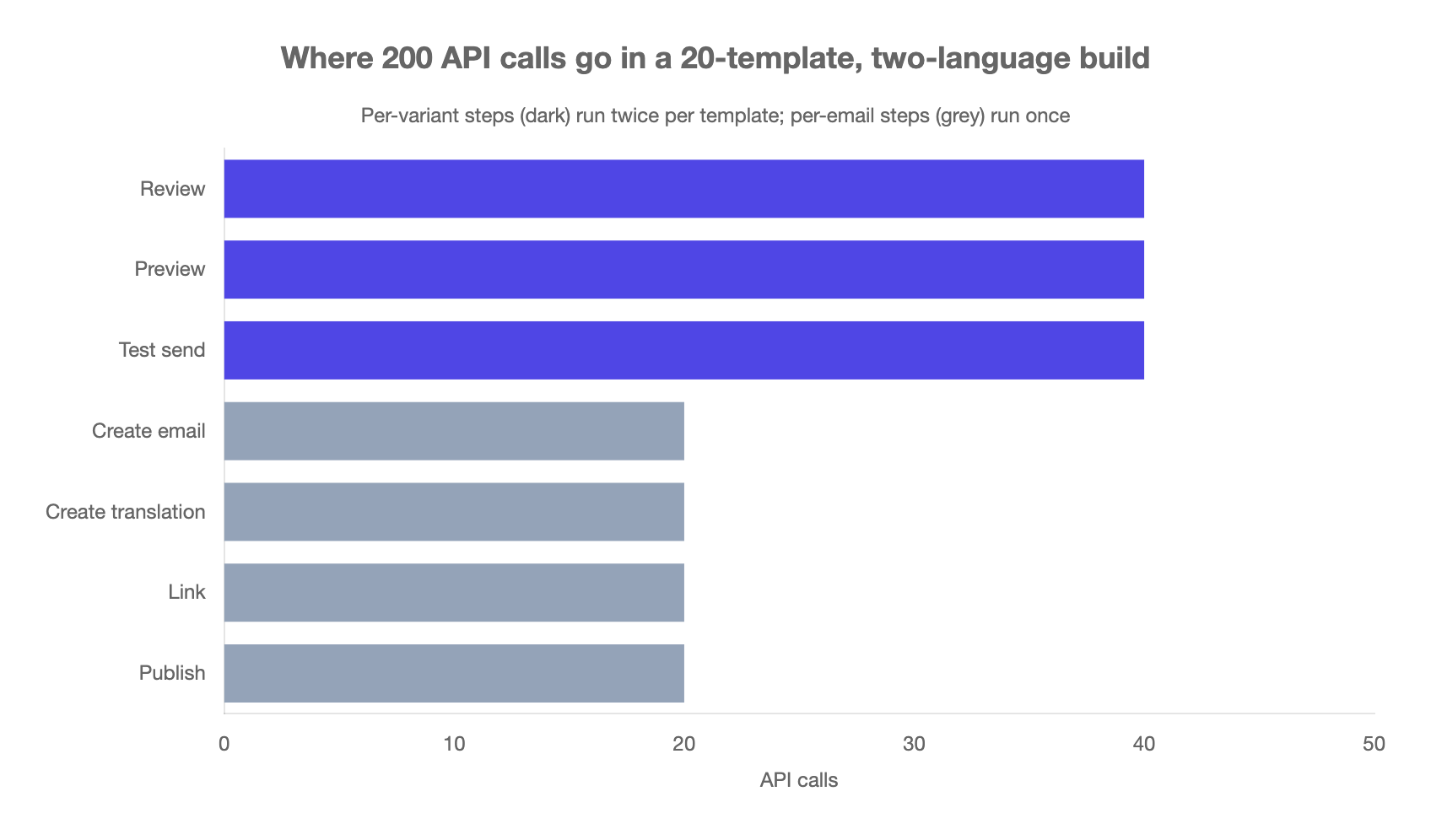
| Step | Runs per | Calls for 20 templates in two languages |
|---|---|---|
| Create email | 20 | |
| Create translation | translation | 20 |
| Review | language variant | 40 |
| Preview | language variant | 40 |
| Test send | language variant | 40 |
| Link | 20 | |
| Publish | 20 | |
| Total | 200 |
Two hundred calls is nothing for a script. But three rows carry their own limits, set out on the API overview.
- Design Studio endpoints share the App API bucket of 10 requests per second per workspace. Render, preview, review, link, publish and inbox preview share a tighter bucket of 5 requests per second, because each starts a server-side render. Exceed either and you get a
429. - Test sends draw from a per-workspace bucket with a burst of 20, refilling one every 9 seconds, shared with the dashboard. The 40 test sends above take about three minutes by the same arithmetic, not three seconds. They also count against the daily quota on the plan features page: 250 a day on Essentials, 500 on Premium and Enterprise.
- Inbox previews cost credits. Paid plans get 25 at no cost per monthly billing cycle, shared across the account, and one email previewed across 10 clients uses 10 credits. Preview all 40 variants in one client and the free allowance runs out with 15 variants still to go. Preview the templates that carry layout risk and trust the review for the rest; Litmus is the comparison.
None of those limits bites at five templates in one language. All of them shape the pipeline at twenty in two.
Where the line is
Here is the decision, stated so you can disagree with it.
Under about twenty templates, one language: stay in the canvas. The visual editor shows the rendered result as you type, and the review panel is one click. Auto-translate with AI lives there, not in the API. A pipeline costs days to build and hours a quarter to maintain. Use the API for the odd bulk job: an import from another ESP, a nightly export to a repository, a UTM change across every template.
At twenty templates, or at the second language, move the lifecycle to code. Two reasons. The first is review coverage. The editor's panel "only validates the language variant you're viewing", per the review documentation. A marketer checking a two-language email has to switch languages and look twice, and at 40 variants nobody does. A loop that reviews every variant and fails the build on any error finding checks all of them every time. The second is drift. At twenty templates sharing components, one component change means twenty publishes, and a script is what keeps the old footer out of the emails nobody opened this month.
Translations push the line down, not up. A second language doubles the per-variant work and adds the multi-language publish, which runs in the background and needs polling. If your workspace is bilingual at eight templates, treat it as twenty. Shared components push it down for the same reason.
The App API is one of three engineering surfaces, alongside the CLI and the MCP server. Content belongs to this one.
When not to do this
Your emails are not Design Studio emails. The API cannot see a drag-and-drop email. Convert first or do not start.
Nobody owns the pipeline. A script that links with force: true and publishes can replace the content of a live automation in two calls. If the one person who understands it leaves, the next change is made in the editor, the repository goes stale, and the next run overwrites a marketer's edit.
Your brand lives in global styles you change often. The API cannot touch global styles, and publishing a style change to every message is an editor action. If the palette changes monthly, the editor is still the centre of the work.
You wanted the API to send. It does not. If the goal is a one-off send of this HTML to this list, the App API's one-time send endpoint has done that in a single request since 14 April 2026.
If your workspace is past the line and nobody has had time to build the pipeline, that is work we do. We build it with your team trained to run it. Tell us your template count.
Frequently asked questions
Can I publish a Customer.io email to an automation through the API?
Yes, since 6 October 2026. You link the Design Studio email to one workflow with the link endpoint, passing campaign_action and the action ID for an automation or API-triggered broadcast, newsletter for a one-time send, or transactional_message. Then the publish endpoint pushes the saved content into that workflow, translations included.
Does the Design Studio API send emails?
No. The Design Studio API creates, checks, links and publishes content, and the integration guide says plainly that there is no endpoint that triggers automations. Transactional messages, one-time sends and API-triggered broadcasts go out through the App API's existing send endpoints.
Can the API run the Design Studio review on an email?
Yes. The review endpoint runs the same process as the editor's review panel and returns a readiness score from 0 to 100, a status per check and a list of findings with fixes. The checks cover Liquid syntax, source markup, links, images, accessibility, SpamAssassin score, the unsubscribe link, implied links, Gmail's 102 KB clip and the preheader. It reviews one language variant per call.
Can I send a test email through the Customer.io API?
Yes. The test send endpoint sends the saved content through your sending domain to up to 25 addresses per request, three on a trial account. Pass sample data or a customer_id so Liquid renders. Test sends count against the daily quota of 250 on Essentials and 500 on Premium and Enterprise.
Can I keep Customer.io email templates in git?
Yes, and the October 2026 release is what makes it complete. Keep the HTML in a repository, create or update the email through the API on each change, save a named version, run preview and review, test-send to the reviewer, and publish on merge. The restore endpoint rolls the draft back to any saved version.
Does updating a custom component through the API update every email that uses it?
No. Updating a component changes the component itself, and the messages that reference it keep sending their published content until each one is published again. Publishing works one email at a time. Budget one publish per email that uses the component.
Can the Design Studio API create SMS messages?
Only in workspaces that write SMS in Design Studio, which means workspaces that set up SMS on or after 30 July 2026. A Twilio integration set up before that date writes each SMS inside the workflow that sends it and cannot use the SMS endpoints.
Sources
- Customer.io, Design Studio API: manage email content end-to-end, release note, 6 October 2026.
- Customer.io, Import content into Design Studio using our new API endpoints, release note, 18 March 2026.
- Customer.io, Create and send newsletters via API, release note, 14 April 2026.
- Customer.io, Design Studio: find and fix errors with the new review panel, release note, 7 July 2026.
- Customer.io, Set up SMS with Sinch, Infobip, or Vonage, release note, 30 July 2026.
- Customer.io, Design Studio: preview your email in real inboxes, release note, 15 September 2026.
- Customer.io, About the Design Studio API, read 23 October 2026.
- Customer.io, Integration guide for email, updated 7 October 2026.
- Customer.io, Design Studio API OpenAPI specification, version 1.0.0, read 22 October 2026.
- Customer.io, Email link and publish, read 23 October 2026.
- Customer.io, Review your email for quality and accessibility, updated 5 October 2026.
- Customer.io, Inbox preview credits, updated 5 October 2026.
- Customer.io, Plan features, updated 19 October 2026.
- Customer.io, Understand and style standard components, updated 5 October 2026.
- Customer.io, Get started with the code editor, updated 22 October 2026.
Want this working in your Customer.io workspace?
It's what we do all day for SMBs—strategy, automations, deliverability and hands-on execution.
See how we work as a Customer.io agency →

