Customer.io for SaaS: Lifecycle Messaging Across Email, SMS, Push and In-App From One Set of Usage Signals
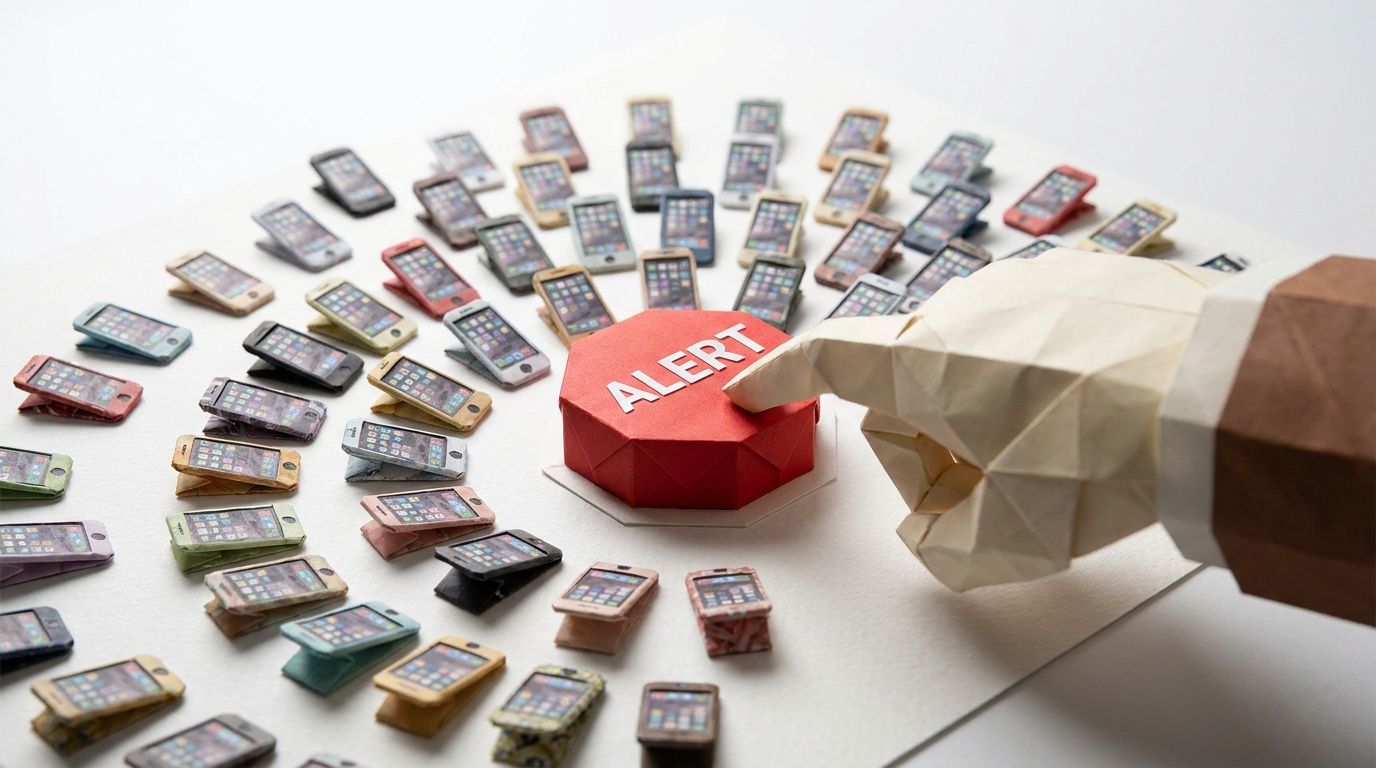
At 8:07 a.m. Hawaii time on 13 January 2018, a warning officer at the Hawaii Emergency Management Agency sent a live alert to every phone, radio and TV station in the state. It ended "THIS IS NOT A DRILL". It was a drill. The officer had picked the live-alert template from a drop-down menu instead of the test template. The software asked "Are you sure that you want to send this Alert?", the same wording it used for a test. Five colleagues in the room had heard "Exercise, Exercise, Exercise" over the speaker. The officer, the FCC's April 2018 report records, believed the threat was real.
No second officer had to approve a missile alert, and the agency had no correction message ready. The correction went out at 8:45 a.m., 38 minutes after the first message, to a state of over 1.4 million residents.
Afterwards the agency required two credentialed officers to validate every alert and test, wrote a correction template, and asked its software vendor to separate the test environment from the live one. The fix was a second pair of eyes, a correction ready to go, and a clear line between test and live. That is also the fix for SaaS lifecycle messaging, where the usual failure is quieter: four channels, four triggers, and a customer who turns all of them off.
TL;DR: Yes, a SaaS company can run lifecycle messaging across email, SMS, push and in-app in Customer.io from product usage signals. Do it with one event model feeding every channel, and choose the channel by how urgent the moment is, not by how many channels you have licensed. Email and in-app carry nearly all of it. Push is for moments that need the mobile app open. SMS is for account-critical events only. Customer.io added channel-based message limits on 20 July 2026, with windows of up to 31 days, channel-based subscription preferences on 2 April 2026, and human opens and clicks in segments on 30 June 2025. Message limits do not cover in-app messages, so in-app needs its own discipline: expiry and page rules. Activation is where the signals earn their keep: in Userpilot's 2025 benchmark the average activation rate across 62 B2B companies was 37.5%.
The question behind the question
The question people type is can we automate lifecycle messaging across email, SMS, push and in-app based on usage? The answer is yes, and the four channels are not the hard part. The hard part is deciding what a usage signal means and which single channel that meaning deserves.
Teams that skip that decision build four parallel programmes: an email welcome series, a push re-engagement series, an in-app tour, an SMS promotion. Each is reasonable alone. Together they land on the same person in the same week.
So the stance is simple. One event model. Every channel reads from it. A channel is a delivery decision made per moment, never a programme of its own. The omnichannel messaging strategy guide covers the general shape; this is the SaaS version.
The usage-signal event model
A SaaS product throws off hundreds of events. Lifecycle messaging needs about eight, named once. Customer.io recommends a separate data-in integration, with its own API key, for each application, so your website and mobile app send under different keys into one vocabulary.
The names are examples; the shape is the point.
| Stage | Signal | Shape | What it drives |
|---|---|---|---|
| Sign-up | signed_up |
Event, once | The welcome and the first activation nudge |
| Activation | project_created (your product's first-value action) |
Event, first time | Ends the activation sequence, starts everything else |
| Activation stall | No project_created within the window after signed_up |
Absent event, read as a segment | The stuck message |
| Habit | core_action_performed (the action a retained customer repeats) |
Event, high volume | Nothing directly; feeds the habit and churn segments |
| Team growth | Person added to an Account object | Relationship change | The follow-up to the inviter, the welcome to the invitee |
| Expansion | plan_limit_reached with the limit as a property |
Event, repeatable | The upgrade prompt, in the product, at the moment |
| Churn risk | core_action_performed count falls against the person's own baseline |
Segment on event frequency | The usage-drop message, covered in the usage-drop churn trigger post |
| Account-critical | payment_failed, login_code_requested, security_alert |
Event, from the backend | The one SMS a SaaS product should send |
Two rules sit under the table.
First, decide what is an event and what is an attribute before anyone writes a tracking call. An event happened at a time; an attribute is the current state. plan is an attribute. plan_limit_reached is an event. Attributes versus events in Customer.io is the long version. The event schema guide shows how to write the names down so engineering and marketing agree.
Second, the habit event is not a trigger. It is the raw material for two segments, habit and churn risk. The moment a team wires a message to every core_action_performed, the fatigue starts.
Channel by urgency
The channel decision is a question about the moment, not the person. How urgent is it, and where is the person likely to be when it matters?
| Moment | Urgency | Channel | Why this one |
|---|---|---|---|
| Welcome, activation nudges, activation stall | Low. Hours to days | Email, with an in-app message on the next visit | Email reaches people who are not in the product, which is the stall |
| Activation reached | Low. Celebrate, point to the next step | In-app, with a page rule on the screen they have just reached | They are already in the product |
| Teammate joined | Low | Email to the inviter | They may be nowhere near the product when it happens |
| Plan limit reached | Medium. Minutes, while the intent is live | In-app at the moment, email the same day if they do not act | The decision is being made in the product; the email is the second chance |
| Something needs the mobile app open | Medium. A reply, a finished job, an approval | Push to the last_used device, with a copy in the notification inbox |
Customer.io recommends the last_used device: the one the person is most likely using |
| Usage drop | Low to medium | Email, one message, then a Wait until block that holds until the habit event returns | A push to someone who has stopped opening the app is a push nobody sees |
| Payment failed, login code, security alert | High. Now | SMS if you hold a consented number, plus a transactional email | The one place SMS earns its cost and its regulatory load |
Email and in-app carry nearly every row because people are either in the product or away from it, and those two channels cover those two states.
Push has one job: moments that need the app open, on the device in someone's hand. Customer.io's push best-practice page is blunt: "People are likely to dismiss or even disable notifications if they aren't significantly meaningful or you send them too often." The same page says to segment on device criteria, such as last_seen and whether a device exists, before any push goes out. Live notifications are not a channel in their own right.
SMS gets the account-critical row and nothing else. Customer.io's SMS documentation lists what carriers require before they approve you to send, including an opt-in and opt-out flow. An encoding setting keeps messages within the 160-character limit. That is a lot of machinery for one job.
Wiring it in Customer.io
Triggers
An event-triggered automation is the default for the sign-up, activation, expansion and account-critical rows. The frequency setting is the fatigue control. By default a person enters every time they perform the event; you can set it to one time, every event, or once within a time period. The docs' example is an app that generates notifications: set "at most once within 24 hours" and the person gets one email a day however many pile up. That is the setting for plan_limit_reached.
The attribute or segment trigger, which shipped on 21 April 2025, is the trigger for the stall and churn-risk rows, because both are states rather than events. It carries one trap. The legacy segment trigger had automatic match-time logic; the new one does not, so backfilled users can enter the moment they match. The documented fix is a time-based condition in the trigger, such as created_at is a timestamp after a relative date of 1 day ago.
The team-growth row uses an object or relationship trigger, and this is where the release note of 10 February 2025 matters. Before that date, an object-triggered automation only caught people who matched after the automation started. Now you choose "Current people and future additions", so when an account's plan changes to premium, people already related to premium accounts can enter too. The constraint the release note left out is on the triggers page. An update can only fan out to 500 to 5,000 people per trigger event depending on plan, and an update over the limit enters nobody. For accounts with thousands of seats, that is a design constraint, not a footnote.
Human opens
Since 30 June 2025 you can build segments and conditions on human opens and clicks rather than machine activity. Human-opened conditions only match activity from 21 March 2025, and human-clicked from 21 April 2025, because that is when Customer.io started recording them.
For the activation-stall sequence, branch on a human open of the first email and send the second only to people who have not opened it. Mail clients' machine opens no longer decide who gets message two.
Limits and preferences
Channel-based message limits shipped on 20 July 2026. Before that a workspace had one limit across all channels. Now you can set per-channel and shared limits, a time frame of up to 31 days rather than 7, and a retry window of up to 48 hours. The message-limits post goes through the mechanics; two facts matter here.
Limits apply to nothing until you assign them. The overview page says it in one line: "By default, no workflow counts towards a limit."
Limits do not cover in-app or inbox messages. For in-app the documented controls are expiry and page rules. Messages expire 30 days after sending by default, the maximum is 60 days, and page rules decide which screen a message may appear on. A welcome tour that fires on the billing page three weeks after sign-up is the in-app version of a missile alert.
Channel-based subscription preferences, since 2 April 2026, let a person stay subscribed to a topic and unsubscribe from one channel of it. Both the topic and the channel must be subscribed for a message to send. Add a topic first, because channel subscriptions need at least one topic. Set each channel's default status deliberately when you add it: you choose whether people start subscribed or opted out, and you cannot change it afterwards. How the channel preferences work is the walk-through.
Decision boundaries
The answer changes with the shape of the company asking.
Web-only B2B product, any size. Email and in-app. SMS only for the account-critical row, and only if you collect phone numbers with the explicit opt-in flow the SMS docs describe. Without that flow you do not have an SMS channel; you have a column of phone numbers.
Mobile-first product, where the app is the product. Push earns its row, and the notification inbox keeps a copy of each push. Email still carries the activation and churn-risk rows, for the reason in the table. This is the one shape where all four channels are live and the shared limit matters most.
A marketing team of one. Two channels, one shared limit, one event model. Add push when someone can own the SDK and the device segments. A third channel with nobody watching it is a fatigue machine.
Accounts with thousands of seats. Design the team-growth automations around the fan-out limit before you build them, and prefer triggering on the individual relationship change rather than on the account object.
Activation carries the weight
If you only get one stage right, make it activation: that is where most of the audience is lost.
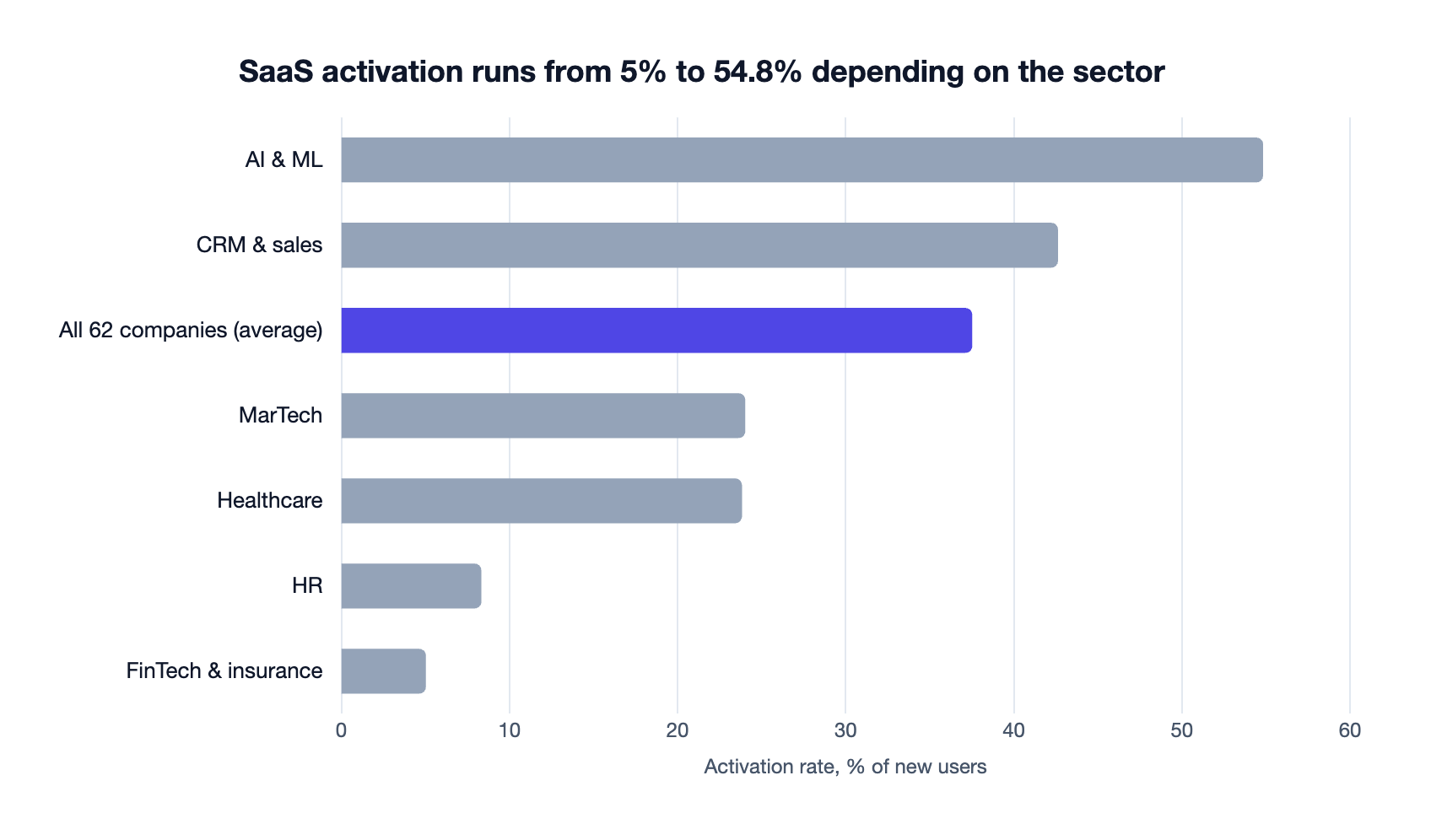
Userpilot's SaaS Product Metrics Benchmark Report 2025 draws on first-party data from 547 companies. It puts the average activation rate across 62 B2B companies at 37.5%, with a median of 37.04%. It defines the metric as "the percentage of new users who complete a specific action that demonstrates the initial value of your product".
| Sector | Activation rate |
|---|---|
| AI & ML | 54.8% |
| CRM & sales | 42.6% |
| All 62 companies (average) | 37.5% |
| MarTech | 24% |
| Healthcare | 23.8% |
| HR | 8.3% |
| FinTech & insurance | 5% |
Read it as a sizing exercise. If roughly six in ten sign-ups never reach your first-value action, the stall row is your biggest audience, and it is not in the product. Email is the channel, in-app the follow-up on the next visit, and push and SMS have no part in it. Why a three-email activation sprint beats a twelve-email welcome covers the sequence, and the lifecycle email examples show the messages.
The data plan comes first, though. When AIRE Health moved to Customer.io from an internal email system, we built the event data plan alongside the campaign redesign. Campaign conversion went from 7.0% to 17.8%, a 154% increase. The emails were not the clever part. Knowing which event meant what was.
When not to do this
You do not have the events yet. An event model you cannot populate is a diagram. If project_created is not being sent, the activation row is a guess and the stall segment is wrong in both directions. Build the tracking first, confirm it in the activity log, then build the automations.
You cannot name the first-value action. Everything above hangs on project_created or its equivalent. If three people in the company give three answers, the lifecycle programme is not the next project. The activation definition is.
A forgotten limit is already capping your sends. Audit the workspace message limits before adding channels. An old shared limit with a short time frame will quietly mark your new push as Undeliverable.
If you want the event model and the channel table built against your product, that is the work we do for SaaS teams on Customer.io. Tell us what your product tracks today and we will tell you what is missing.
Frequently asked questions
Can SaaS companies use Customer.io to automate lifecycle messaging across email, SMS, push and in-app from product usage signals?
Yes: Customer.io triggers automations from events, attributes, segments, object and relationship changes and dates, and one automation can send email, SMS, push and in-app from one trigger.
What SMS cadence works for a subscription SaaS with lifecycle drips?
As close to zero marketing SMS as the business allows. For a subscription SaaS the honest use of SMS is account-critical: payment failures, login codes and security alerts, which are transactional and not a drip at all. If you do send marketing SMS, give it its own channel-based message limit and segment on consent and recent product activity before anything sends.
Do Customer.io message limits apply to in-app messages?
No: the message-limits overview lists email, push, webhooks, SMS, WhatsApp and LINE as channels you can limit, and in-app, inbox and Slack as channels you cannot. For in-app messages the controls are an expiry, which defaults to 30 days and can be set up to 60 days, and page rules that restrict the screens a message can appear on.
How do I stop a usage event from triggering a message every time it fires?
Use the frequency setting on the event-triggered automation. By default people enter every time they perform the event, and you can change that to one time, or once within a time period such as at most once within 24 hours. For high-volume habit events, do not trigger on the event at all; build a segment on its frequency and trigger on the segment.
Can I trigger a Customer.io automation for people who already match an object condition?
Yes, since 10 February 2025 an object or relationship-triggered automation can run for current people and future additions, or future additions only. Each update can fan out to 500 to 5,000 people per trigger event depending on your plan, and an update over the limit enters nobody.
Can Customer.io segments use human opens rather than machine opens?
Yes, since 30 June 2025 a message condition in a segment can require that an email was opened or clicked by a human, and you choose whether to include machine activity. Human-opened conditions only match activity from 21 March 2025 and human-clicked from 21 April 2025, when Customer.io started recording them separately.
Sources
- Federal Communications Commission, Report and Recommendations: Hawaii January 13, 2018 False Alert, April 2018.
- CNN, Here's what went wrong with the Hawaii false alarm, 31 January 2018.
- Customer.io, Set up channel-based message limits, release note, 20 July 2026.
- Customer.io, Channel-based subscription preferences, release note, 2 April 2026.
- Customer.io, Use human opens and clicks in your workflows, release note, 30 June 2025.
- Customer.io, Set up automations quicker with our new attribute or segment trigger, release note, 21 April 2025.
- Customer.io, Trigger object automations for people who already match your criteria, release note, 10 February 2025.
- Customer.io, Automation triggers, filters, and frequencies, read 23 October 2026.
- Customer.io, Message frequency limits, updated 16 October 2026.
- Customer.io, Send in-app messages, read 23 October 2026.
- Customer.io, Best practices for push notifications, updated 14 September 2026.
- Customer.io, SMS/MMS: get started, read 23 October 2026.
- Customer.io, Subscription centre, read 23 October 2026.
- Customer.io, Data-driven segments, read 23 October 2026.
- Customer.io, Getting started with incoming integrations, updated 21 October 2026.
- Userpilot, SaaS Product Metrics Benchmark Report 2025, read 23 October 2026.
Want this working in your Customer.io workspace?
It's what we do all day for SMBs—strategy, automations, deliverability and hands-on execution.
See how we work as a Customer.io agency →